
How to Complete a Software Development Task with an AI Agent
An eight-stage engineering workflow for agent-assisted development, grounded in real issues, code reviews, tests, and releases from SyndiRelay, Remote Browser MCP, and VidOtter. Includes a reusable AGENTS.md.
1. Introduction
Over the past few weeks, I have used AI agents to build and refactor several personal projects, including VidOtter, SyndiRelay, Wardrobe, Remote Desktop MCP, Remote Browser MCP, and DevEnvironment. The work spans browser extensions, local services, MCP, Docker-based development environments, and cross-platform installers. As the projects accumulated, so did recurring problems: requirements buried in conversations, agents changing code before understanding the system, concurrent tasks interfering with one another, and builds passing even though the installed product still failed.
I also built file, terminal, and browser integrations so agents could work against real development environments. Access to those tools, however, does not guarantee a completed development task. We still need a way to manage requirements, locate failures, isolate changes, validate behavior, and decide when work is actually delivered.
This article reviews the approaches that worked and the problems encountered, then puts them into a straightforward, reusable workflow. The final section collects its practical rules in an AGENTS.md file.
2. Completing a Software Development Task
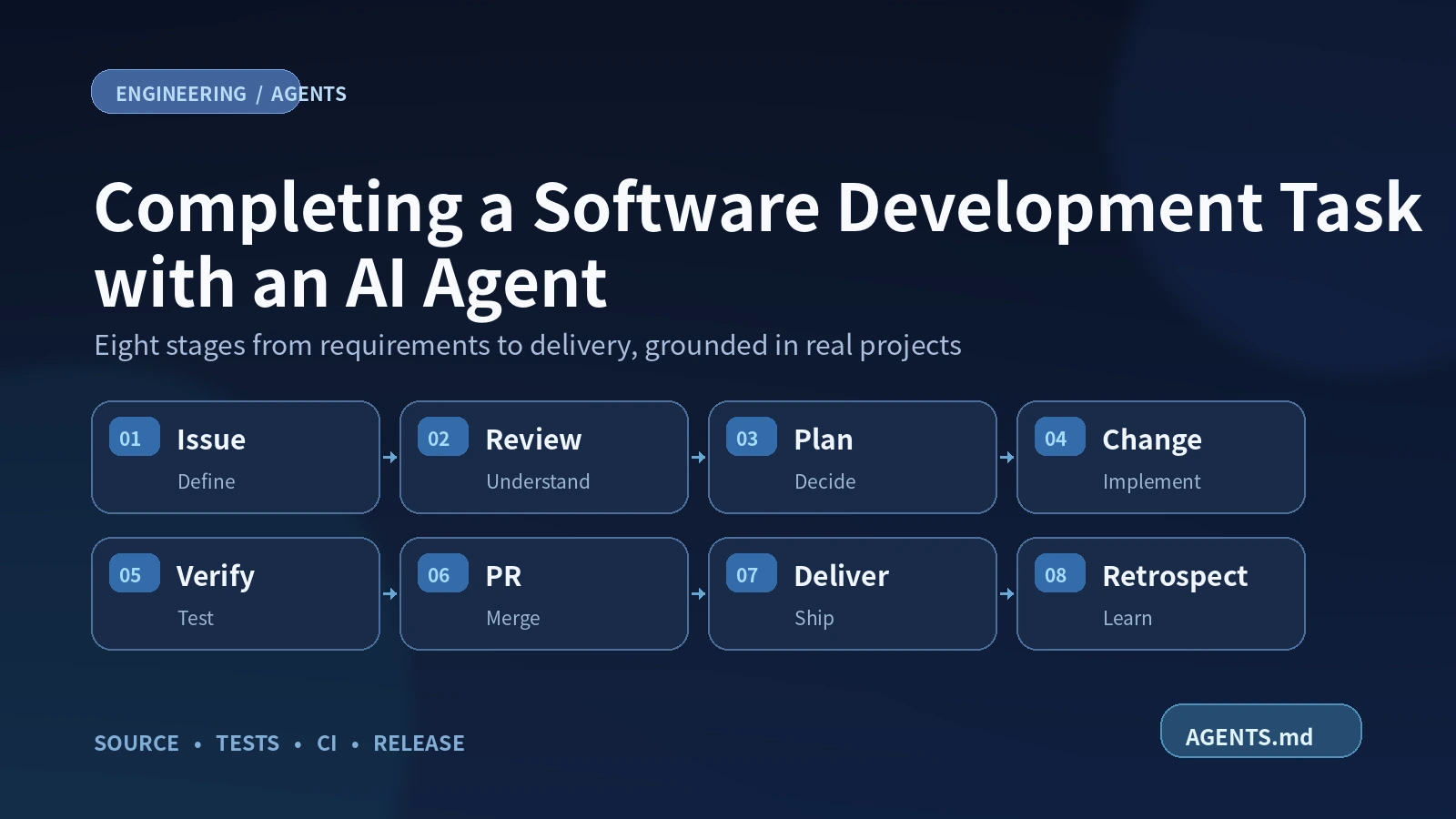
I will follow eight stages of a typical software development lifecycle: requirements, analysis, design, implementation, verification, merge, delivery, and retrospective. Each stage is illustrated with a problem encountered in an actual project.
2.1. Record an Issue and Define Acceptance Criteria
SyndiRelay distributes blog articles to multiple publishing platforms. It exposes CLI, MCP, and browser-extension entry points; the extension handles operations that depend on an authenticated browser session.
In one test, creating a Toutiao draft through the CLI/MCP stalled while waiting for its browser handler and eventually timed out. Performing the same operation from the extension UI succeeded. Article compilation worked, so describing this merely as a “publishing failure” would have hidden the actual difference between the two paths.
There was another complication: saving a remote draft is a write operation. A timeout does not prove the remote server received nothing. Blindly retrying could create duplicate drafts. The task therefore raised three questions: why did the entry points behave differently, how could a CLI/MCP task wake the browser handler, and how should the remote result be reconciled after a timeout?
Investigation required examining the extension’s MV3 background logic, changing the wake-up mechanism, running mock tests, and eventually checking the platform’s actual draft state. If all of that lived only in chat, it would be easy to mistake completed code for a resolved incident.
The failure was tracked in SyndiRelay Issue #10. Its central information was:
## Problem
Draft creation from CLI/MCP waits for the Toutiao browser handler
until it times out; the equivalent extension UI operation succeeds.

## Expected
A CLI/MCP task wakes the existing browser handler automatically,
without opening the extension's task page.

## Acceptance
- [ ] Active CLI/MCP tasks wake the handler promptly without stealing focus.
- [ ] If a remote write may have succeeded, inspect the draft inventory before retrying.
- [ ] Cover job states and wake-up behavior with a mock transport; no live platform writes in tests.
- [ ] Preserve draft-only behavior; never publish automatically.

## Scope
Change job wake-up and its tests, not the article compiler
or the browser session and authorization boundaries.
Problem supports reproduction, Expected states the desired behavior, Acceptance provides testable conditions, and Scope sets the limits of the change. A complicated problem can include logs and a call trace; a trivial one-off change can be documented directly in its PR.
PR #14 and PR #21 subsequently improved periodic and immediate worker wake-up. Live draft creation still requires authorized acceptance testing, so Issue #10 remains open.
An agent can help organize evidence and draft the Issue. Remote writes, merging PRs, and closing a task remain subject to authorization and actual acceptance results.
Takeaway: Start with the failure and its risks, then specify Problem / Expected / Acceptance / Scope. The Issue tracks the goal and acceptance; the PR tracks its implementation.
2.2. Understand the Existing System
Consider Remote Browser MCP, which connects an agent to a local Edge/Chrome browser through the Chrome DevTools Protocol (CDP), allowing it to inspect pages and interact with the real browser.
During one investigation, Edge had already authorized remote debugging, yet repeated calls to browser_status kept triggering Allow remote debugging?, sometimes reporting that the browser was unavailable.
A superficial diagnosis might blame a stopped browser or lost permission, leading to restarts or more retries. Yet the existing CDP session was still functional. The MCP connection, health probe, and browser state had to be examined separately.
Tracing the implementation showed that each old health check established another CDP WebSocket. Edge asked for permission on the new connection, and the probe interpreted the resulting delay as a connection failure. The health check was changing the state it was meant to observe.
Before changing code, a useful baseline was to call the probe repeatedly in the same MCP process and note new connections, authorization dialogs, and false negatives. PR #6 then reused the healthy connection, coalesced concurrent probes, and reconnected only after failure. The PR recorded tests and a check in the real Edge environment.
The investigation sequence is reusable: inspect the current code and process, reproduce the symptom, trace the real call path, and identify the failing layer. Agents can inspect Git state, logs, and configuration through the terminal, follow symbols through search or LSP, and use an authorized browser connection where needed. When a tool or index does not match the current branch, fall back to direct source inspection and report what remains unverified.
Takeaway: Reproduce the failure with its inputs and environment before editing. Locate the failing layer before choosing a fix.
2.3. Analyze the Problem and Design a Solution
There are two common situations: a known failure needs a root-cause analysis and a choice among fixes; or the requirement is clear but its implementation needs a small experiment before committing to a design.
2.3.1. SyndiRelay: A Concurrent Map Write
Besides creating drafts, SyndiRelay compiles articles into each platform’s format. During a Windows CLI test, compiling for 11 platforms concurrently crashed the Go process:
fatal error: concurrent map writesPR #13 addressed this bug. Inspecting SyncService.Run and publishing.Normalize showed that each goroutine received a by-value Config, but its Platforms field was a Go map. Copying a struct does not clone the map’s underlying storage. The normalization function, mergeDefaults, therefore wrote to shared data from several tasks.
Three plausible fixes were considered:
| Option | Avoids the crash? | Remaining trade-off |
|---|---|---|
| Run platform compilation sequentially | Yes | Gives up concurrency; normalization still mutates the caller’s map |
| Lock the shared map | Yes | Keeps mutable shared state and synchronization overhead |
| Clone the map before normalization | Yes | Requires a copy and a clear understanding of nested reference fields |
The chosen change cloned the map before normalization:
cloned := make(map[string]PlatformConfig, len(config.Platforms))
for name, platform := range config.Platforms {
    cloned[name] = platform
}
config.Platforms = cloned
The deciding factor was ownership: a normalization function should not silently modify configuration owned by its caller. The PR tested 128 concurrent goroutines, passed go test -race and a native Windows dry run, and checked that relevant configuration and job files had not changed.
A useful design review explains the cause, viable alternatives, the trade-off, and how the result will be verified. For shared state and cross-component protocols, identifying the owner and writer of each piece of data is especially important.
2.3.2. Wardrobe: Validate the Smallest Useful Workflow
Sometimes the user-visible goal is clear, but the interaction design is not. Asking an agent to implement the UI, backend, configuration, and installer in one pass can lead to a lot of work before the basic experience has been tested.
For example, Wardrobe used to load its browser side panel from a local service. When the service was stopped, even the panel’s navigation would not open.
The first behavior to validate was open the side panel → display an offline interface → resume using the existing data when the service returns. Reusing the existing page made that small test possible without rebuilding the whole product. PR #2 provided the offline interface; PR #3 subsequently added Native Messaging to start the local service.
This is rapid prototyping: implement just enough interaction to determine whether a design works. A prototype validates a technical or interaction hypothesis; an MVP completes a minimally useful core user task. A prototype may be discarded or evolve into the real implementation. An evolutionary prototype needs progressively stronger tests, state management, and error handling.
The same technique applies outside browser extensions. A CLI can first demonstrate one successful command; an MCP tool, one real tool call; a backend, one request completed end-to-end. Prefer mature components when useful, but do not force reuse when a small independent implementation would cost less.
Interaction design should also settle the main entry point, required configuration, and recovery behavior. Installer and release concerns can follow in the delivery stage.
Takeaway: For known defects, investigate causes and compare fixes. For uncertain implementations, validate a minimal end-to-end path first. In both cases, define scope and verification before expanding the change.
2.4. Isolate the Environment and Implement Changes
Concurrent work can interfere at both the source-code and runtime levels. Git Worktree isolates working directories; Docker can isolate toolchains and service dependencies when required.
2.4.1. Reverfolio: Separate Concurrent Work with Worktrees
Reverfolio tracks the reach of websites, articles, and open-source projects. Installation and MCP management, impact events, and collection recovery have been developed on separate branches. If agents share one checkout, changing branches or installing dependencies for one task can disrupt another task’s uncommitted work.
Branches separate commit histories, but one checkout has just one active branch. Git Worktree creates another working directory for a separate task:
git status --short --branch
git worktree list
git fetch origin

# Confirm that the repository uses main before running this command.
git worktree add ../project-fix -b fix/example origin/main
Before creating a worktree, an agent should inspect existing directories and uncommitted changes. Before removing one, it should verify that no useful commits or active tasks remain. Worktrees do not isolate a shared SQLite database, port, browser profile, or build output directory.
2.4.2. Docker: Consistent Toolchains and Services
Even with separate source directories, results can differ across Go, Node, or Android SDK versions. Integration tests can also interfere when services compete for the same ports or databases.
DevEnvironment packages a reproducible Linux toolchain in Docker images, reducing repeated setup work across development machines.
For multi-service testing, Docker Compose is often more appropriate. Oncall Lab, for example, organizes a gateway, RPC service, and observability components for fault-investigation experiments. DevEnvironment provides development tools; Oncall Lab brings up a service environment.
| What needs isolation? | Approach | What still needs checking? |
|---|---|---|
| Source changes from separate tasks | Git Worktree | Uncommitted files and active branches |
| Compiler and SDK versions | DevEnvironment / Docker | Image versions, mounts, caches |
| Services and data in integration tests | Docker Compose | Ports, volumes, databases, test data |
| Browser behavior and native installation | Real target system | A Linux container does not validate Windows/macOS installation |
Simple documentation or UI changes generally do not need Docker. Use it when toolchain versions, multiple services, or runtime state affect reproducibility. Do not mount a user’s real Data/ or browser credentials into arbitrary test containers.
After isolating what needs to be isolated, implement one coherent change, run relevant tests, inspect git diff, commit it, and push within the authorized scope. Isolation should reduce interference, not impose additional bureaucracy.
Takeaway: Give concurrent tasks separate source workspaces; introduce Docker when toolchain or service dependencies demand it. Keep changes small and verifiable.
2.5. Verify the Change
Consider VidOtter, which detects video resources in a browser and downloads them through a local program. During an upgrade test, enabling the optional ChatGPT Tunnel Client from the extension popup produced “Unsupported Tool operation.”
The Popup and Bridge on disk were already new, but Edge was still running the old Manifest V3 service worker. The new popup sent a command the old worker did not recognize. Go unit tests and installer-file inspections could not discover that mismatch; verification had to include the component actually running in the browser.
Choose tests according to what they must prove:
| Claim | Verification |
|---|---|
| Logic and concurrent state are correct | Unit tests and race tests |
| Components speak the same protocol | API/message-handler integration tests |
| The user can complete the operation | Critical-path testing in the real Web UI, extension, or CLI |
| Installation and upgrades work | Native installer, runtime-version, and data-preservation checks |
For a bug fix, repeat the original reproduction and confirm that normal behavior remains intact. For a new feature, test the Issue’s acceptance criteria. Record the actual commands and results as Passed / Failed / Not Tested. A cross-compile, a Docker test, and an actual Windows or macOS installation are different forms of evidence.
Takeaway: Test at the layer where the failure occurs. The agent should supply inspectable evidence and clearly identify what was not tested.
2.6. Submit and Merge Changes
Consider the blog site repository. Inkerio renders its articles and project pages, while the site repository owns project routes. After DownKit was renamed VidOtter, old articles still linked to /projects/downkit/. This was a routing problem in the site configuration, not a problem in the rendering engine.
Site PR #271 therefore changed only the site configuration, redirect-generation script, and tests. It mapped the old URL to the renamed project and checked duplicate mappings, redirect chains, and loops. Making this change directly on the default branch would have made the modification and its verification harder to review.
A PR gathers the code diff, reason for the change, test results, and related Issues in one place. An agent can prepare the diff, submit the PR, and inspect CI; merge and release remain separately authorized actions.
Before submitting, git status --short --branch, git diff --check, and git diff --cached help inspect the worktree and staged changes. After a push or merge, verify the remote branch state.
These projects use Squash Merge: the feature branch can accumulate small, reviewable commits, while the default branch receives one coherent change. Requiring PRs and preventing force pushes must be enforced through GitHub Rulesets or branch protection; merely writing those rules into AGENTS.md does not enforce them.
A merged PR also does not imply that users have received a release. If an Issue still requires packaging or live acceptance, do not close it automatically with Fixes #N. After merging, check the remote state and clean up only completed branches and worktrees.
Takeaway: PRs own code review and merging; Issues keep track of outstanding acceptance work. Protect the default branch and merge only with authorization.
2.7. Productization and Delivery
VidOtter’s download functionality was working, but first-time setup still involved starting a local Go Bridge, registering Native Messaging for extension-to-process communication, loading the extension, and checking connectivity. These steps were not straightforward for a user unfamiliar with the internal components.
A complete user journey is download → install → configure → start → complete the core task → upgrade or uninstall.
2.7.1. Choosing an Installation Method
For a tool such as VidOtter, which includes a Bridge, Native Messaging, and a browser extension, a portable archive leaves users with several manual steps. The installation method should follow actual user effort:
| Method | Suitable for | Maintenance cost |
|---|---|---|
| Portable archive | CLIs and portable tools | More manual setup for users |
| Installation script | A few local components requiring registration | Platform-specific scripts and failure recovery |
| GUI installer, such as Qt IFW | Multi-component software with regular install/upgrade needs | Installer logic and cross-platform testing |
Choose based on the number of manual steps imposed on the user and the project’s ability to maintain the installation lifecycle.
2.7.2. First-Run Guidance
An installer can copy files and register Native Messaging, but it cannot silently grant browser permissions. An unpacked extension still needs user confirmation. Optional features such as ChatGPT Tunnel should not become prerequisites for basic downloading.
A practical test is to ask someone unfamiliar with the code to start from the release download and complete one core operation. Every point where a developer must explain an internal term is a point where first-run guidance can improve.
2.7.3. Recovering from a Failed Upgrade
An upgrade must verify not only files on disk but also background processes, browser workers, and local protocols. User data matters even more: Wardrobe uses SQLite, while VidOtter stores jobs and configuration in Data/jobs.json and TOML files. Upgrades and uninstalls must preserve those records and downloaded files.
If a database schema has been migrated, replacing the executable with an older version might not restore compatibility. Prepare a matching backup before migration, check runtime health afterwards, and test the recovery path against isolated data when the risk warrants it. Uninstall support alone is not proof of safe rollback.
2.7.4. Cross-Platform Acceptance
The same delivery problems appear elsewhere. When packaging SyndiRelay on Windows, PR #4 found that a ZIP archive had lost the POSIX executable bits required by Linux and macOS binaries. Compilation had succeeded, yet users could not necessarily run the extracted programs. The archive permissions had to be corrected.
Web deployments also need acceptance checks. VidOtter PR #22 fixed an image link used by the blog, while site PR #271 restored links to renamed projects. Neither can be verified with one local compile.
Before releasing, check assets, permissions, first-time installation, and the core operation on target platforms. The README should describe a continuous path a user can actually follow. Mark cross-compiled but untested platforms accordingly; updating a README later does not modify an already-published archive.
Takeaway: Validate the real first-use path, then check upgrades, user data, and target platforms. An installer is only one part of delivery.
2.8. Retrospective and Reusable Rules
When similar problems recur across projects, they are worth turning into engineering rules. Remote Browser’s health probes, SyndiRelay’s shared map, and VidOtter’s stale worker look unrelated—connection, concurrency, and installation—but each shows the danger of trusting a local success signal without checking real system state and ownership boundaries.
After a PR, the agent can summarize the observed failure, code changes, tests, and outstanding work. Project-specific protocol details and function names should stay in that project’s instructions. Broadly useful practices—reproduce before changing code, establish ownership, and test real user paths—can enter a shared AGENTS.md.
For example, section 2.1 suggests a precise rule: “When a remote write times out, reconcile the remote state before retrying.” If it applies only to publishing systems, keep it in SyndiRelay’s own instructions rather than turning it into a universal protocol requirement.
Takeaway: Derive rules from observed failures and verified results. Include only executable, cross-project practices in the general template.
3. VidOtter as a Worked Example
The following example traces VidOtter from the initial user workflow through implementation, verification, and delivery.
3.1. Define the Goal and Acceptance Criteria
VidOtter began with a practical problem: a video could play in the browser, but saving an authorized MP4 or HLS resource still required finding the media URL and passing it to a local program. The goal was to let the browser detect a resource and submit the download task, avoiding manual URL copying and shell commands.
Before subtitles, AI integration, or installers, the first usable flow was:
Open a page and play media
        ↓
Extension detects MP4 / HLS requests
        ↓
Create a local download task
        ↓
Bridge invokes the download engine
        ↓
The task completes and the user opens the file
Once that core flow worked, subsequent iterations encountered expiring signed URLs, MCP requests for pages that had not yet produced media traffic, and incompatibilities between updated popups and stale workers. Browser automation, MCP, and Qt installers emerged as follow-up work.
For expiring URLs, a useful acceptance condition was: keep the existing task waiting for new browser traffic, then continue that same task with a valid new request. Do not replay the expired URL or persist browser credentials in the job record. Public delivery additionally required installation, first-run, upgrade, and data-preservation checks.
3.2. Trace the Existing System
When a temporary media URL expired, simply adding another retry to the downloader was tempting. But the browser request, Bridge job state, and URL held by the downloader belong to different layers. To locate the right recovery point, the call path was examined:
Edge / Chrome page
       │ media network requests
       ▼
extension/core/media.js + background.js
       │ browser session and temporary media data
       ▼
Native Messaging / local Bridge API
       │
       ▼
bridge/browser_media.go + browser_wait.go
       │ discover media and claim waiting jobs
       ▼
bridge/bridge_jobs.go
       │ job state and dispatch
       ▼
bridge/downloader.go
       │ MP4/HLS downloads
       ▼
Data/downloads/ (resulting files)
The ownership boundaries matter. The extension observes browser requests and owns page-session context. The Go Bridge manages tasks, job states, and downloads. MCP is an optional entry point: it may submit a page, inspect a job, or invoke a bounded browser operation, but MCP results must not expose cookies, authorization headers, or raw signed media URLs.
The implementation follows this split. bridge/browser_media.go holds a short-lived media index in memory; bridge/browser_wait.go creates waiting_for_browser jobs and continues them under the same job ID once new browser traffic appears. In bridge/bridge_job_store.go, persistentBridgeTask strips browser-session URLs, cookies, and authorization fields before writing Data/jobs.json.
This makes the diagnosis more precise: did the page generate a new request, did the Bridge claim the waiting job, or had the downloader already started transferring segments? Those states need different recovery behavior.
3.3. Compare Recovery Strategies
Some media URLs expire or depend on an active browser session. A previously detected URL may return HTTP 403 by the time the downloader uses it.
Three approaches were considered:
| Approach | Immediate outcome | Problem |
|---|---|---|
| Implement a parser for each site | May work for the current page | High maintenance cost; does not generalize |
| Retry the old URL immediately | Easy to implement | Expired session data stays invalid; checkpoints could be reused incorrectly |
| Retain the task and wait for a fresh browser request | Reuses job ID and download engine | Requires accurate task phase and session ownership |
PR #16 used the third approach. bridge/media_expiry.go reads only explicitly named expiry parameters, supports Unix seconds, milliseconds, and RFC3339, and avoids site-specific rules. Unknown expiry formats remain unknown. Known expirations use a 30-second safety margin.
Recovery is conditional. bridge/bridge_jobs.go returns a browser-origin job to waiting_for_browser only for media_expired or media_access_denied, while the job is still in resolving, and when page context is available. Once segment downloading has begun, resetting or replaying an old HLS checkpoint would be unsafe.
// bridge/bridge_jobs.go (relevant condition)
if status == "failed" &&
    (reason == "media_expired" || reason == "media_access_denied") &&
    job.Phase == "resolving" && job.PageURL != "" && job.SourceTabID >= 0 {
    job.Status = "waiting_for_browser"
    // Wait until the browser issues a new media request.
}
When the user plays the media again, the extension supplies fresh request information and the Bridge attempts to continue the original task. The same engine is reused without turning a failed download into an endless retry loop.
Privacy is also part of the design. Data/jobs.json does not persist raw browser credentials or signed media URLs. Some HLS checkpoint plans in the private Data/work/ directory may still contain sensitive URLs, so the entire Data/ directory must be treated as private runtime data, not uploaded as a build artifact.
3.4. Implement the Changes in Isolation
In addition to changing failure-state transitions, the implementation must prevent media traffic from another page from claiming the wrong task. For example, claimBrowserWait in bridge/browser_wait.go checks that the supplied browser page matches the waiting job:
// bridge/browser_wait.go (excerpt)
if job == nil || job.BrowserPageHash == "" ||
    job.BrowserPageHash != browserPageDigest(task.PageURL) {
    return "", false, errors.New("browser page does not match waiting task")
}
The Bridge also checks the waiting deadline and whether another request has already claimed the task, then resumes under the existing ID. Tests are needed for each boundary across the extension’s request capture, Bridge media index, job state, and persistence.
VidOtter provides go -C tools/vidotterdev run . verify as a project verification entry point. After an agent changes the extension, Bridge, or downloader, it should run targeted tests and inspect the diff; parallel tasks can use separate worktrees and runtime resources as needed.
3.5. Verify the Change
Compilation alone is insufficient. Three separate kinds of validation were recorded.
First: a real download path. PR #15 recorded a Windows end-to-end MCP test using a public MDN CC0 test video:
vidotter_browser_status
    → vidotter_browser_open (dedicated background tab)
    → vidotter_list_browser_media (MP4 detected)
    → vidotter_download_browser_media (job queued)
    → vidotter_get_job (completed, 100%, 1,128,375 bytes)
    → vidotter_browser_close (close only the test tab)
That test covered Windows + MP4 + MCP. HLS, DASH, and other browser sites still need their own acceptance cases.
Second: recovery and data security. PR #16 passed Go/Node verification and go test -race. Added tests covered expiry formats, stale captures, HTTP 403 classification, rejected replay, retained task IDs, and sensitive-field redaction. This was an automated regression pass, not a fresh live browser download acceptance.
Third: active runtime versions. A user who installed a candidate package encountered “Unsupported Tool operation” because the new Popup and Bridge were installed, but Edge was still running an older Manifest V3 worker. PR #18 added bridge.mcp.capabilities, an extension-reload prompt, unique preview build versions, and tests that execute the registered worker message handler.
The relevant three-platform CI and installer candidate checks succeeded. Interactive browser consent and user-specific integration require separate acceptance on the installed device.
3.6. Review PRs, Merge, and Clean Up
The browser relay’s credential boundaries, media-recovery state machine, and installer lifecycle were reviewed in separate PRs: #15, #16, and #18. PR #19 then prepared the release; after v1.6.3 shipped, PR #21 revised the quick start from installation through a completed download.
This separation made regressions easier to locate. A state-machine failure could be traced to #16, while a stale worker or installer protocol issue belonged to #18 instead of forcing reviewers to reason about one enormous change.
In the agent workflow, each PR still requires a checked diff, targeted tests, CI, and appropriate authorization. Merge with the repository’s Squash Merge convention, then verify the remote state before deleting branches or worktrees.
3.7. Productization and Delivery
A working downloader was not enough for new users still struggling with the Bridge, Native Messaging, extension loading, and first connection. VidOtter v1.6.3 therefore introduced official Qt Installer Framework (Qt IFW) offline GUI installers, while continuing to provide portable archives.
The v1.6.3 release includes GUI installers for Windows x64, Linux x64, and Intel macOS; ARM64 Linux and Apple Silicon use portable archives. The installer deploys the Bridge and registers Native Messaging, then guides the user through enabling the extension. Users still need to load the unpacked extension manually in Edge/Chrome.
Delivery includes upgrades and removal. The repository’s installer-smoke.yml tests unattended installation/removal and user-data preservation on three target systems. Linux also has a virtual GUI installer-wizard test. Program updates should leave Data/, downloaded files, and user settings intact; an updated extension must also actually reload its running worker.
v1.6.3 does not yet have a public online auto-update feed. Windows installers are unsigned and macOS installers are not Apple-notarized. Browser consent, private Tunnel authentication, and real third-party media sources must be validated on the user’s own setup.
A practical delivery check is to ask someone unfamiliar with the implementation to download the release, install it, load the extension, complete one authorized test download, and then verify that tasks and files survive an upgrade.
3.8. Retrospective
Three practices emerged from the iterations:
- Prove one real task first. Make browser detection, local jobs, and resulting downloads work end-to-end before adding optional MCP and product capabilities.
- Handle failures according to state and ownership. Browser sessions, pending jobs, and in-progress checkpoints have different owners. Recovery needs phase-aware logic and must not replay stale requests or persist sensitive credentials.
- Validate the active software and actual installation experience. Source files, installed assets, active workers, browser permissions, and user data can disagree. A successful build is not sufficient evidence for delivery.
4. Reusable AGENTS.md
The development workflow described here is maintained as a reusable, evolving set of agent instructions. See the latest AGENTS.md (English).
Drag to pan, scroll to zoom, and click a node to expand or collapse it. Large maps start with deeper levels collapsed; click nodes to expand them.
Discussion
Sign in with GitHub to comment. Discussions are stored as GitHub Issues.View on GitHub