
NOTE
1.1 Nginx
Original Nginx study note: characteristics, configuration, Lua, optimization, general configuration, and FAQ.
This is a historical learning note and may contain outdated or incomplete understanding.
1. What Is Nginx
It is a web server designed to solve the C10K problem. It can be used as:
- Virtual hosting That is, one machine can host multiple websites.
- Reverse proxy Proxy upstream servers.
- Load balancing Load balancing can be performed on top of reverse proxying.
- Caching Nginx local caching can be implemented on top of reverse proxying.
- Static/dynamic separation Nginx is very capable at processing static files, while dynamic requests are forwarded to Tomcat.
2. Characteristics
2.1. I/O Multiplexing with epoll
-
First, I/O has two stages:
- Wait for data to arrive in kernel space
- Copy data from kernel space to user space
-
Here it is necessary to distinguish “synchronous / asynchronous” from “blocking / non-blocking.” Blocking versus non-blocking describes whether a call waits for data readiness. In the common Unix network-I/O model, blocking I/O, non-blocking I/O, I/O multiplexing, and signal-driven I/O are all synchronous I/O because the application still performs the actual read/write after readiness. With asynchronous I/O, the application submits an I/O request, the system completes it in the background, and the application is notified after completion.
Common synchronous I/O models include:
- Synchronous blocking If data is not ready, the call blocks.
- Synchronous non-blocking If data is not ready, the call returns immediately. Keep calling it.
- I/O multiplexing If data is not ready, the I/O multiplexing interface blocks rather than the application.
- Signal-driven When data is ready, the operating system notifies the application.
-
Next, I/O multiplexing Traditional network programming uses multiple threads when serving multiple users, but the number of operating-system threads is limited, and the number of threads available to each process is even more limited. On Linux, everything is a file. Socket connections are also files. I/O is essentially reading and writing files, so the I/O models above can also be used for network programming. I/O multiplexing can use a single thread to process requests from multiple users. Each arriving user is registered with the epoll interface.
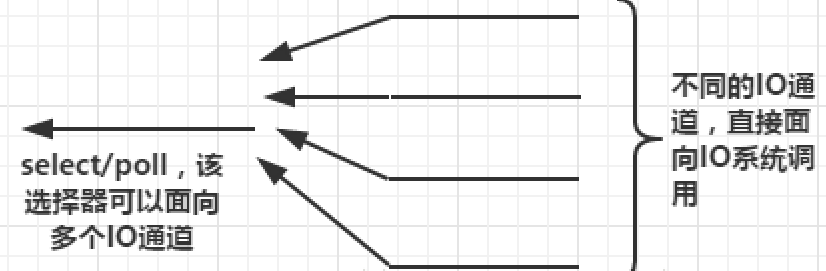 When there is data to read or write, the upper-layer application is notified to process it.
 -
Finally, the differences among select, poll, and epoll
2.2. CPU Affinity
Pin Nginx worker processes to a CPU to reduce cache misses caused by switching CPUs and obtain better performance.
2.3. sendfile
3. Build and Installation
4. Configuration
It mainly consists of three major parts.
4.1. Log Configuration
4.1.1. Syntax
Syntax:	access_log path [format [buffer=size] [gzip[=level]] [flush=time] [if=condition]];
access_log off;
Default:
access_log logs/access.log combined;
Context:	http, server, location, if in location, limit_except
4.1.2. Example
Generally, error_log is configured globally and access_log is configured inside http.
error_log  logs/error.log warn;

http {
    log_format  main  '$remote_addr - $remote_user [$time_local] "$request" '
                      '$status $body_bytes_sent "$http_referer" '
                      '"$http_user_agent" "$http_x_forwarded_for"';

access_log logs/access.log main;- Output
If a field is empty,
-is used instead.
127.0.0.1 - - [13/Apr/2020:23:30:43 +0800] "GET /favicon.ico HTTP/1.1" 404 555 "http://localhost/" "Mozilla/5.0 (Windows NT 10.0; Win64; x64) AppleWebKit/537.36 (KHTML, like Gecko) Chrome/80.0.3987.163 Safari/537.36" "-"4.1.3. References
4.2. Status
4.2.1. Syntax
Syntax:	stub_status;
Default:	—
Context:	server, location
4.2.2. Example
server {
    location /mystatus {
        stub_status;
    }
}- Output
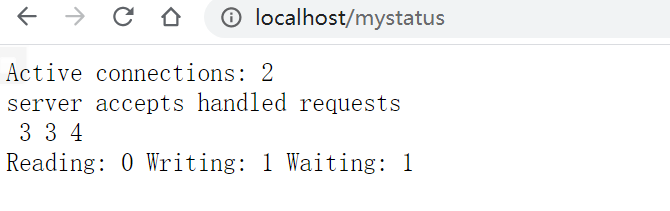 See the documentation for the explanation.
4.2.3. References
4.3. HTTP Content Replacement
4.3.1. Syntax
# Replace string with replacement
Syntax:	sub_filter string replacement;
Default:	—
Context:	http, server, location

# Used for caching. last_modified header
Syntax:	sub_filter_last_modified on | off;
Default:
sub_filter_last_modified off;
Context:	http, server, location
This directive appeared in version 1.5.1.

# By default, only the first match is replaced
Syntax:	sub_filter_once on | off;
Default:
sub_filter_once on;
Context:	http, server, location
4.3.2. Example
server {
    location / {
        root   html;
        index  index.html index.htm;
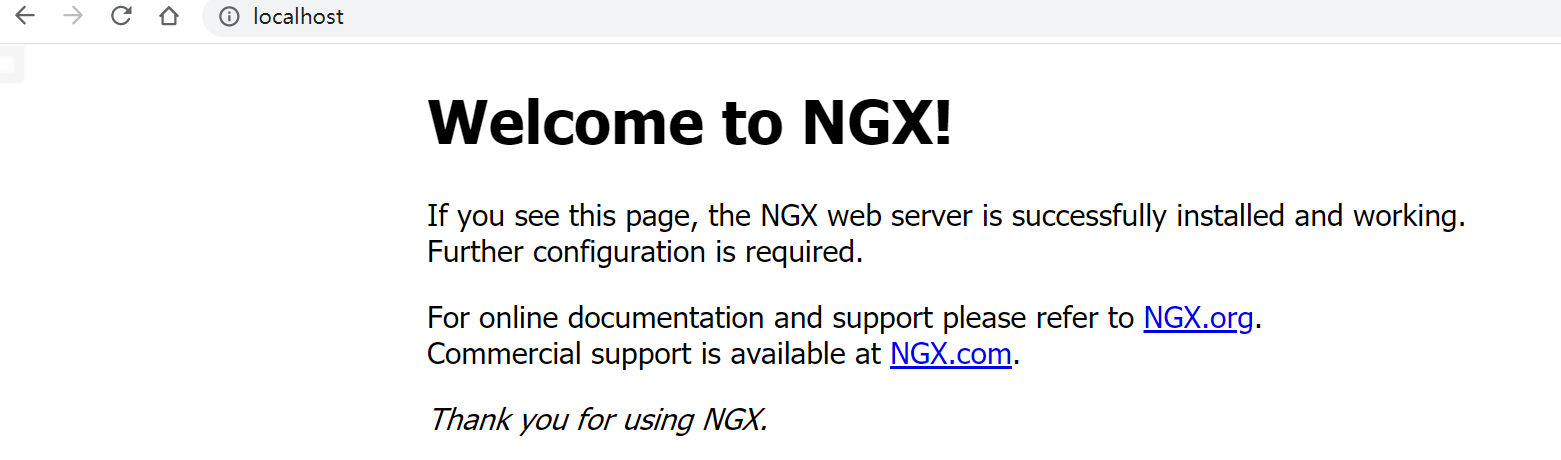
        # Replace Nginx with NGX
        sub_filter 'Nginx' 'NGX';
        # Replace all matches
        sub_filter_once off;
    }
}
4.3.3. References
4.4. Nginx Request Limits
4.4.1. Limit the Number of TCP Connections
4.4.1.1. Syntax
Syntax:	limit_conn zone number;
Default:	—
Context:	http, server, location

Syntax:	limit_conn_zone key zone=name:size;
Default:	—
Context:	http
4.4.1.2. Example
http
{
    limit_conn_zone $binary_remote_addr zone=conn_zone:1m;
    server {
        location / {
            root   html;
            index  index.html index.htm;
            limit_conn conn_zone 1;
        }
    }
}
4.4.1.3. References
4.4.2. Limit the Number of HTTP Requests
4.4.2.1. Syntax
Syntax:	limit_req zone=name [burst=number] [nodelay | delay=number];
Default:	—
Context:	http, server, location

Syntax:	limit_req_zone key zone=name:size rate=rate [sync];
Default:	—
Context:	http
4.4.2.2. Example
http
{
    limit_req_zone $binary_remote_addr zone=req_zone:1m rate=1r/s;
    server {
        location / {
            root   html;
            index  index.html index.htm;
            limit_req zone=req_zone;
        }
    }
}
4.4.2.3. References
4.5. Nginx Access Control
4.5.1. IP-Based Access Control
Access control is implemented through $remote_addr, but $remote_addr changes after passing through a proxy, as shown below.
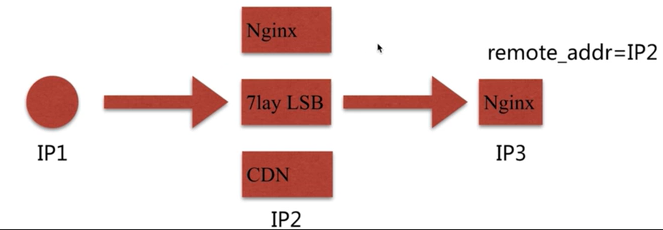 How to solve it:
-
Use
x_forwarded_for, but this header may not exist and can be modified.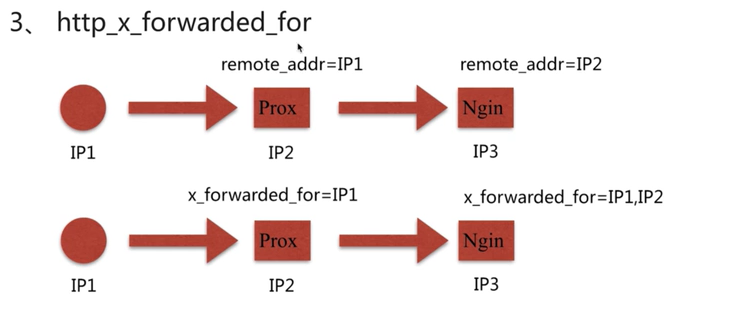
-
Use a custom variable to pass it through.
4.5.1.1. Syntax
# Which IP addresses are allowed to access
Syntax:	allow address | CIDR | unix: | all;
Default:	—
Context:	http, server, location, limit_except

# Which IP addresses are forbidden from accessing
Syntax:	deny address | CIDR | unix: | all;
Default:	—
Context:	http, server, location, limit_except
4.5.1.2. Example
server {
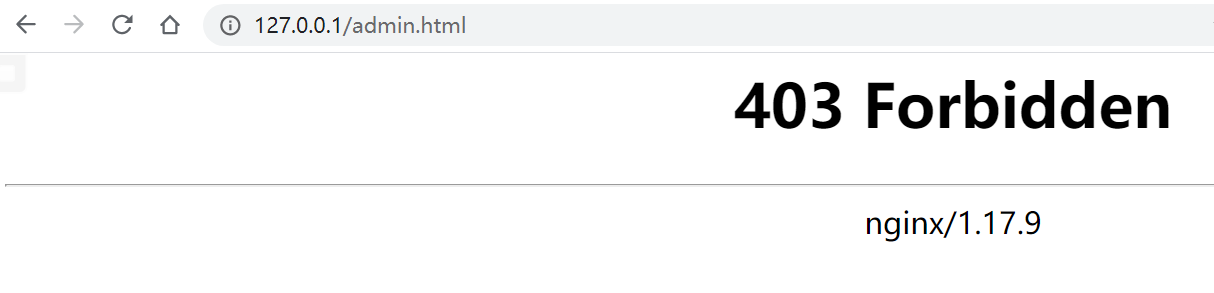
    # Accessing localhost/admin.html looks for admin.html under <USER_HOME>/software/code
    location ~ ^/admin.html {
        root   <USER_HOME>/software/code;
        # Do not allow 127.0.0.1 to access
        deny 127.0.0.1;
        # Allow all other IP addresses
        allow all;
    }
}
4.5.1.3. References
4.5.2. Login Control
4.5.2.1. Syntax
# Password prompt
Syntax:	auth_basic string | off;
Default:
auth_basic off;
Context:	http, server, location, limit_except

# Password file location
Syntax:	auth_basic_user_file file;
Default:	—
Context:	http, server, location, limit_except
4.5.2.2. Example
- Generate the password file:
htpasswd -c ./auth_password <USER>
location ~ ^/admin.html {
    root   <USER_HOME>/software/code;
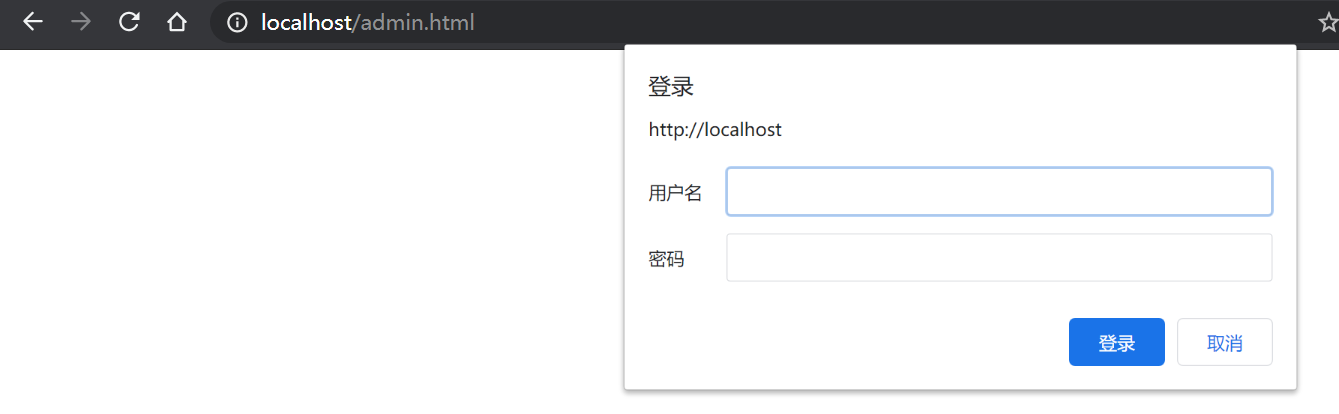
    auth_basic "Auth access test! Input your password!";
    auth_basic_user_file <USER_HOME>/software/nginx/nginx/conf/conf.d/auth_password;
}
-
Disadvantage The password file needs to be managed manually.
-
Solution Combine it with Lua. Integrate with LDAP.
4.5.2.3. References
4.5.3. secure_link
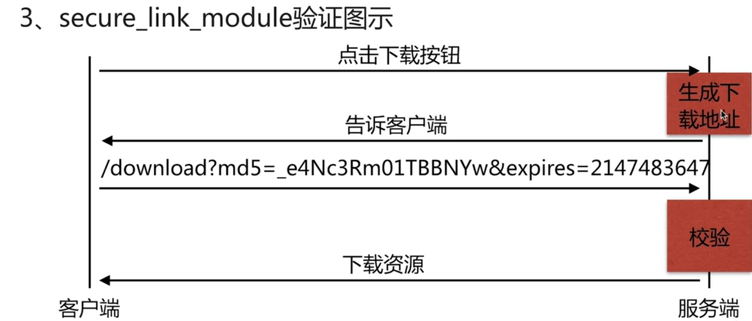
4.5.3.1. Syntax
Syntax:	secure_link expression;
Default:	—
Context:	http, server, location

Syntax:	secure_link_md5 expression;
Default:	—
Context:	http, server, location
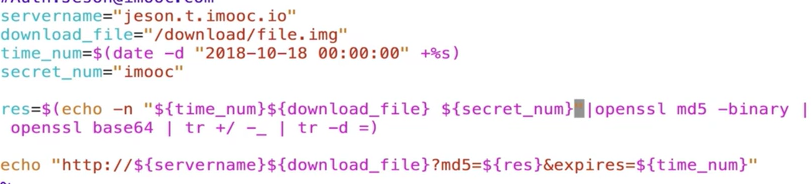
4.5.3.2. Example
location / {
    # Read the md5 and expires parameters from the URL
    secure_link $arg_md5,$arg_expires;
    # Calculate MD5 over (expires parameter + URI, key), and compare the result with md5 in the parameters
    secure_link_md5 "$secure_link_expires$uri imooc";

    # Return 403 if no parameters are provided
    if ($secure_link = "") {
        return 403;
    }

    if($secure_link = "0") {
        return 410;
    }
    root <USER_HOME>/software/code;
}
4.5.3.3. References
4.6. Nginx as a Static Resource Web Server

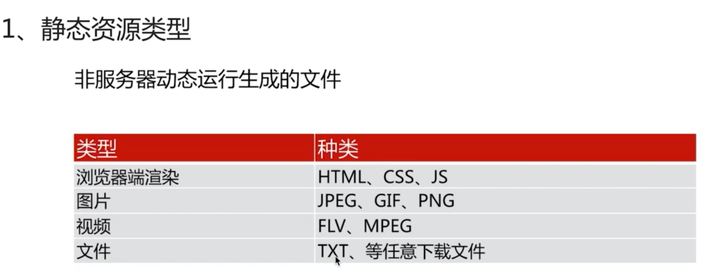
4.6.1. gzip
4.6.1.1. Syntax
# Use sendfile to transfer files
Syntax:	sendfile on | off;
Default:
sendfile off;
Context:	http, server, location, if in location

# Improve network-packet transmission efficiency when sendfile is enabled
# In essence, buffer network packets and send them at once
Syntax:	tcp_nopush on | off;
Default:
tcp_nopush off;
Context:	http, server, location

# Under a keepalive connection, improve the real-time nature of network-packet transmission
Syntax:	tcp_nodelay on | off;
Default:
tcp_nodelay on;
Context:	http, server, location

# Use gzip compression
Syntax:	gzip on | off;
Default:
gzip off;
Context:	http, server, location, if in location
# Compression level
Syntax:	gzip_comp_level level;
Default:
gzip_comp_level 1;
Context:	http, server, location
# gzip version
Syntax:	gzip_http_version 1.0 | 1.1;
Default:
gzip_http_version 1.1;
Context:	http, server, location
# gzip type
Syntax:	gzip_types mime-type ...;
Default:
gzip_types text/html;
Context:	http, server, location
# Enable gzip pre-read; if a gzip file exists, return the gzip file
Syntax:	gzip_static on | off | always;
Default:
gzip_static off;
Context:	http, server, location
4.6.1.2. Usage
# Access .html and other files
location ~ .*\.(txt|xml|html|js|css)$ {
    root <USER_HOME>/software/code;
    gzip on;
    gzip_http_version 1.1;
    gzip_comp_level 1;
    gzip_types text/plain text/html text/css text/xml application/javascript;
}
# Download files
location ~ ^/download {
    gzip_static on;
    tcp_nopush on;
    root <USER_HOME>/software/code;
}-
Comparison before and after text compression
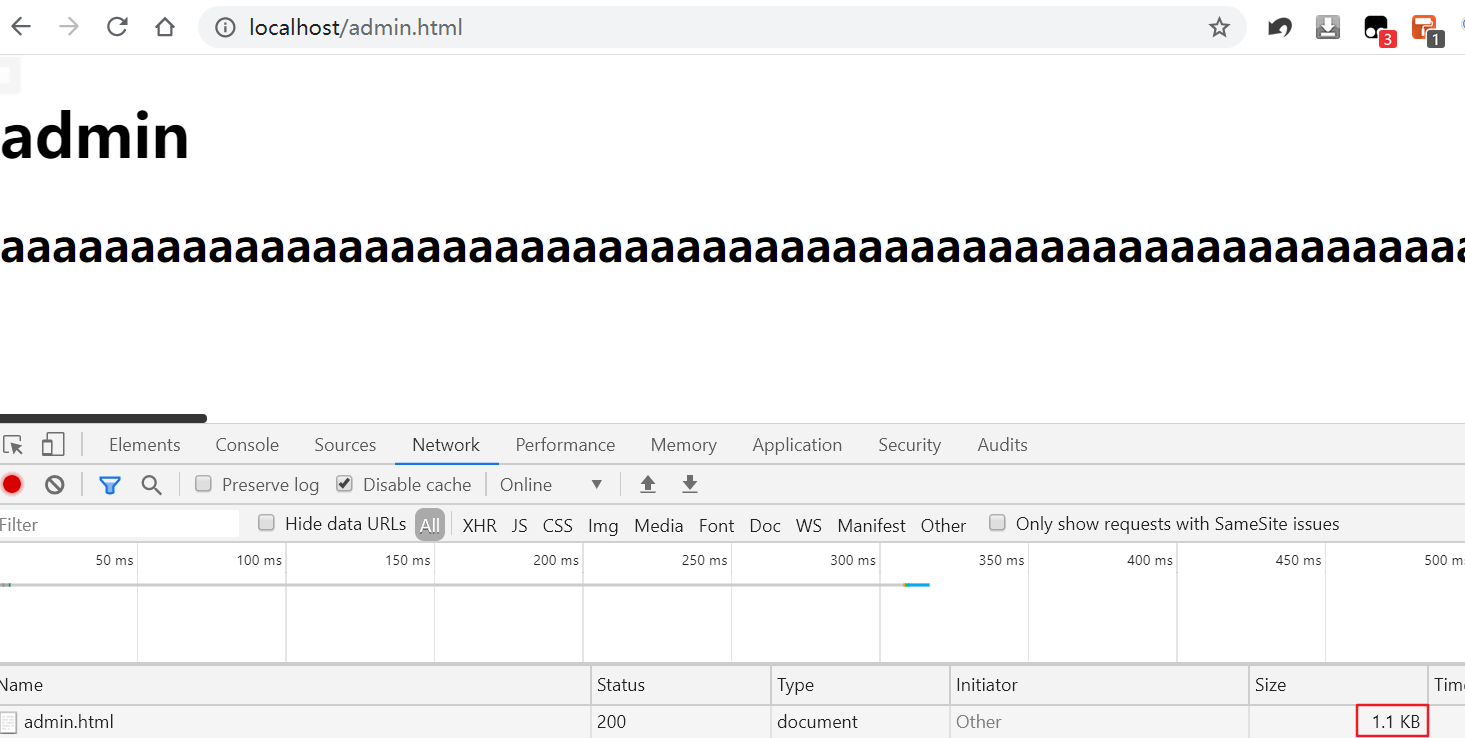
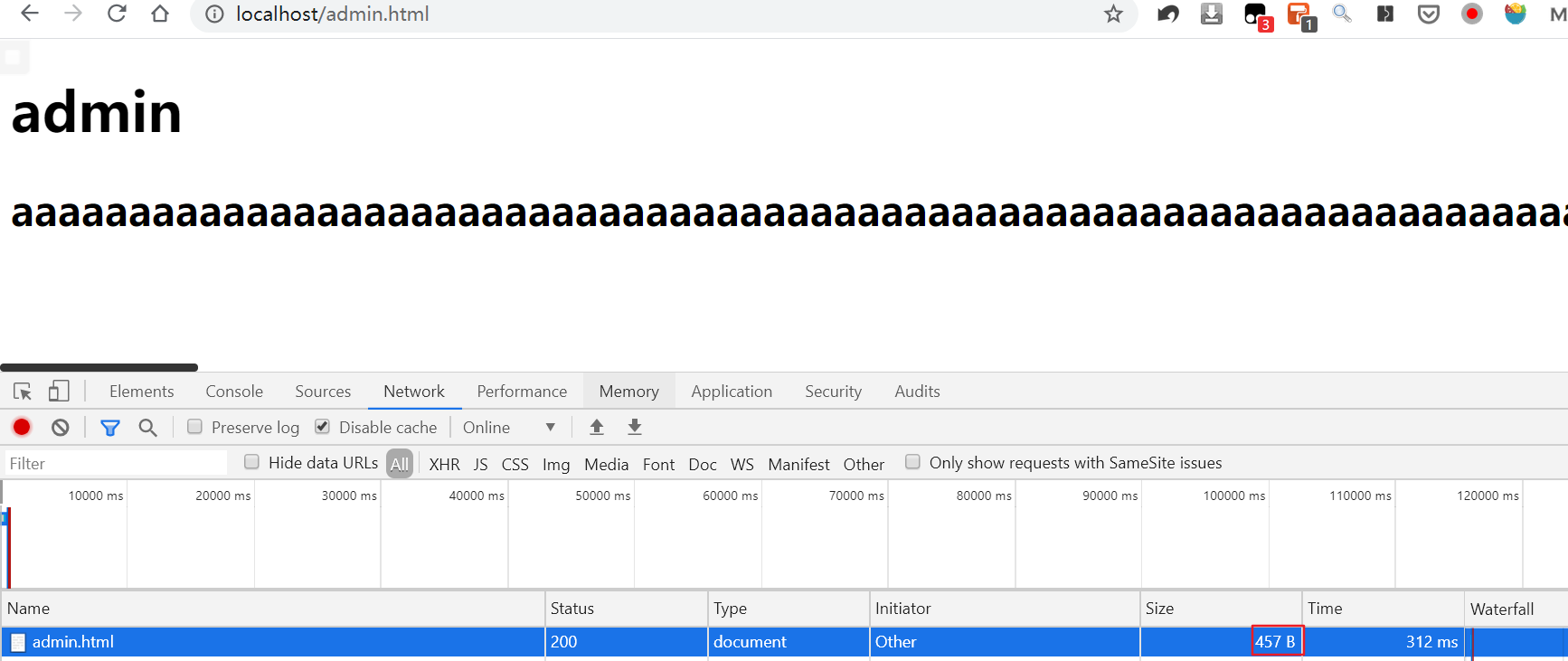
-
gzip pre-read First compress the file:
gzip ./test.mp4Then visit http://localhost/download/test.mp4
4.6.1.3. References
4.6.2. Client Cache
With the default Nginx configuration, the browser uses ETag and Last-Modified.
- First visit:

- Second visit:

4.6.2.1. Syntax
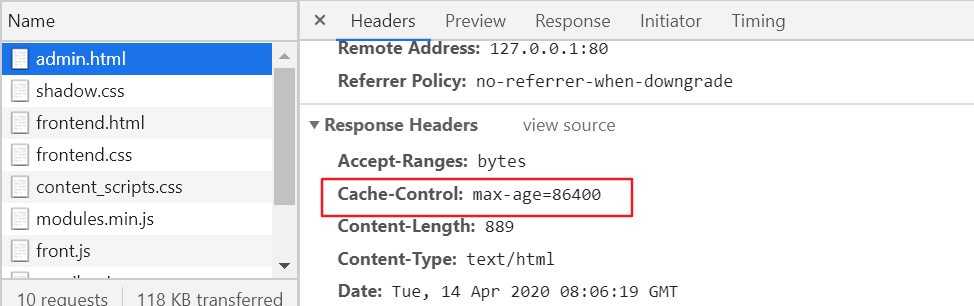
# Set Cache-Control:max-age=time; while the cached response is still fresh, the browser can normally reuse it without a validation request; 304 means a conditional request was made and the server confirmed that the resource was not modified
Syntax:	expires [modified] time;
expires epoch | max | off;
Default:
expires off;
Context:	http, server, location, if in location
4.6.2.2. Example
location ~ .*\.(txt|xml|html|js|css)$ {
    expires 24h;
    root <USER_HOME>/software/code;
}
4.6.2.3. References
4.6.3. Cross-Origin Access
4.6.3.1. Syntax
# Add a request header
Syntax:	add_header name value [always];
Default:	—
Context:	http, server, location, if in location
4.6.3.2. Example
location ~ .*\.(txt|xml|html|js|css)$ {
    add_header Access-Control-Allow-Origin *;
    add_header Access-Control-Allow-Methods GET,POST,PUT,DELETE,OPTIONS;
    root <USER_HOME>/software/code;
}
server {
set $cors_origin "";
set $cors_cred "";
set $cors_header "";
set $cors_method "";
if ($http_origin ~ \.qq\.com) {
set $cors_origin $http_origin;
set $cors_cred true;
set $cors_header "DNT,X-Mx-ReqToken,Keep-Alive,User-Agent,X-Requested-With,If-Modified-Since,Cache-Control,Content-Type,Authorization";
set $cors_method "GET,POST,OPTIONS";
}
add_header Access-Control-Allow-Origin $cors_origin;
add_header Access-Control-Allow-Credentials $cors_cred;
add_header Access-Control-Allow-Headers $cors_header;
add_header Access-Control-Allow-Methods $cors_method;
}4.6.3.3. References
4.6.4. Hotlink Protection
4.6.4.1. Syntax
# Validate the referer in the request header
Syntax:	valid_referers none | blocked | server_names | string ...;
Default:	—
Context:	server, location
4.6.4.2. Example
location ~ .*\.(jpg|gif|png)$ {
    root <USER_HOME>/software/code/images;
    valid_referers none blocked 127.0.0.1;
    if ($invalid_referer)  {
        return 403;
    }
}
4.6.4.3. References
4.7. Nginx as a Proxy Service
4.7.1. Forward / Reverse Proxy
The difference between a forward proxy and a reverse proxy is that the former proxies the client while the latter proxies the server.
4.7.1.1. Syntax
Syntax:	proxy_pass URL;
Default:	—
Context:	location, if in location, limit_except
4.7.1.2. Example
- Forward proxy
server {
    # Just configure a DNS resolver
    resolver 8.8.8.8;
    location / {
        # Request whatever website was requested, unchanged
        proxy_pass http://$http_host$request_uri;
    }
}- Reverse proxy
server {
    # This appends /baidu to the URL, i.e. http://www.baidu.com/baidu
    location /baidu {
        proxy_pass http://www.baidu.com;
    }
    # This appends /baidu-cache to the URL, i.e. http://www.baidu.com/baidu-cache
    location /baidu—cache {
        proxy_pass http://www.baidu.com;

        # Set header information
        proxy_redirect default;
        proxy_set_header Host $http_host;
        proxy_set_header X-Real-IP $remote_addr;

        proxy_connect_timeout 30;
        proxy_send_timeout 60;

        # Configure buffering
        proxy_buffer_size 32k;
        proxy_buffering on;
        proxy_buffers 4 128k;
        proxy_busy_buffers_size 256k;
        proxy_max_temp_file_size 256k;
    }
}
4.7.1.3. References
4.7.2. Load Balancing
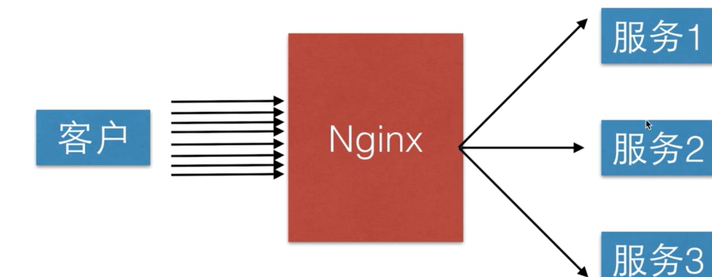
4.7.2.1. Syntax
# Address of the upstream servers
Syntax:	upstream name { ... }
Default:	—
Context:	http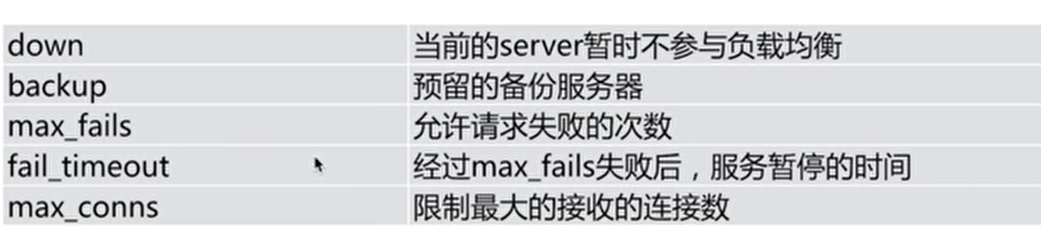
4.7.2.2. Example
# Define upstream servers
upstream ngx {
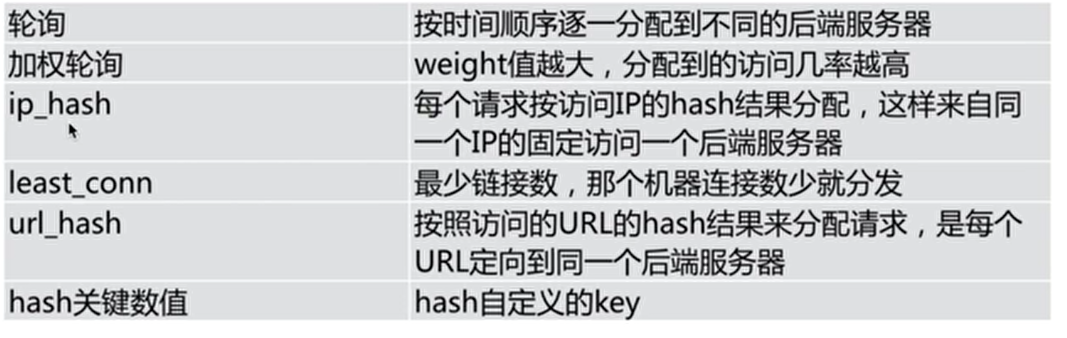
    #hash $request_uri;
    #ip_hash;
    # Parameters such as down, backup, and max_fails can be added after the server
    server 127.0.0.1:8080 weight 5;
    server 127.0.0.1:8081;
    server 127.0.0.1:8082;
}

# A total of four servers are started below: 80, 8080, 8081, and 8082
server {
    listen       80;
    server_name  localhost;
    location / {
        proxy_pass http://ngx;
    }
}

server {
    listen       8080;
    server_name  localhost;

    location / {
       root <USER_HOME>/software/nginx/nginx/html;
       index 8080.html;
    }
}

server {
    listen       8081;
    server_name  localhost;

    location / {
       root <USER_HOME>/software/nginx/nginx/html;
       index 8081.html;
    }
}

server {
    listen       8082;
    server_name  localhost;

    location / {
       root <USER_HOME>/software/nginx/nginx/html;
       index 8082.html;
    }
}
4.7.2.3. References
4.7.3. Server Cache
4.7.3.1. Syntax
Syntax:	proxy_cache zone | off;
Default:
proxy_cache off;
Context:	http, server, location

Syntax:	proxy_cache_path path [levels=levels] [use_temp_path=on|off] keys_zone=name:size [inactive=time] [max_size=size] [manager_files=number] [manager_sleep=time] [manager_threshold=time] [loader_files=number] [loader_sleep=time] [loader_threshold=time] [purger=on|off] [purger_files=number] [purger_sleep=time] [purger_threshold=time];
Default:	—
Context:	http

# Cache expiration
Syntax:	proxy_cache_valid [code ...] time;
Default:	—
Context:	http, server, location

# Cache key dimensions
Syntax:	proxy_cache_key string;
Default:
proxy_cache_key $scheme$proxy_host$request_uri;
Context:	http, server, location

# Do not cache certain pages
Syntax:	proxy_no_cache string ...;
Default:	—
Context:	http, server, location
4.7.3.2. Example
upstream ngx {
    server 127.0.0.1:8080;
    server 127.0.0.1:8081;
    server 127.0.0.1:8082;
}

proxy_cache_path /tmp levels=1:2 keys_zone=ngx_cache:10m max_size=10g inactive=60m use_temp_path=off;

server {
    listen       80;
    server_name  localhost;

    if ($request_uri ~^/(url3|login|register|password)) {
        set $cookie_nocache 1;
    }

    location / {
        proxy_pass http://ngx;

        proxy_cache ngx_cache;
        proxy_cache_valid 200 304 12h;
        proxy_cache_valid any 10m;
        proxy_cache_key $host$uri$is_args$args;
        add_header Nginx-Cache "$upstream_cache_status";
        proxy_no_cache $cookie_nocache $arg_nocache $arg_comment;
        proxy_no_cache $http_pragma $http_authorization;
        proxy_next_upstream error timeout invalid_header http_500 http_502 http_503 http_504;
    }
}
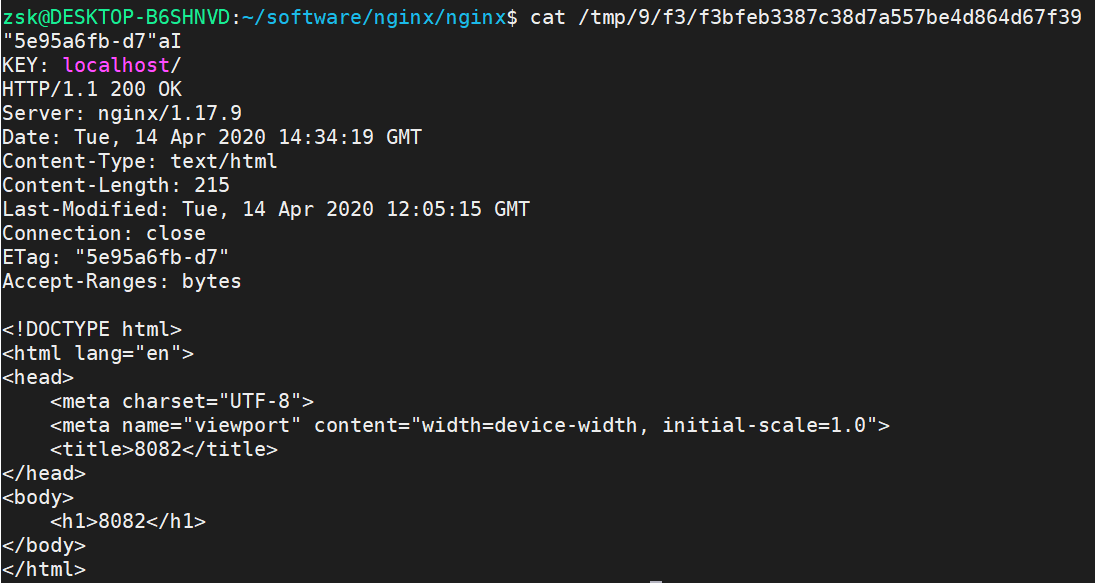
Although Nginx uses a round-robin algorithm by default, repeatedly refreshing the page always accesses the same one, which shows that the cache has taken effect. The cached content can also be seen under the /tmp directory.
4.7.3.3. References
4.7.4. Static/Dynamic Separation
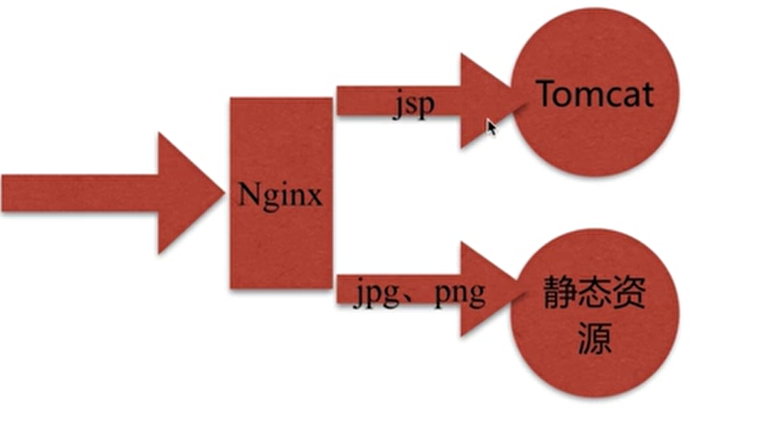
Use middleware to separate dynamic requests from static requests. Simply put, Nginx responds to HTML, CSS, and JS, while Ajax requests are handled by Tomcat.
4.7.4.1. Example
upstream java_api {
    server 127.0.0.1:8000;
}

server {
    listen       80;
    server_name  localhost;

    location ~ \.jsp$ {
         proxy_pass http://java_api;
         index index.html index.htm;
    }

    location ~ \.(jpg|png|gif)$ {
        expires 1h;
        gzip on;
    }
}
4.8. rewrite Rules
4.8.1. Syntax
# Replace regex in the URL with replacement
Syntax:	rewrite regex replacement [flag];
Default:	—
Context:	server, location, if
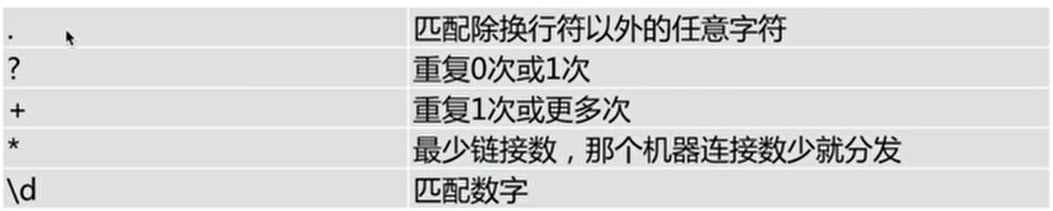
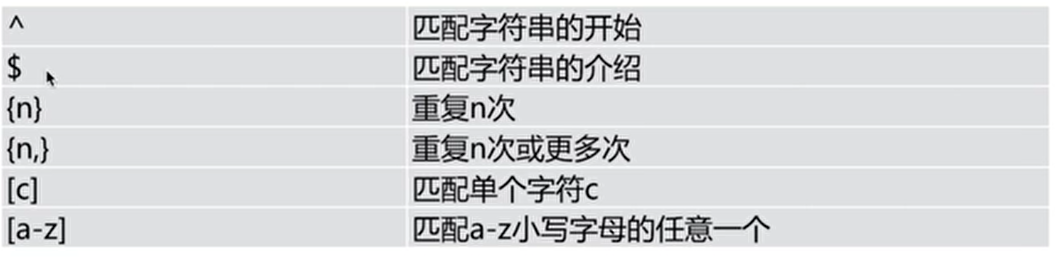
4.8.1.1. Regular Expression Syntax


4.8.1.2. flag
- redirect: returns a 302 temporary redirect. The browser address bar displays the redirected URL, and crawlers do not update the URL.
- permanent: returns a 301 permanent redirect. The browser address bar displays the redirected URL, and crawlers update the URL.
- break: stops processing subsequent rewrite directives, does not leave the location scope, does not perform another lookup, terminates matching, and leaves the URL unchanged.
- last: stops processing subsequent rewrite directives, leaves the location scope, and starts searching for a location matching the changed URI. The URL remains unchanged.
redirect and permanent are easy to understand: both directly redirect the URL and display the redirected URL. From the perspective of functionality, they are the same; there is no issue of one being better or faster. The main difference is their effect on SEO.
4.8.2. Example
location ~ ^/break {
    # Rewrite /break in the URL to /test/; break does not rematch location
    rewrite ^/break /test/ break;
}

location ~ ^/last {
    # Rewrite /last in the URL to /test/; last rematches location
    rewrite ^/last /test/ last;
}

# Visiting /test/ returns JSON data; visiting /test404
location /test/ {
    default_type application/json;
    return 200 '{"status" :"success"}';
}

location ~ ^/redirect {
    # Visiting /redirect redirects to /test/
    rewrite ^/redirect /test/ redirect;
}

location ~ ^/permanent {
    # Visiting /permanent redirects to /test/
    rewrite ^/permanent /test/ permanent;
}

location / {
    # If visiting http://localhost/courses-11-22-1.html
    # It is converted to courses/11/22/course_1.html
    # Finally it accesses <USER_HOME>/software/code/courses/11/22/course_1.html
    rewrite ^/courses-(\d+)-(\d+)-(\d+)\.html$ /courses/$1/$2/course_$3.html break;

    # If it is the Chrome browser, redirect to http://www.baidu.com
    if ($http_user_agent ~* Chrome) {
        rewrite ^/(.*)$ http://www.baidu.com redirect;
    }
    # If it is not a file, redirect to http://www.google.com
    if (!-f $request_filename) {
        rewrite ^/(.*)$ http://www.google.com/$1 redirect;
    }

    root <USER_HOME>/software/code;
    index index.html index.htm;
}
4.8.3. References
4.9. Configure HTTPS
4.9.1. Syntax
Syntax:	ssl on | off;
Default:
ssl off;
Context:	http, server

Syntax:	ssl_certificate file;
Default:	—
Context:	http, server

Syntax:	ssl_certificate_key file;
Default:	—
Context:	http, server
4.9.2. Example
- Generate certificates
#!/usr/bin/env bash
# Generate private key
openssl genrsa -idea -out server.key 1024
# Generate certificate request file
openssl req -new -key server.key -out server.csr
# Generate certificate file
openssl x509 -req -days 3650 -in server.csr -signkey server.key -out server.crt

# Convert to Netty format
openssl pkcs8 -topk8 -nocrypt -in server.key -out server_pkcs8.key

# Convert to Tomcat format
openssl pkcs12 -export -in server.crt -inkey server.key -out keystore.p12 -name server

# Generate the certificate format required by HAProxy
cat server.crt server.key > server.pem- Configure Nginx
server {
    listen 443;
    server_name 127.0.0.1;
    ssl on;
    ssl_certificate <USER_HOME>/software/code/server.crt;
    ssl_certificate_key <USER_HOME>/software/code/server.key;

    index index.html;
    location / {
        root <USER_HOME>/software/code;
    }
}
4.9.3. References
5. LUA
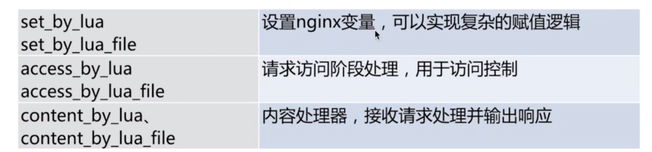
5.1. Processing Stages
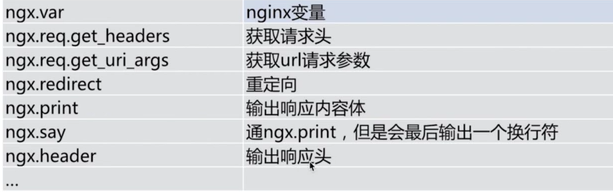
5.2. Lua API
5.3. Example
location /hello {
	default_type 'text/plain';
	content_by_lua 'ngx.say("Hello, Lua")';
}

location /myip {
	default_type 'text/plain';
	content_by_lua '
		clientIP = ngx.req.get_headers()["x_forwarded_for"];
		ngx.say("IP:", clientIP);
	';
}

location / {
	default_type 'text/html';
	content_by_lua_file <USER_HOME>/software/code/dep.lua;
}- dep.lua
ngx.say("Hello, Lua file")6. Optimization
6.1. CPU Affinity
- Number of CPUs / cores
# Number of physical CPUs: 1
cat /proc/cpuinfo | grep "physical id" | sort |uniq|wc -l

# Cores per CPU: 6
cat /proc/cpuinfo | grep "cpu cores" | uniq

# Total CPU cores: 6
cat /proc/cpuinfo |grep "processor" | wc -l- nginx.conf
# Number of CPUs
worker_processes 1;
# If there are n CPU cores, there are n n-bit masks
worker_cpu_affinity 000001 000010 000100 001000 010000 100000

events {
    use epoll;
    worker_connections 10240;
}
6.2. File Handles
- /etc/security/limits.conf
root soft nofile 65535
root hard nofile 65535
* soft nofile 25535
* hard nofile 25535- nginx.conf
worker_rlimit_nofile 35535;

events {...}

http {...}
7. General Configuration
user nginx;
worker_processes 16;
worker_cpu_affinity auto;

error_log /var/log/nginx/error.log warn;
pid /var/run/nginx.pid;

worker_rlimit_nofile 35535;

events {
    use epoll;
    worker_connections 10240;
}

http {
    include /etc/nginx/mime.types;
    default_type application/octet-stream;
    charset utf-8;

    log_format main;

    sendfile on;
    keepalive_timeout 65;

    gzip on;
    gzip_disable "MSIE [1-6]\.";
    gzip_http_version 1.1;

    include /etc/nginx/conf.d/*.conf;
}
8. FAQ
8.1. Priority When One server Has Multiple location Blocks
| Pattern | Meaning | |
|---|---|---|
| location = /uri | = means exact matching; it takes effect only when the URI matches exactly |
|
| location ^~ /uri | ^~ performs prefix matching on the URL path and takes precedence over regular expressions |
|
| location ~ pattern | ~ at the beginning means a case-sensitive regular-expression match |
|
| location ~* pattern | ~* at the beginning means a case-insensitive regular-expression match |
|
| location /uri | With no modifier, it is also a prefix match, but after regular-expression matching | |
| location / | General match; any request not matched by another location matches here, similar to default in a switch |
A more precise description of matching multiple location blocks is:
- If an exact
=match exists, that configuration is used immediately. - Otherwise, Nginx first selects and remembers the longest matching prefix location.
- If that longest prefix uses
^~, it is used and regular-expression locations are not checked. - Otherwise, regular-expression locations are checked in configuration-file order, and the first matching regular expression is used.
- If no regular expression matches, the previously remembered longest prefix is used.
location /is simply a prefix location and commonly serves as the fallback.
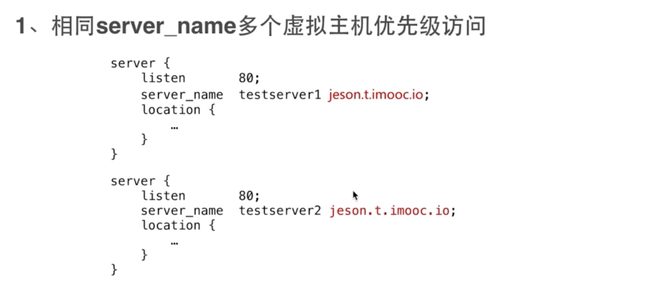
8.2. Priority of Multiple Identical server_name Values
Configuration syntax checking can still succeed, but Nginx emits a conflicting server name ... ignored warning; for the same listen address/port, the later conflicting server_name is ignored.
8.3. Difference Between root and alias
rootappends the location itself plus the path after the location toroot.aliasappends only the path after the location toalias.
location /static/imgs {
    root <USER_HOME>/static/imgs;
}

location /static/imgs {
    alias <USER_HOME>/static/imgs;
}
Suppose both access http://localhost/static/imgs/test.png. root accesses <USER_HOME>/static/imgs/static/imgs/test.png, while alias accesses <USER_HOME>/static/imgs/test.png.

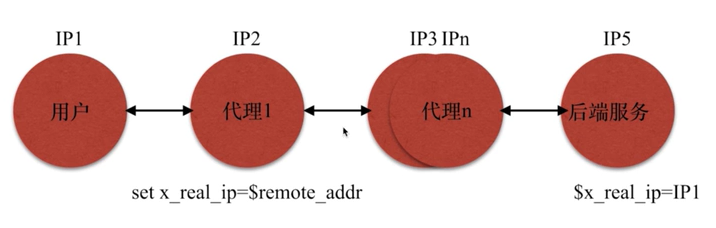
8.4. Get the User’s Real IP
Proxy 1 sets x_real_ip to remote_addr, which is IP1.
Subsequent proxies keep passing this x_real_ip.
8.5. try_files
Check whether files exist in order.
When the user requests http://localhost/example, $uri here is /example.
try_filestries to find this file on disk. If a file named<USER_HOME>/software/nginx/nginx/cache/exampleexists, its content is sent directly to the user.- Obviously, there is no file called
examplein the directory. Then it checks$uri/, adding a/, which means checking whether a directory named<USER_HOME>/software/nginx/nginx/cache/example/exists. - If it still cannot be found, it falls back to the last
try_filesoption,@java_page, and performs an internal redirect according to the@java_pageconfiguration.
location / {
    root <USER_HOME>/software/nginx/nginx/cache;
    try_files $uri $uri/ @java_page;
}

location @java_page {
    proxy_pass http://127.0.0.1:9090;
}
8.6. Common Error Codes
- 413
User upload file limit:
client_max_body_size - 502 As a gateway/proxy, Nginx received an invalid upstream response or could not successfully complete the upstream request; use the error log to determine the concrete cause
- 504 As a gateway/proxy, Nginx timed out while waiting for the upstream response
9. References
- nginx documentation
- Four rewrite flags in Nginx - Wu Hao’s Blog
- Understanding Nginx location Matching in One Article - SegmentFault
- location Matching Rules · OpenResty Best Practices
- GitHub - russelltao/geektime-nginx: Geek Time: Nginx Core Knowledge 100 Lectures, Configuration Files and Code
- Nginx Config for Cors - add_header directive is not allowed - Stack Overflow
Discussion
Sign in with GitHub to comment. Discussions are stored as GitHub Issues.View on GitHub