
NOTE
1.8 MySQL Indexes
1. What Is an Index - An index is a structure that sorts the values of one or more columns in a database table and is a data structure (B+Tree) that helps MySQL obtain data efficiently 2. Index Classification 2.1. By Whether It Is a Primary Key - Primary-key index - Data columns cannot be duplicated or NULL; a table can have only one primary key - Secondary index - Basic index type with no uniqueness restriction; NULL values are allowed
This is a historical learning note and may contain outdated or incomplete understanding.
1. What Is an Index
- An index is a structure that sorts the values of one or more columns in a database table and is a data structure (B+Tree) that helps MySQL obtain data efficiently.
2. Index Classification
2.1. By Whether It Is a Primary Key
- Primary-key index
- Data columns cannot be duplicated or NULL, and a table can have only one primary key.
- Secondary index
- A basic index type with no uniqueness restriction; NULL values are allowed.
- Records and pages are sorted by the value of column
c2. - Characteristics:
- The leaf nodes of the B+ tree do not store complete user records; they only store the values of
c2 + primary key. - Directory-item records are no longer
primary key + page number, butc2 + primary key + page number.
- The leaf nodes of the B+ tree do not store complete user records; they only store the values of
2.2. By Whether It Is Unique
| Unique Index | Ordinary Index | |
|---|---|---|
| Query | After finding the first record that satisfies the condition, the search stops | After finding the first record that satisfies the condition, searching continues until a record that does not satisfy the condition is found |
| Update | Change Buffer cannot be used, because uniqueness must be checked on disk rather than only updating memory | Change Buffer can be used |
2.3. By Number of Columns
- Single-value
- One index contains only one column.
- Unique
- Data columns cannot be duplicated; NULL values are allowed.
- A table can create unique indexes on multiple columns.
- Composite / multi-column
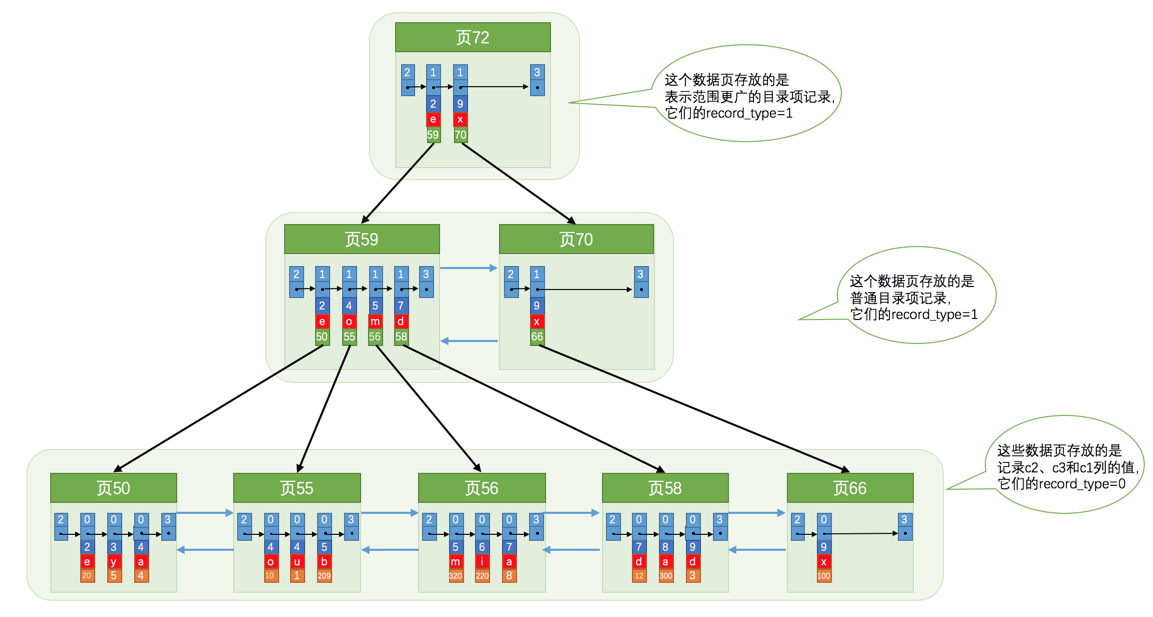
- It is essentially also a secondary index.
- For example, if we want the B+ tree to be sorted by columns
c2andc3, this contains two meanings:- first sort records and pages by column
c2; - when records have the same value in
c2, sort by columnc3.
- first sort records and pages by column
2.4. By Data Structure
2.5. Clustered and Non-Clustered Indexes
- According to whether logical order and physical order are consistent, indexes can be divided into clustered and non-clustered indexes.
- Whose logical order? — the position of the index in the B+ tree.
- Whose physical order? — the position of data rows on disk.
- Clustered index
- The physical order of data rows is consistent with the logical order of the index; data storage and the index are placed together.
- In the corresponding B+ tree, leaf nodes store the actual data.
- The primary-key index in InnoDB.
- A table can have only one clustered index.
- The physical order of data rows is consistent with the logical order of the index; data storage and the index are placed together.
- Non-clustered index
- The physical order of data rows is inconsistent with the logical order of the index; data storage and the index are not placed together.
- In the corresponding B+ tree, leaf nodes store the address of the data.
- MyISAM indexes.
- A table can have multiple non-clustered indexes.
- The physical order of data rows is inconsistent with the logical order of the index; data storage and the index are not placed together.
3. Advantages of Indexes
Improve query efficiency.
4. Disadvantages of Indexes
- Space
- Each index is a B+ tree, and each node is a page (16KB). If there are too many nodes, space consumption is large.
- Time
- Indexes need to maintain order, so insert/delete/update operations become slower.
5. How to Write SQL That Can Use Indexes
- Prefer full-value matching with
=. - Try to use covering indexes.
- Do not perform calculations, functions, type conversions, etc. on indexed columns.
- If a string is not enclosed in single quotes, the index becomes invalid.
- If an integer is enclosed in single quotes, the index does not become invalid.
- Do not create indexes on fields that filter out too much data.
is not nullandis nullcannot use an index.!=and<>cannot use an index.
LIKE '%abc%'cannot use an index, whileLIKE 'abc%'can.- If only a covering index is queried, the
%abc%form can still use the index.
- If only a covering index is queried, the
- Leftmost-prefix principle: start matching from the first column of a multi-column index. Once a range query is encountered, later index columns cannot be used further.
CREATE TABLE person_info(
    id INT NOT NULL auto_increment,
    name VARCHAR(100) NOT NULL,
    birthday DATE NOT NULL,
    phone_number CHAR(11) NOT NULL,
    country varchar(100) NOT NULL,
    PRIMARY KEY (id),
    KEY idx_name_birthday_phone_number (name, birthday, phone_number)
);
5.1. Full-Value Matching
If the columns in our search conditions are consistent with the index columns, this is called full-value matching.
SELECT * FROM person_info WHERE name = 'Ashburn' AND birthday = '1990-09-27' AND phone_number = '[Redacted phone number]';Or:
// The query optimizer will optimize the order of this statement
SELECT * FROM person_info WHERE birthday = '1990-09-27' AND phone_number = '[Redacted phone number]' AND name = 'Ashburn';
5.2. Match the Leftmost Columns (Leftmost-Prefix Principle)
- When creating a multi-column index, according to business requirements, put the column most frequently used in the
WHEREclause on the far left. - Start matching from the first column of the multi-column index and continue until a range query is encountered; the later index columns can no longer be used.
- For example, for
a = 3, b = 4 and c > 5 and d = 6, if an(a,b,c,d)index is created,dcannot use the index. If an(a,b,d,c)index is created, all can use it. In addition, the order ofa,b,dcan be adjusted arbitrarily. - In a composite index on fields
a,b,c, as long as fieldais used, the index can be used regardless of the condition order.
- For example, for
- If we want to use as many columns as possible in a composite index, the columns in the search conditions must be continuous columns from the far left of the composite index.
SELECT * FROM person_info WHERE name = 'Ashburn';Or:
SELECT * FROM person_info WHERE name = 'Ashburn' AND birthday = '1990-09-27';If range searches are performed on multiple columns at the same time, only the range search on the leftmost indexed column can use the B+ tree index.
// This can only use name
SELECT * FROM person_info WHERE name > 'Asa' AND name < 'Barlow' AND birthday > '1980-01-01';
5.3. Match a String Column Prefix (Prefix Index)
For a string-type indexed column, matching only its prefix can also quickly locate records.
SELECT * FROM person_info WHERE name LIKE 'As%';- The practical difficulty lies in the prefix length.
- You can use
select count(*)/count(distinct left(password,prefixLen));, adjustprefixLenfrom 1 upward, and observe the average matching ratio for different prefix lengths. When it approaches 1, the length is sufficient.
- You can use
5.4. Index Condition Pushdown
select * from tuser where name like '张%' and age=10 and ismale=1;- If an index is created on the
nameandagecolumns, MySQL checks whethernamestarts with张and at the same time whetherageis 10 on the composite index, instead of checking only whethernamestarts with张and immediately performing a back-to-table lookup.
5.5. Match Range Values
Find records whose indexed-column values are within a range.
SELECT * FROM person_info WHERE name > 'Asa' AND name < 'Barlow';5.6. Exact-Match One Column and Range-Match Another
// This can use the name and birthday columns
SELECT * FROM person_info WHERE name = 'Ashburn' AND birthday > '1980-01-01' AND birthday < '2000-12-31' AND phone_number > '[Redacted phone number]';
5.7. Sorting
If there is no index, data needs to be loaded into memory for sorting; if the data is too large, disk is also needed, which is file sorting.
SELECT * FROM person_info ORDER BY name, birthday, phone_number LIMIT 10;- The order of columns after the
ORDER BYclause must also follow the order of index columns.
SELECT * FROM person_info WHERE name = 'A' ORDER BY birthday, phone_number LIMIT 10; 5.7.1. Cases Where Indexes Cannot Be Used for Sorting
- Mixing
ASCandDESC.SELECT * FROM person_info ORDER BY name, birthday DESC LIMIT 10;
- A non-sorting indexed column appears in the
WHEREclause.SELECT * FROM person_info WHERE country = 'China' ORDER BY name LIMIT 10;
- Sorting columns contain columns from different indexes.
SELECT * FROM person_info ORDER BY name, country LIMIT 10;
- A complex expression is used on a sorting column.
SELECT * FROM person_info ORDER BY UPPER(name) LIMIT 10;
5.8. Grouping
Same as sorting.
5.9. Avoid Back-to-Table Lookups
5.9.1. What Is a Back-to-Table Lookup
- In InnoDB, first query the primary key through a secondary index, and then use the primary key to query data from the primary-key index. This is a back-to-table lookup.
- Querying through a secondary index requires a back-to-table lookup.
- Query the primary key through the index (sequential I/O).
- Query the user record through the primary key (clustered index) (random I/O).
- Limiting the query to obtain fewer records makes the optimizer more inclined to choose the secondary-index + back-to-table lookup method.
5.9.2. How to Solve It: Covering Index
- If the columns in
SELECTare a subset of the index columns, there is no need for a back-to-table lookup. - Do not use
select *; onlyselect indexed columns.
6. How to Choose Indexes
6.1. Create Indexes on Frequently Queried Fields
6.1.1. Create Indexes Only for Columns That Appear in WHERE Clauses, Fields of the Right Table in JOINs, or Columns That Appear in ORDER BY LIMIT or GROUP BY HAVING Clauses
- The
birthdayandcountrycolumns do not need indexes here; we only need to create an index for thenamecolumn that appears in theWHEREclause.
SELECT birthday, country FROM person name WHERE name = 'Ashburn';6.2. Prefer Indexes on Columns with High Cardinality; Indexes on Columns with Very Low Cardinality May Be Less Effective
- Column cardinality: the number of distinct values in a column.
6.3. Keep Indexed-Column Types as Small as Possible
- The smaller the data type, the faster comparison operations are during queries (CPU level).
- The smaller the data type, the less storage space the index occupies. More records fit in one data page, reducing the performance loss caused by disk I/O and allowing more data pages to be cached in memory, thereby improving read/write efficiency.
TINYINT > MEDIUMINT > INT > BIGINT
6.4. String Index Techniques
- The key is distinctiveness.
select
  count(distinct left(email,4))as L4,
  count(distinct left(email,5))as L5,
  count(distinct left(email,6))as L6,
  count(distinct left(email,7))as L7,
from SUser;
6.4.1. Index Only the First Few Characters of a String
- When a string type can store many characters, index only the prefix of the string value.
CREATE TABLE person_info(
    name VARCHAR(100) NOT NULL,
    birthday DATE NOT NULL,
    phone_number CHAR(11) NOT NULL,
    country varchar(100) NOT NULL,
    KEY idx_name_birthday_phone_number (name(10), birthday, phone_number)
);- A prefix index cannot be used for sorting.
SELECT * FROM person_info ORDER BY name LIMIT 106.4.2. Reverse Storage
- If prefix distinctiveness is low but suffix distinctiveness is high, store the value in reverse order, for example an ID card number.
select field_list from t where id_card = reverse('input_id_card_string');6.5. Let the Indexed Column Appear Alone in a Comparison Expression
WHERE my_col * 2 < 4Change it to:
WHERE my_col < 4/26.6. Use Auto-Increment Values for the Primary Key to Avoid Page Splits
6.6.1. Page Split
- Insert a record when a page is already full.
- If it is appended, only a new page needs to be created.
- If it is inserted in the middle, some records in the old page are moved to the new page, and then the record is inserted into the old page.
6.7. Redundant and Duplicate Indexes
idx_name_birthday_phone_numberandidx_nameare redundant.
CREATE TABLE person_info(
    id INT UNSIGNED NOT NULL AUTO_INCREMENT,
    name VARCHAR(100) NOT NULL,
    birthday DATE NOT NULL,
    phone_number CHAR(11) NOT NULL,
    country varchar(100) NOT NULL,
    PRIMARY KEY (id),
    KEY idx_name_birthday_phone_number (name(10), birthday, phone_number),
    KEY idx_name (name(10))
);
6.8. Do Not Create Indexes on Columns That Are Frequently Inserted/Deleted/Updated or Have Too Many Duplicate Values
7. My Own Experience
- Do not add indexes when the amount of data is small.
- With only dozens of rows, an index may not be used because looking up the index and then the data can be slower than a direct sequential scan.
- Single-column indexes:
- Add indexes to columns frequently queried in
where,order by limit, andgroup by. - Uniqueness should not be too low.
- If a seq filter can filter down to a small amount of data, an index can be created.
and (... or ...)can only use the index of theand; the laterorcannot use it.- PostgreSQL
LIKE '%%'queries cannot use an index, whileLIKE 'xxx%'can, provided the index type isvarchar pattern.- If
LIKE '%%'needs to use an index, a special index type such asgistorgimmust be created.
- If
- Add indexes to columns frequently queried in
- Composite indexes:
- Single-column indexes can be created on both sides of
or, and both can be used. - Use a covering index when possible.
- Refer to the leftmost-prefix principle.
- Single-column indexes can be created on both sides of
- Multiple tables:
- Be sure to create an index on the join field of the right table in a
left join.
- Be sure to create an index on the join field of the right table in a
- For deduplication,
distinct,gruop by, andexistscan be used. Which is more efficient?- If the
group byfield is to use an index, the field must be much smaller than the width of the table. - If the
order byfield is to use an index, it must be used together withlimit.
- If the
8. MySQL Index Implementation
9. References
- Summary of Clustered and Non-Clustered Indexes - imooc
- MySQL Tuning: Index Failure Cases - Jianshu
- PostgreSQL - Postgres doesn’t use index with “ORDER BY” - Stack Overflow
- PostgreSQL - Why is Postgres not using index on a simple GROUP BY? - Stack Overflow
- Index Columns for
LIKEin PostgreSQL | Niall Burkley’s Developer Blog - PostgreSQL Fuzzy Matching with Indexes - CSDN
- Indexing - PostgreSQL LIKE Query Performance Variations - Stack Overflow
- Efficient Use of PostgreSQL Indexes | Heroku Dev Center
- Why Is My Index Not Being Used - Postgres OnLine Journal
- MySQL Index Back-to-Table Lookup - CSDN
Discussion
Sign in with GitHub to comment. Discussions are stored as GitHub Issues.View on GitHub