
NOTE
1.11 MySQL Pages
1. Row Format - The format in which a Record (Row) is stored on disk 1.1. Compact 1.1.1. Extra Record Information 1.1.1.1. Variable-Length Field Length List - For varchar(100), blob, text, etc., the length is recorded here 1.1.1.2. NULL Value List - Bits are used to record whether a column is NULL 1.1.1.3. Record Header Information 1.1.2. Actual Record Data 1.2. Redundant 1.3. Dynamic 1.4. Compressed 2. Pages
This is a historical learning note and may contain outdated or incomplete understanding.
1. Row Format
- The format in which a Record (Row) is stored on disk.
1.1. Compact
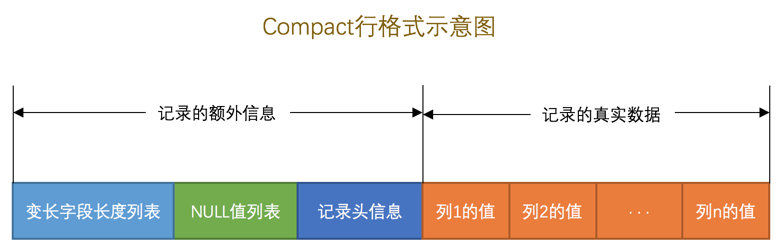
1.1.1. Extra Record Information
1.1.1.1. Variable-Length Field Length List
- For fields such as
varchar(100),blob, andtext, their length is recorded here.
1.1.1.2. NULL Value List
- Bits are used to record whether a column is NULL. A NULL column is
1; otherwise it is0.
1.1.1.3. Record Header Information
| Name | Bits | Description |
|---|---|---|
| Reserved bit 1 | 1 | Not used |
| Reserved bit 2 | 1 | Not used |
| delete_mask | 1 | Marks whether the record has been deleted |
| min_rec_mask | 1 | The minimum record in each non-leaf level of the B+ tree has this mark |
| n_owned | 4 | Indicates the number of records owned by the current record |
| heap_no | 13 | Indicates the position of the current record in the record heap |
| record_type | 3 | Indicates the current record type: 0 ordinary record, 1 B+ tree non-leaf-node record, 2 minimum record, 3 maximum record |
| next_record | 16 | Indicates the relative position of the next record |
1.1.1.3.1. delete_mask
- A deleted record is not physically deleted; it is logically deleted.
- All deleted records form a so-called garbage linked list. The space occupied by records in this linked list is called reusable space. If new records are later inserted into the table, they may overwrite the storage space occupied by these deleted records.
- This also means that deleting records does not release space.
optimize table table_namecan be used to release disk space.
1.1.1.3.2. min_rec_mask
- The minimum record in each non-leaf level of the B+ tree has this mark.
1.1.1.3.3. next_record
- The address offset from the actual data of the current record to the actual data of the next record. In other words, records form a singly linked list in ascending primary-key order.
1.1.1.3.4. heap_no
- Indicates the position of the current record on this page, for example 2, 3, 4, 5. Positions 0 and 1 are the minimum and maximum records.
1.1.1.3.5. record_type
- Indicates the current record type. There are four record types: 0 ordinary record, 1 B+ tree non-leaf-node record, 2 minimum record, and 3 maximum record.
1.1.2. Actual Record Data
- row_id
- transaction_id
- roll_pointer
- value of column 1
- value of column 2
- …
1.2. Redundant
- A row format used before MySQL 5.0.
1.3. Dynamic
- The default format in MySQL 5.7.
- Like Compact, except for how row-overflow data is handled.
- It does not store the first 768 bytes of the field’s actual data in the actual record data. Instead, all bytes are stored on other pages, and only the location of those other pages is stored in the actual record data.
- Row overflow:
- A page can store 16KB of data. When a record contains too much data to fit on the current page, the excess data is stored on other pages. This is called row overflow.
1.4. Compressed
Like Dynamic, except that a compression algorithm is used to compress pages.
2. Pages
- The basic unit used by InnoDB to manage storage space. A page is generally 16KB.
2.1. Data Pages
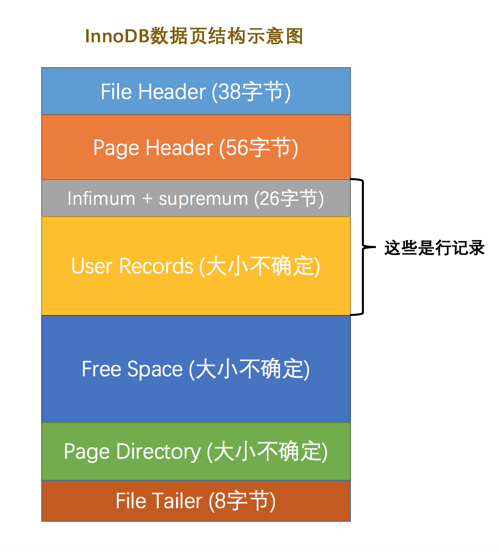
| Name | Chinese Name | Space Used | Brief Description |
|---|---|---|---|
| File Header | File header | 38 bytes | General information about the page |
| Page Header | Page header | 56 bytes | Information specific to data pages |
| Infimum + Supremum | Minimum and maximum records | 26 bytes | Two virtual row records |
| User Records | User records | Variable | Actual stored row-record content |
| Free Space | Free space | Variable | Unused space on the page |
| Page Directory | Page directory | Variable | Relative positions of certain records on the page |
| File Trailer | File trailer | 8 bytes | Checks whether the page is complete |
2.1.1. File Header
- Common to all types of pages.
| Name | Space Used (Bytes) | Brief Description |
|---|---|---|
| FIL_PAGE_SPACE_OR_CHKSUM | 4 | Page checksum |
| FIL_PAGE_OFFSET | 4 | Page number |
| FIL_PAGE_PREV | 4 | Page number of the previous page |
| FIL_PAGE_NEXT | 4 | Page number of the next page |
| FIL_PAGE_LSN | 8 | Log sequence position corresponding to the last modification of the page (Log Sequence Number) |
| FIL_PAGE_TYPE | 2 | Type of the page |
| FIL_PAGE_FILE_FLUSH_LSN | 8 | Defined only on one page in the system tablespace; indicates the LSN up to which the file has at least been flushed |
| FIL_PAGE_ARCH_LOG_NO_OR_SPACE_ID | 4 | Which tablespace the page belongs to |
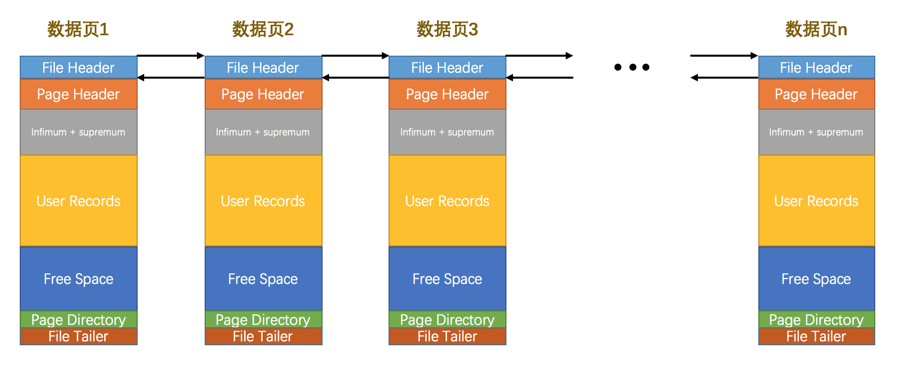
FIL_PAGE_PREVandFIL_PAGE_NEXT:- Only INDEX-type pages, that is, data pages, have these two fields.
- They represent the page numbers of the previous and next pages respectively.
- Multiple pages are linked with a doubly linked list.
FIL_PAGE_OFFSET:- Every page has an independent page number.
- It consists of 4 bytes, meaning a tablespace can hold
2^32pages. With each page being 16KB, a tablespace can be at most 64TB.
FIL_PAGE_TYPE:- The type of the current page.
- For example, the type of a data page that stores records is actually
FIL_PAGE_INDEX, that is, an index page.
2.1.2. Page Header
- Stores status information about records in the data page, such as how many records are already stored on the page, the address of the first record, and how many slots are stored in the page directory.
| Name | Space Used (Bytes) | Brief Description |
|---|---|---|
| PAGE_N_DIR_SLOTS | 2 | Number of slots in the page directory |
| PAGE_HEAP_TOP | 2 | Minimum address of unused space; after this address is Free Space |
| PAGE_N_HEAP | 2 | Number of records on this page, including minimum/maximum records and records marked deleted |
| PAGE_FREE | 2 | Address of the first record marked deleted; deleted records also form a singly linked list through next_record, and records in this list can be reused |
| PAGE_GARBAGE | 2 | Number of bytes occupied by deleted records |
| PAGE_LAST_INSERT | 2 | Position of the last inserted record |
| PAGE_DIRECTION | 2 | Direction in which records are inserted |
| PAGE_N_DIRECTION | 2 | Number of consecutive inserted records in one direction |
| PAGE_N_RECS | 2 | Number of records on the page, excluding minimum/maximum records and records marked deleted |
| PAGE_MAX_TRX_ID | 8 | Maximum transaction ID that modified the current page; defined only for secondary indexes |
| PAGE_LEVEL | 2 | Level of the current page in the B+ tree |
| PAGE_INDEX_ID | 8 | Index ID, indicating which index the current page belongs to |
| PAGE_BTR_SEG_LEAF | 10 | Header information for the B+ tree leaf segment; defined only on the Root page of the B+ tree |
| PAGE_BTR_SEG_TOP | 10 | Header information for the B+ tree non-leaf segment; defined only on the Root page of the B+ tree |
PAGE_DIRECTION: if the primary-key value of a newly inserted record is greater than that of the previous record, its insertion direction is to the right; otherwise it is to the left.PAGE_N_DIRECTION: if several consecutive new records are inserted in the same direction, InnoDB records the number of records inserted in that direction using this state.PAGE_N_DIR_SLOTS: number of slots in the page directory.PAGE_LAST_INSERT: position of the last inserted record.PAGE_N_RECS: number of records on the page, excluding minimum/maximum records and records marked deleted.
2.1.3. User Records
- Actual stored row-record content.
- As User Records grows, Free Space shrinks.
2.1.4. Free Space
- Unused space on the page.
- As User Records grows, Free Space shrinks.
2.1.5. Page Directory
2.1.5.1. Why a Page Directory Is Needed
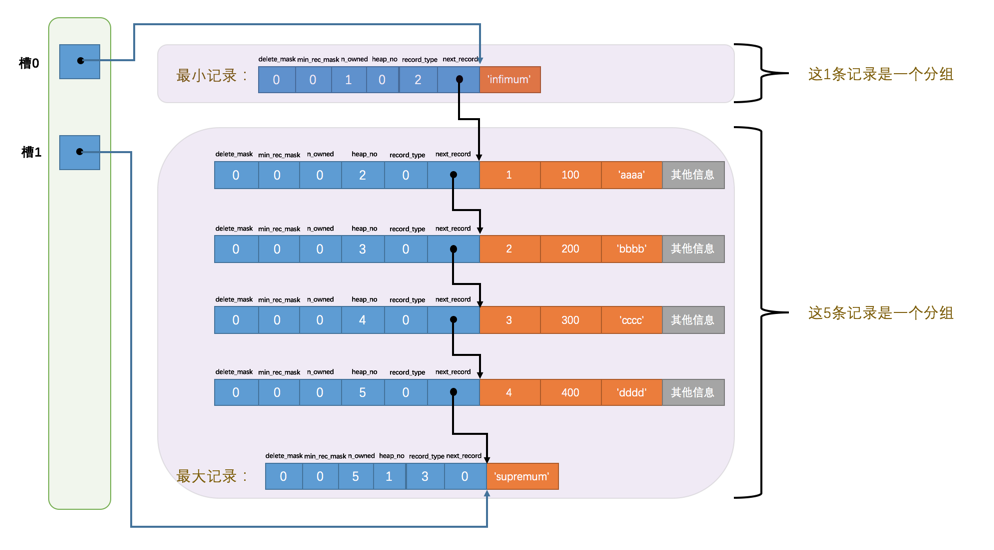
- Records on a page are linked in a singly linked list in ascending primary-key order. If we want to find a record on the page by its primary-key value, traversing the linked list would be too slow.
2.1.5.2. What Is a Page Directory
- Records are grouped. The address of the last record in each group is stored in the page directory and is called a slot. It is essentially a directory.
- Finding a record with a specified primary-key value in a data page is divided into two steps:
- use binary search to determine the slot containing the record and find the record with the smallest primary-key value in that slot;
- traverse the records in the group belonging to that slot through the record’s
next_recordproperty.
2.1.6. File Trailer
2.1.6.1. Why a File Trailer Is Needed
- InnoDB loads disk data into memory in units of pages. If the page data is modified in memory, the whole page needs to be written back to disk later. If a crash happens during the write-back, the data can become incorrect. Therefore, to detect whether a page is complete, a File Trailer is added to the end of every page.
2.1.6.2. What Is a File Trailer
- Common to all page types.
2.2. Index Pages
2.2.1. Why Index Pages Are Needed
The Page Directory can only be used for fast lookup by primary key within a page. It cannot handle non-primary-key lookup or lookup across multiple pages.
2.2.2. Relationship Between Index Pages and Data Pages
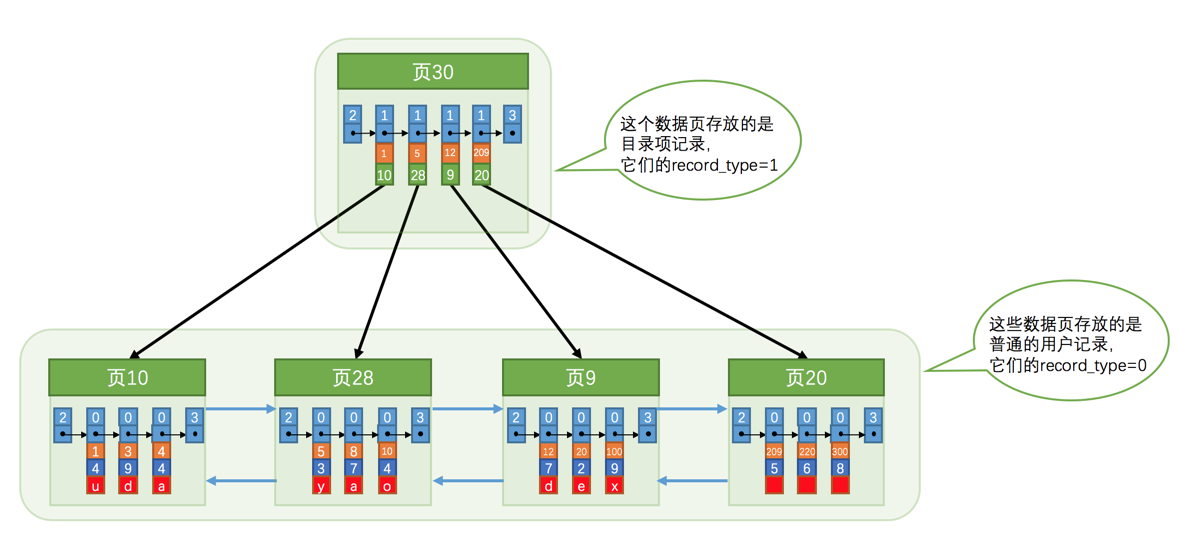
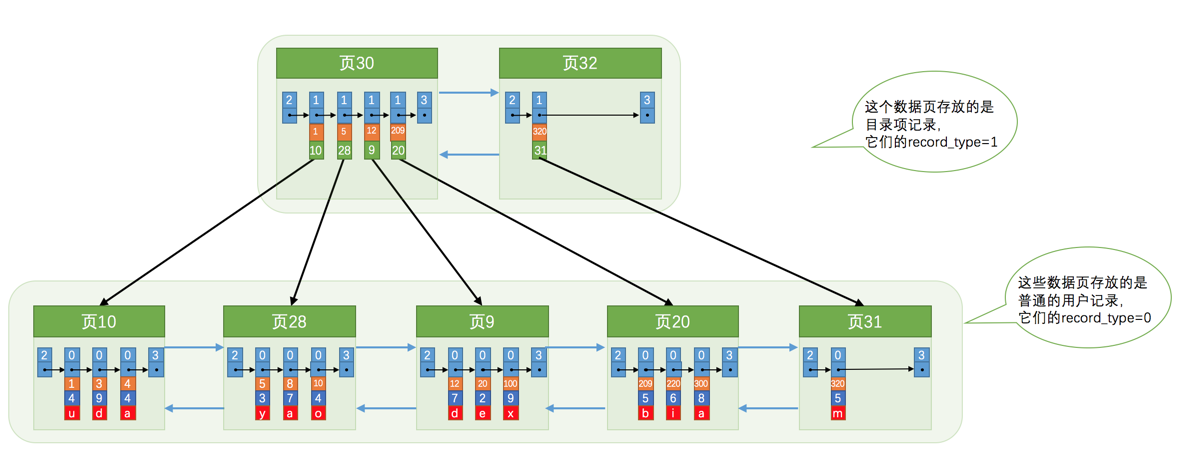
- Index pages are also stored as pages, except that the
record_typeof User Records is 1, indicating a directory entry (that is, an index). - One-level directory:
- Multi-level directory:
Discussion
Sign in with GitHub to comment. Discussions are stored as GitHub Issues.View on GitHub