
NOTE
SQL Join Queries
1. What Is a Join Query Take records from each joined table, match them one by one, add the matching combinations to the result set, and return them to the user. 2. What Types of Join Are There 2.1. Inner Join If a record in the driving table cannot find a matching record in the driven table, it is not added to the final result set. Conditions after ON and WHERE are equivalent. The driving and driven tables can be swapped; without conditions this is equivalent to a Cartesian product. 2.2. Outer Join Even if a record in the driving table has no matching record in the driven table, it is added to the result set. The ON clause must be used to specify the join condition. ON and WHERE are not equivalent.
This is a historical learning note and may contain outdated or incomplete understanding.
1. What Is a Join Query
- Take records from each joined table, match them one by one, add the matching combinations to the result set, and return them to the user.
2. What Types of Join Are There
2.1. Inner Join
-
If a record in the driving table cannot find a matching record in the driven table, it will not be added to the final result set.
- Conditions after
ONandWHEREare equivalent.
- Conditions after
-
The driving table and driven table can be swapped. Without conditions, this is equivalent to a Cartesian product.
-
Example
SELECT * FROM t1 JOIN t2;
SELECT * FROM t1 INNER JOIN t2;
SELECT * FROM t1 CROSS JOIN t2;
SELECT * FROM t1, t2;
2.2. Outer Join
-
Even if a record in the driving table has no matching record in the driven table, it will be added to the result set.
- The
ONclause must be used to specify the join condition. ONandWHEREare not equivalent.
- The
-
Left outer join: choose the table on the left as the driving table; right outer join: choose the table on the right as the driving table.
-
Example
SELECT s1.number, s1.name, s2.subject, s2.score
FROM student AS s1 LEFT JOIN score AS s2
ON s1.number = s2.number;
2.3. Example
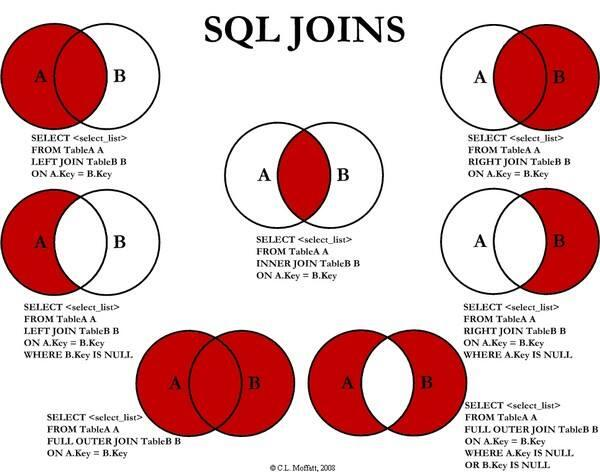
tb_item:3096 tb_item_cat:1182 No. 1 All rows from table A
select * from tb_item left join tb_item_cat on tb_item.cid = tb_item_cat.id;//3096No. 2 Rows unique to table A
select * from tb_item left join tb_item_cat on tb_item.cid = tb_item_cat.id where tb_item_cat.id is null;//0No. 3 All rows from table A + all rows from table B
select * from tb_item left join tb_item_cat on tb_item.cid = tb_item_cat.id
union
select * from tb_item right join tb_item_cat on tb_item.cid = tb_item_cat.id;//4274
No. 4 Rows shared by A and B
select * from tb_item inner join tb_item_cat on tb_item.cid = tb_item_cat.id;//3096No. 5 Query all rows from B
select * from tb_item right join tb_item_cat on tb_item.cid = tb_item_cat.id;//4274No. 6 Query rows unique to B
select * from tb_item right join tb_item_cat on tb_item.cid = tb_item_cat.id where tb_item.cid is null;//1178No. 7 Query rows unique to A + rows unique to B
select * from tb_item left join tb_item_cat on tb_item.cid = tb_item_cat.id where tb_item_cat.id is null
union
select * from tb_item right join tb_item_cat on tb_item.cid = tb_item_cat.id where tb_item.cid is null;//1178
3. Join Process
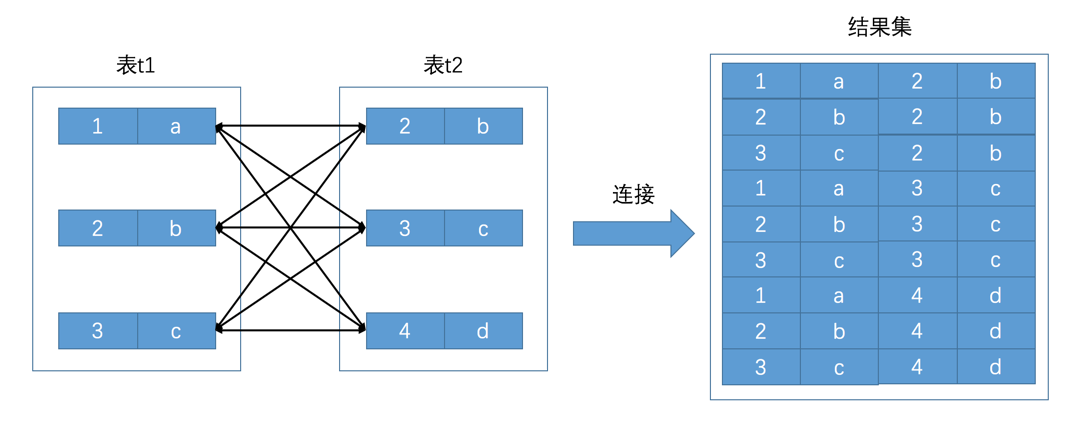
3.1. Cartesian Product
- Process
- Each record in one table is combined with each record in another table.
- Diagram
3.2. Filter Conditions
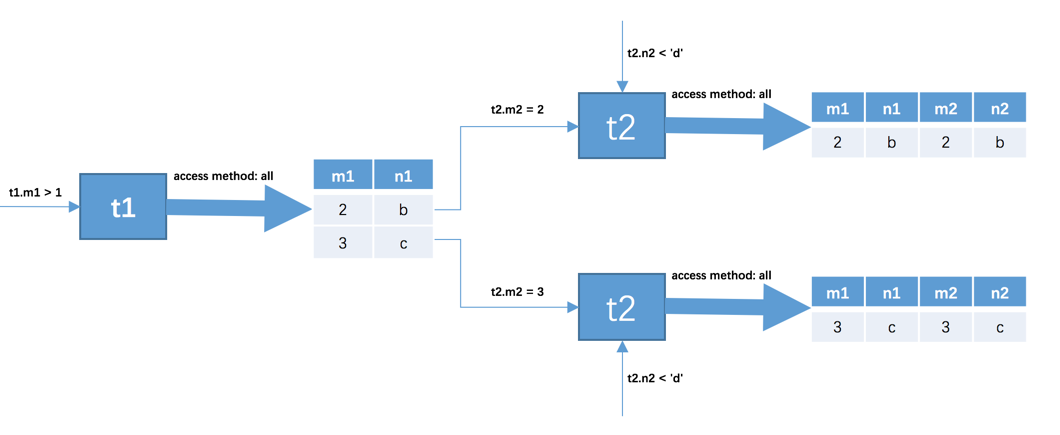
- Process
- First determine the first table to query. This table is called the driving table.
- First consider the single-table search conditions on the driving table and obtain a result set.
- For each record in the result set produced by the driving table in the previous step, separately find matching records in table
t2. A matching record means a record that satisfies the filter conditions.
- Diagram
Discussion
Sign in with GitHub to comment. Discussions are stored as GitHub Issues.View on GitHub