
NOTE
1.3 Elasticsearch CRUD Flow
English translation of the original VNote ‘Elasticsearch CRUD Flow’, preserving its steps, examples, code, and historical questions.
This is a historical learning note and may contain outdated or incomplete understanding.
1. Writing Data
- The client randomly selects a node and sends a write request.
- This node acts as the coordinating node. It calculates which shard the document should be on based on
_id, i.e.hash(_id) % number_of_primary_shards, and then obtains which node hosts that shard from the cluster state. - Route the request to the primary shard on the corresponding node.
- The primary shard performs the write.
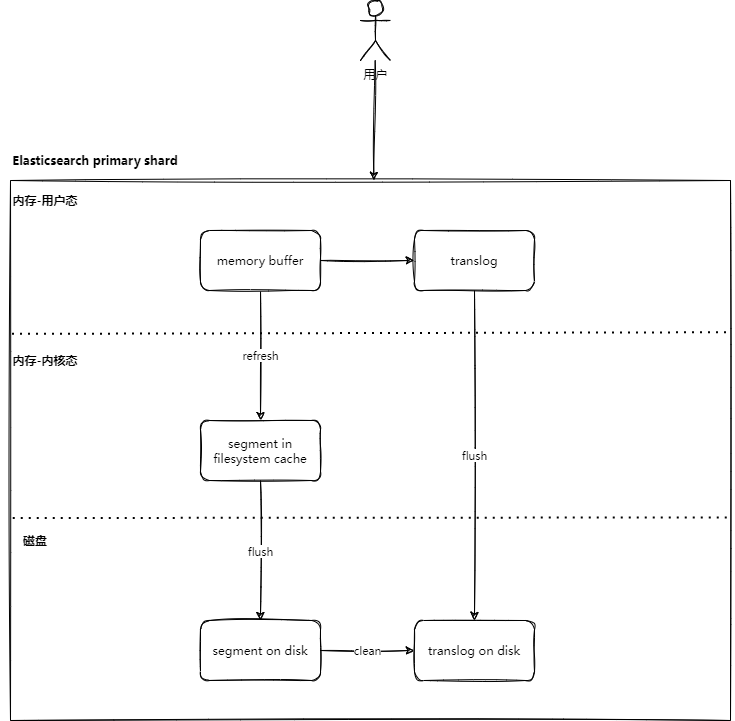
- The primary shard writes the data into the memory buffer.
- The primary shard writes the data into the transaction log.
- The primary shard sends the data to replica shards in parallel.
- After synchronization completes, the replica shards respond success to the primary shard.
- The primary shard returns success to the coordinating node.
- The coordinating node returns success to the client.
2. Deleting Data
2.1. Delete by ID
- The client randomly selects a node and sends an ID-delete request.
- This node acts as the coordinating node. It calculates which shard the document should be on based on
_id, i.e.hash(_id) % number_of_primary_shards, and then obtains which node hosts that shard from the cluster state. - The coordinating node routes the request to the primary shard.
- The primary shard performs the delete operation.
- The primary shard writes the change into the memory buffer.
- At commit time, this record is written into a
.delfile, indicating that the record has been deleted from the segment. At this point the document can still match queries, but it will be filtered from results. - Elasticsearch refresh
- At commit time, this record is written into a
- The primary shard writes the operation into the transaction log.
- During flush, segment merging is performed, and data listed in the
.delfile will not be written into the new segment. - Elasticsearch translog
- During flush, segment merging is performed, and data listed in the
- The primary shard writes the change into the memory buffer.
- The primary shard sends the delete request to replica shards in parallel.
- After synchronization completes, the replica shards respond success to the primary shard.
- The primary shard returns success to the coordinating node.
- The coordinating node returns success to the client.
2.2. delete_by_query
- The client randomly selects a node and sends a
delete_by_queryrequest. - This node acts as the coordinating node and routes the
delete_by_queryrequest to all primary shards. - Each primary shard performs the delete operation.
- First, find the relevant documents (mainly including version + id).
- Then perform delete-by-ID while comparing the version in the translog (question here: Elasticsearch keeps tracks of the sequence number and primary term of the last operation to have changed each of the documents it stores.). If they do not match, report a version conflict; otherwise deletion succeeds.
- Each primary shard sends the delete operation to replica shards in parallel.
- Replica shards return delete success to the primary shard.
- Primary shards return delete success to the coordinating node.
- The coordinating node returns delete success to the client.
- Example
// Disable automatic refresh
PUT /tb_item/_settings
{
  "index" : {
    "refresh_interval" : -1
  }
}
// Delete
POST /tb_item/_delete_by_query
{
  "query": {
    "match": {
      "id": "936920"
    }
  }
}
// It can still be found by search
GET /tb_item/_search
{
  "query": {
    "ids" : {
      "values" : ["936920"]
    }
  }
}
// Updating by ID reports that the document does not exist
POST /tb_item/_update/936920
{
  "doc": {
    "sellPoint": "test1"
  }
}
3. Querying Data
3.1. Query by ID
- The client randomly selects a node and sends a read request.
- This node acts as the coordinating node. It calculates which shard the document should be on based on
_id, i.e.hash(_id) % number_of_primary_shards, and then obtains which node hosts that shard from the cluster state. - The coordinating node routes the request to either the primary shard or a replica shard.
- The shard obtains the document and returns it to the coordinating node.
- The coordinating node returns the data to the client.
3.2. Keyword Query
- The client randomly selects a node and sends a read request.
- This node acts as the coordinating node and routes the read request to all shards (either primary or replica shards can be used).
- Each shard returns key information about the documents it found (including
_id) to the coordinating node. The coordinating node merges, sorts, paginates, and otherwise processes the data to produce the final result. This operation is called the query phase. - The coordinating node takes the final
_idvalues and fetches the actual document data from the corresponding nodes, then returns it to the client. This operation is called the fetch phase.
Why split this into two phases instead of one? For example, why not have every shard return all document information directly to the coordinating node? Because returning all of that data would be too large.
3.2.1. Paginated Query
- The client randomly selects a node and sends a read request to get 10 records.
- This node acts as the coordinating node and routes the read request to all shards (either primary or replica shards can be used).
- Each shard returns key information about its own top 10 documents (including
_id) to the coordinating node. The coordinating node merges, sorts, paginates, and otherwise processes the data to produce the final 10 results. This is the query phase. - The coordinating node takes the final
_idvalues and fetches the actual document data from the corresponding nodes, then returns it to the client. This is the fetch phase.
4. Updating Data
4.1. Update by ID
- Delete.
- Refer to Delete by ID.
- Write.
- Refer to Writing Data, version + 1.
4.2. update_by_query
- The client randomly selects a node and sends an
update_by_queryrequest. - This node acts as the coordinating node and routes the read request to all shards (either primary or replica shards can be used).
- Each primary shard performs the update operation.
- First, find the relevant documents (mainly including version + id).
- Then perform update-by-ID while comparing the version in the translog (question here: Elasticsearch keeps tracks of the sequence number and primary term of the last operation to have changed each of the documents it stores.). If they do not match, report a version conflict; otherwise the update succeeds.
- Each primary shard sends the update operation to replica shards in parallel.
- Replica shards return update success to the primary shard.
- Primary shards return update success to the coordinating node.
- The coordinating node returns update success to the client.
5. References
- Elasticsearch 数据写入流程 | liuzhihang
- ElasticSearch 内部机制浅析(一) | 茅屋为秋风所破歌
- ElasticSearch 内部机制浅析(二) | 茅屋为秋风所破歌
- Cache 和 Buffer 都是缓存,主要区别是什么? - 知乎
- elasticsearch 的translog是直接写入硬盘还是内存? - Elastic 中文社区
- 持久化变更 | Elasticsearch: 权威指南 | Elastic
- Day 7 - Elasticsearch中数据是如何存储的 - Elastic 中文社区
- Optimistic concurrency control | Elasticsearch Guide [7.13] | Elastic
- elasticsearch - Elastic Search - IS “Fetch” phase really needed during seach - Stack Overflow
Discussion
Sign in with GitHub to comment. Discussions are stored as GitHub Issues.View on GitHub