
NOTE
1.3 Redis Persistence
Why Redis persistence is needed, RDB and AOF mechanisms, triggers, workflows, rewrite, blocking, and recovery choice.
This is a historical learning note and may contain outdated or incomplete understanding.
1. Why Persistence Is Needed
Redis data is stored in memory. Once it crashes, all data in memory is lost. Therefore, the data in memory needs to be persisted to disk so it can be recovered after a crash.
2. Persistence Methods
2.1. RDB
2.1.1. What It Is
Create a binary file from the current in-memory data and dump it to disk; it is a snapshot.
2.1.2. Trigger Timing
2.1.2.1. Automatic Trigger
- Configuration file: automatically trigger according to our
save m nconfiguration rules.
# One change within 900s
save 900 1
save 300 10
save 60 10000
2.1.2.2. Manual Trigger
2.1.2.2.1. save
- Synchronous. It blocks the current Redis server until persistence completes and should be prohibited in production.

2.1.2.2.2. bgsave
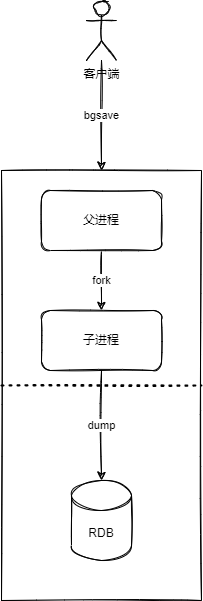
- Asynchronous. This trigger forks a child process, and the child process is responsible for the persistence process (including disk I/O operations), so blocking only occurs when the child process is forked.

2.1.2.2.3. save vs. bgsave
| save | bgsave | |
|---|---|---|
| I/O type | Synchronous | Asynchronous |
| Characteristics | Requires blocking, does not consume extra memory | Only blocks on fork; fork requires extra memory |
2.1.3. RDB Workflow
- The main process forks a child process.
- The child process generates a snapshot and replaces the old RDB after completion.
- The child process notifies the parent process that RDB is complete.
2.1.4. Enable RDB
save 900 1
save 300 10
save 60 10000
dbfilename dump-6379.rdb
stop-writes-on-bgsave-error yes
rdbcompression yes
2.1.5. Characteristics
Data can be recovered faster, but more data may be lost (possibly 5 minutes).
2.2. AOF
2.2.1. What It Is
Append every Redis write command to a log file.
2.2.2. Trigger Timing
2.2.2.1. Manual Trigger
bgrewriteaof

2.2.2.2. Automatic Trigger
First configure appendonly yes in redis.conf.
It is triggered according to configuration rules (generally everysec is used). Of course, the overall automatic-trigger timing is also related to Redis’s scheduled-task frequency.
# fsync every time a new command is appended to the AOF. Very, very slow, very safe.
appendfsync always
# fsync every second. Fast enough (in 2.4 it may be as fast as snapshots); in a disaster, you may lose 1 second of data.
appendfsync everysec
# Never fsync; just hand the data to the operating system. The fastest and least safe approach. Normally Linux flushes data every 30 seconds with this configuration, but this depends on exact kernel tuning.
appendfsync no
The default AOF persistence strategy is to fsync once per second (fsync means writing buffered write commands to disk). In this case Redis can still maintain good processing performance, and even if Redis fails, only the most recent 1 second of data is lost.
2.2.3. AOF Workflow
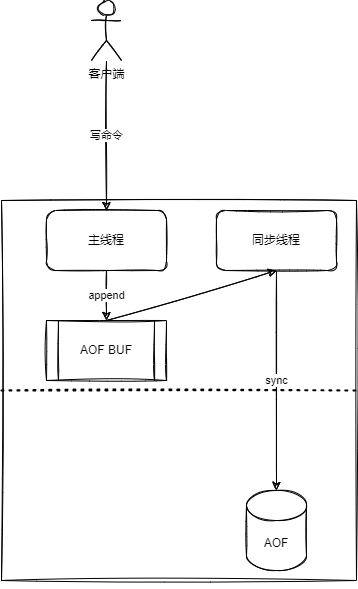
- All commands written by the main thread are appended to
aof_buf(the buffer). - The synchronization thread synchronizes
aof_bufto disk according to the corresponding strategy.
2.2.4. AOF Rewrite
2.2.4.1. What It Is
When the file expands to a certain size, AOF rewrite is performed again based on the data in memory, which can reduce disk usage and speed up recovery.
2.2.4.2. Trigger Timing
2.2.4.2.1. Manual
bgrewriteaof
2.2.4.2.2. Automatic
- Both conditions must be satisfied:
current AOF file size > auto-aof-rewrite-min-size(current AOF file size - AOF file size after the last rewrite) / AOF file size after the last rewrite > auto-aof-rewrite-percentage
2.2.4.3. Process
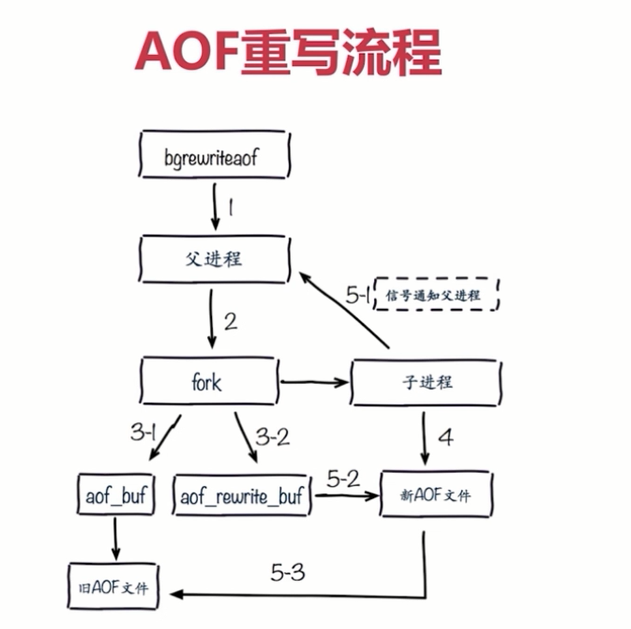
- The parent process forks a child process.
- The parent process continues the AOF flow (write to buffer, flush to disk).
- The child process generates a new AOF file based on in-memory data.
- After the child process finishes generating the AOF file, it notifies the parent process.
- The parent process appends the data in the buffer to the file.
- Rename the old file to the new file and start appending data to the new file.
2.2.5. AOF Append Blocking
2.2.5.1. Scenario
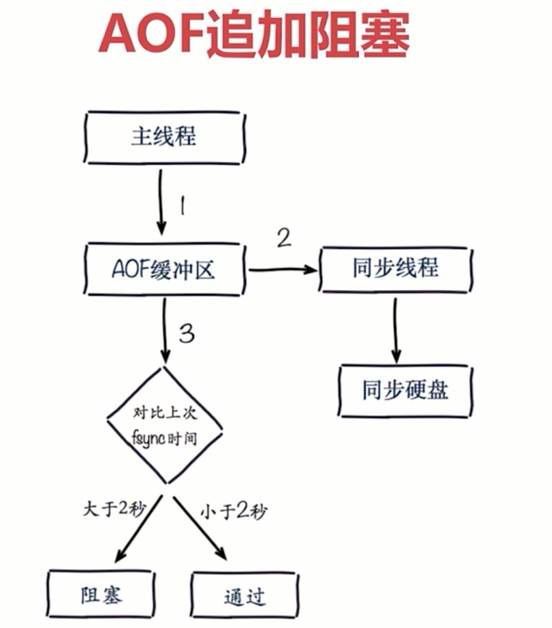
- AOF is written to the buffer by the main thread, and the background thread fsyncs to disk every 1 second.
- The problem is that if disk pressure is too high, fsync must wait until the write succeeds.
- If the main thread finds that more than 2 seconds have passed since the last successful fsync, it needs to block and wait for data safety.
2.2.5.2. Solution
Use iotop or iostat to observe disk load.
2.2.6. Enable AOF
appendonly  yes
appendfilename "appendonly-6379.aof"
appendfsync everysec
no-appendfsync-on-rewrite yes
auto-aof-rewrite-percentage 100
auto-aof-rewrite-min-size 64mb
2.2.7. Characteristics
Data recovery is slower, but less data is lost, generally 1 second (actually 2 seconds).
3. How to Choose
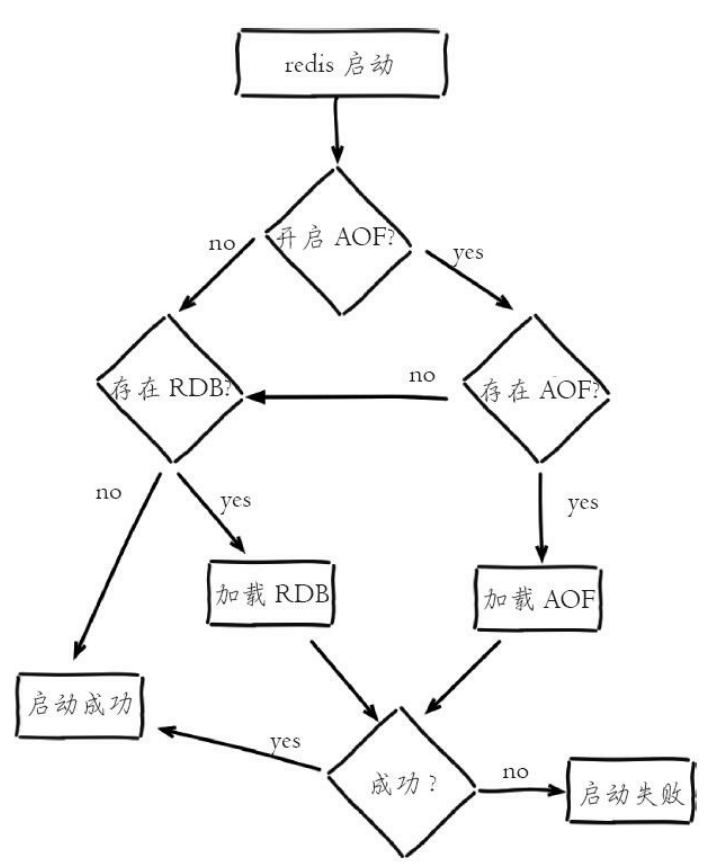
- Generally use AOF and RDB together. In this case, when Redis restarts, it uses AOF to reconstruct the original data.
- AOF is used to ensure data is not lost and is the first recovery choice.
- RDB is used for recovery when AOF is damaged.
4. How to Recover When RDB and AOF Both Exist
- Prefer AOF, then RDB.
Discussion
Sign in with GitHub to comment. Discussions are stored as GitHub Issues.View on GitHub