
NOTE
Designing a Rate-Limiting System
A historical note comparing fixed windows, sliding windows, leaky buckets, and token buckets, with Go implementations.
This is a historical learning note and may contain outdated or incomplete understanding.
1. What Is Rate Limiting?
- One of the three major tools for high-concurrency systems. It limits the access rate, unlike a semaphore, which limits the number of concurrent accesses.
- Technical rate limiting: service A calls service B; service B limits the access rate to prevent excessive traffic.
- Business-level rate limiting: limit one person to using a feature only N times per day.
2. Why Do We Need Rate Limiting?
- Backend processing capacity is limited. If burst traffic suddenly grows, backend services can easily be overwhelmed.
3. Common Rate-Limiting Algorithms
3.1. Time-Window-Based Algorithms
3.1.1. Fixed Window (Counter)
3.1.1.1. Definition
- Counter capacity is fixed.
- Increment the counter for each request; once capacity is reached, reject subsequent requests.
- Arbitrary input rate, arbitrary output rate.
- Process each request as it arrives.
3.1.1.2. Characteristics
- Advantage:
- Easy to implement and low space complexity.
- Disadvantage:
- Boundary burst problem.
- Suppose the limit is 120 per minute. A malicious user sends 120 requests instantly at 0:59:59, and then another 120 at 1:00:00. The application has to process 240 requests from that user within one second.
- Boundary burst problem.
3.1.2. Sliding Window
3.1.2.1. Definition
- Compared with a fixed counter window, a sliding window divides the fixed window into multiple slots and moves forward one small slot each time.
3.1.2.2. Characteristics
- Advantage:
- Solves the boundary burst problem.
- Suppose the limit is 120 per minute and the window is divided into 60 slots, meaning two requests per second. A malicious user sends 120 requests instantly at 0:59:59 and another 120 at 1:00:00, but only two of the second batch are processed, so the application processes 122 requests in that second.
- Solves the boundary burst problem.
- Disadvantages:
- More complex than a simple counter and requires maintaining a window, so space complexity is higher.
- Cannot smooth traffic.
- Suppose the limit is 120 per minute and the window has 60 slots, or two per second. We hope the system will also process two requests per second. A malicious user sends 120 requests instantly at 0:59:59, so the application still has to process 120 requests within one second.
3.2. Leaky Bucket
3.2.1. Definition
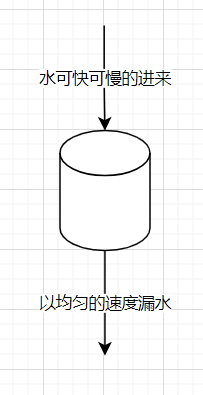
- Bucket capacity is fixed.
- Put every incoming request into the bucket. If request volume exceeds bucket capacity, discard the excess requests.
- Arbitrary input rate, constant output rate.
- Put each request into a task queue and use a timer to take requests out at intervals for execution.
- Essentially message-queue peak shaving.
3.2.2. Characteristics
- Advantages:
- Solves the boundary burst problem.
- Suppose the limit is 120 per minute and bucket capacity is 120. A malicious user sends 120 requests at 0:59:59. They are buffered in the bucket, and a background thread removes two requests on each whole second for processing. At 1:00:00 another 120 arrive, but only two can enter the bucket and the rest are rejected. The application therefore processes only two requests in one second.
- Smooths traffic.
- Suppose the limit is 120 per minute and bucket capacity is 120, and the system should process two requests per second. A malicious user sends 120 requests at 0:59:59. They are buffered in the bucket and the background thread takes out two per second, so the application processes two requests in one second.
- Solves the boundary burst problem.
- Disadvantages:
- High space complexity.
- Cannot handle burst traffic without added latency.
- Suppose the limit is 120 per minute and bucket capacity is 120, while the system can process at most 10 requests per second. Ten requests arrive at 1:00:00 and could all be processed, but they are placed into the leaky bucket and the background thread only takes two per second. The last two of the ten must wait until 1:00:05.
3.3. Token Bucket
3.3.1. Definition
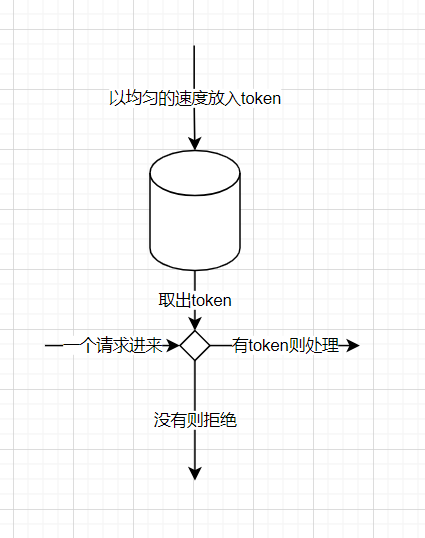
- Bucket capacity is fixed.
- Add a certain number of tokens at intervals; if full, discard extra tokens.
- Constant token-input rate, arbitrary request-output rate.
- Each request must obtain one token from the bucket first; reject service if none is available.
3.3.2. Characteristics
- Advantages:
- Solves the boundary burst problem.
- Suppose the limit is 120 per minute and the token bucket generates two tokens on each whole second. A malicious user sends 120 requests at 0:59:59, but there are only two tokens, so only two are processed. At 1:00:00 another 120 arrive and again only two are processed. The application therefore processes only two requests in one second.
- Smooths traffic. No matter how fast requests arrive, processing happens at a controlled rate.
- With 120 per minute and two tokens per second, a burst of 120 requests at 0:59:59 can only consume two tokens, so the application processes two requests in that second.
- Handles burst traffic without the leaky bucket’s delay problem.
- Suppose the limit is 120 per minute, two tokens are generated per second, and the system can handle up to 10 requests per second, so bucket capacity is 10. If no requests arrive from 0:59:54 to 1:00:00, six seconds pass and the bucket stores
min(6*2,10)=10tokens. If 10 requests then arrive, all can be processed immediately without delay.
- Suppose the limit is 120 per minute, two tokens are generated per second, and the system can handle up to 10 requests per second, so bucket capacity is 10. If no requests arrive from 0:59:54 to 1:00:00, six seconds pass and the bucket stores
- Solves the boundary burst problem.
- Disadvantage:
- Storing and issuing tokens is somewhat more complex.
3.4. Comparison
| Fixed Window | Sliding Window | Leaky Bucket | Token Bucket | |
|---|---|---|---|---|
| Boundary burst problem | A user can burst at the reset boundary and instantaneous traffic may reach 2n | Instantaneous traffic at the reset boundary may reach n + n/window-count | None | None |
| Traffic fluctuation | Yes | Yes | None. Requests are processed at a constant rate regardless of arrival rate | None |
| Burst-traffic latency | None | None | Yes. Traffic must be buffered, increasing latency, so it is unsuitable for low-latency scenarios | None. Maximum token capacity can allow bursts |
4. Implementation
4.1. Golang
4.1.1. Interface
type IRateLimiter interface {
	Set(reqCount int64) bool
	Get() int64
	Reset()
}
4.1.2. Counter
package ratelimiter

import (
	"sync"
	"time"
)

type Counter struct {
	// Total requests that can be processed within interval seconds
	interval int64
	rate     int64
	// Counter
	counter int64
	// Time of the previous request, seconds
	lastTime int64
	lock     sync.Mutex
}

func NewCounter(rate int64, interval int64) *Counter {
	return &Counter{
		interval: interval,
		rate:     rate,
		lastTime: time.Now().Unix(),
	}
}

func (b *Counter) Set(reqCount int64) bool {
	b.lock.Lock()
	defer b.lock.Unlock()

	now := time.Now().Unix()
	if now > b.lastTime+b.interval {
		b.lastTime = now
		b.counter = 0
	}

	if b.counter+reqCount <= b.rate {
		b.counter += reqCount
		return true
	}
	return false
}

func (b *Counter) Get() int64 {
	b.lock.Lock()
	defer b.lock.Unlock()
	if b.lastTime+b.interval < time.Now().Unix() {
		return b.rate
	}
	return b.rate - b.counter
}

func (b *Counter) Reset() {
	b.lock.Lock()
	defer b.lock.Unlock()
	b.lastTime = time.Now().Unix()
	b.counter = 0
}
4.1.3. Leaky Bucket
package ratelimiter

import (
	"sync"
	"time"
)

type LeakyBucket struct {
	// Rate at which water flows out
	rate int64
	// Total bucket capacity, i.e. total requests it can contain
	capacity int64
	// Remaining water, i.e. unprocessed requests
	remainCapacity int64
	// Time of previous request
	lastTime int64
	lock sync.Mutex
}

func NewLeakyBucket(rate int64, capacity int64) *LeakyBucket {
	return &LeakyBucket{rate: rate, capacity: capacity}
}

func (b *LeakyBucket) Set(reqCount int64) bool {
	b.lock.Lock()
	defer b.lock.Unlock()

	now := time.Now().Unix()

	processCount := (now - b.lastTime) * b.rate
	b.remainCapacity = Max(b.remainCapacity-processCount, 0)

	if b.remainCapacity + reqCount <= b.capacity {
		b.remainCapacity += reqCount
		b.lastTime = now
		return true
	}
	return false
}

func (b *LeakyBucket) Get() int64 {
	b.lock.Lock()
	defer b.lock.Unlock()
	return b.capacity - b.remainCapacity
}

func (b *LeakyBucket) Reset() {
	b.lock.Lock()
	defer b.lock.Unlock()
	b.lastTime = 0
	b.remainCapacity = b.capacity
}

func Max(data ...int64) int64 {
	max := data[0]
	for i := 1; i < len(data); i++ {
		if data[i] > max {
			max = data[i]
		}
	}
	return max
}
4.1.4. Token Bucket
package ratelimiter

import (
	"sync"
	"time"
)

type TokenBucket struct {
	// Token generation rate, per second
	rate int64
	// Total token capacity
	capacity int64
	// Unused token count
	remainToken int64
	// Previous request time, seconds
	lastTime int64
	lock     sync.Mutex
}

func (b *TokenBucket) Get() int64 {
	b.lock.Lock()
	defer b.lock.Unlock()
	return b.genToken(time.Now().Unix())
}

func (b *TokenBucket) Reset() {
	b.lock.Lock()
	defer b.lock.Unlock()
	b.lastTime = 0
	b.remainToken = 0
}

func NewTokenBucket(rate int64, capacity int64) *TokenBucket {
	return &TokenBucket{rate: rate, capacity: capacity}
}

func (b *TokenBucket) Set(reqCount int64) bool {
	b.lock.Lock()
	defer b.lock.Unlock()
	now := time.Now().Unix()

	b.remainToken = b.genToken(now)

	if b.remainToken >= reqCount {
		b.remainToken -= reqCount
		b.lastTime = now
		return true
	}
	return false
}

// Update token count
func (b *TokenBucket) genToken(now int64) int64 {
	generateToken := (now - b.lastTime) * b.rate
	return Min(b.remainToken+generateToken, b.capacity)
}

func Min(data ...int64) int64 {
	min := data[0]
	for i := 1; i < len(data); i++ {
		if data[i] < min {
			min = data[i]
		}
	}
	return min
}
Discussion
Sign in with GitHub to comment. Discussions are stored as GitHub Issues.View on GitHub