
NOTE
Designing an E-Commerce Detail Page
A historical note on e-commerce detail-page caching architectures, cache consistency, two-layer Nginx caching, and cache warm-up.
This is a historical learning note and may contain outdated or incomplete understanding.
1. E-Commerce Detail Page
1.1. Small E-Commerce Site
1.1.1. Rebuild HTML
If the data volume is relatively small, a fully static design can be used: the static-generation system queries all product data from the database, renders it into HTML files with Thymeleaf + HTML templates, places the files in the Nginx directory, and serves them through Nginx.
- Advantage: very high access efficiency.
- Disadvantage: once the template changes, everything must be rendered again. When the data volume is very large, rerendering everything is not practical.
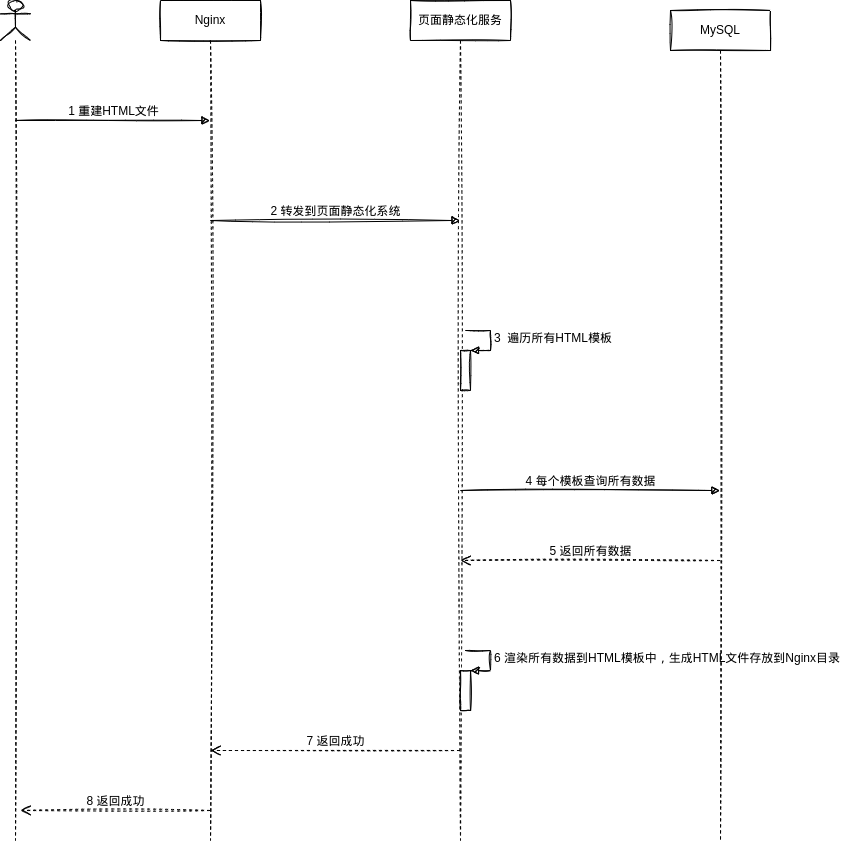
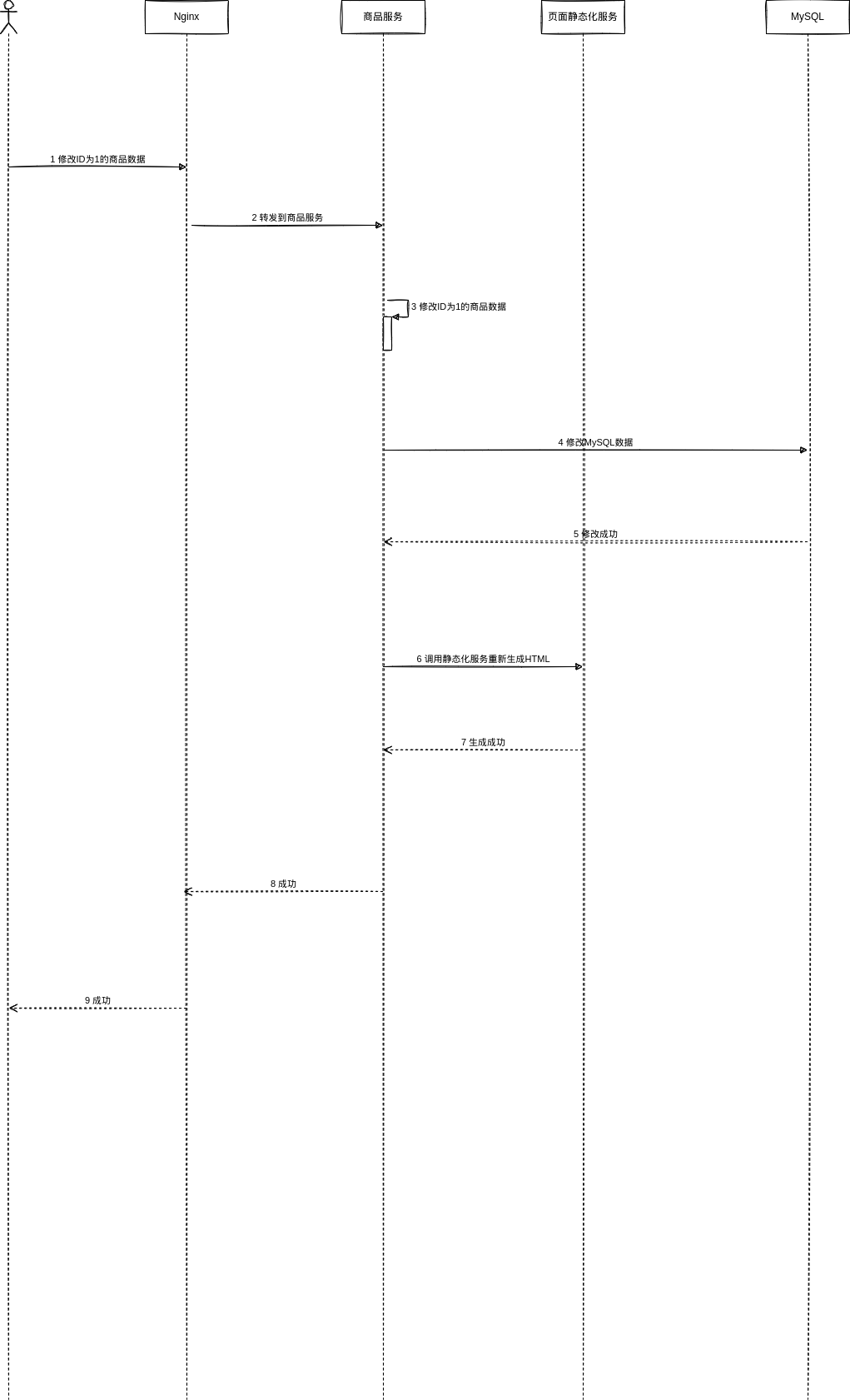
1.1.2. Write Flow
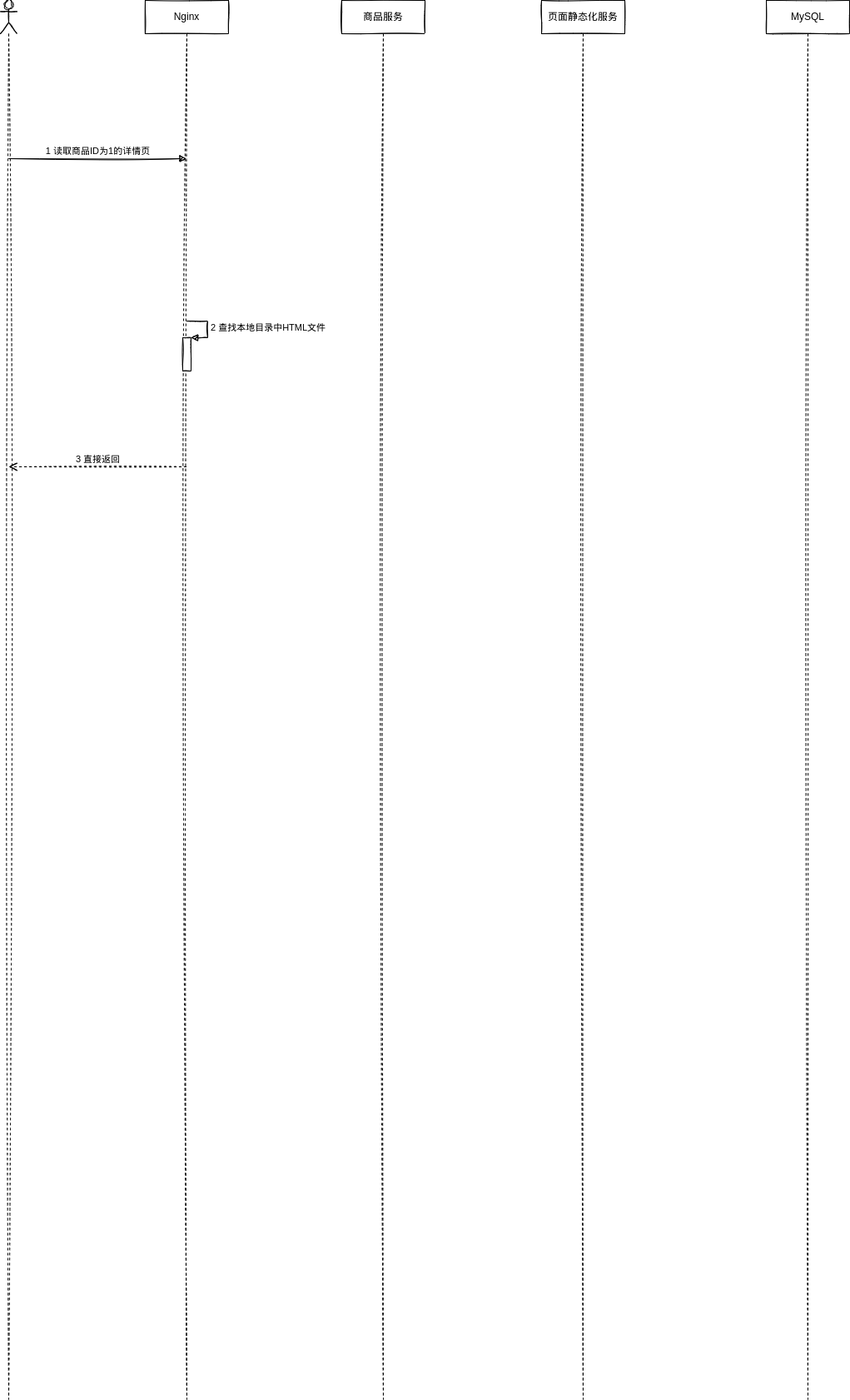
1.1.3. Read Flow
1.2. Large E-Commerce Site
1.2.1. Low Freshness Requirement
Use a three-level cache composed of Nginx + Redis + JVM, and use Thymeleaf to dynamically render HTML templates into HTML.
1.2.1.1. Read Flow [Read-through]
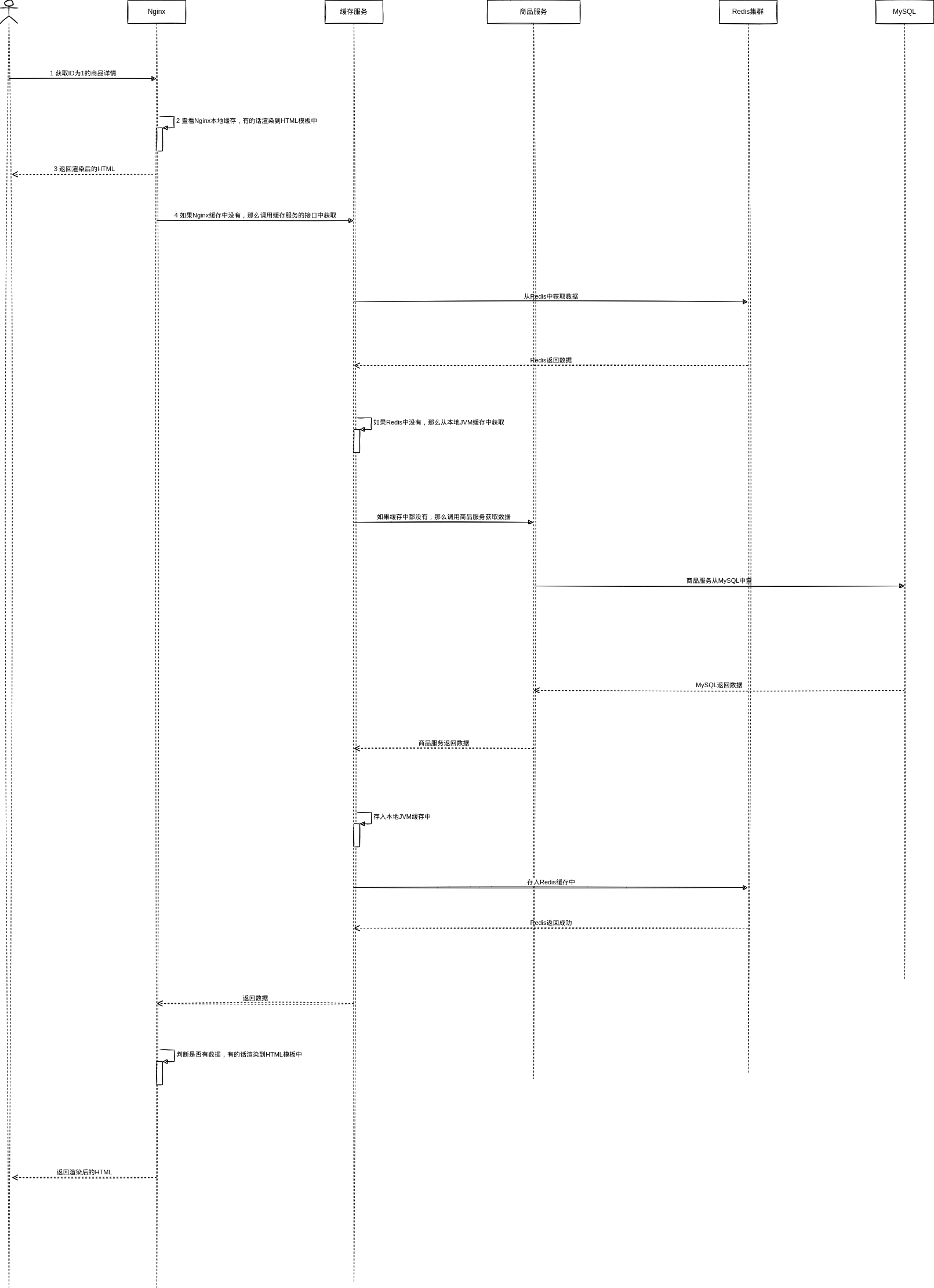
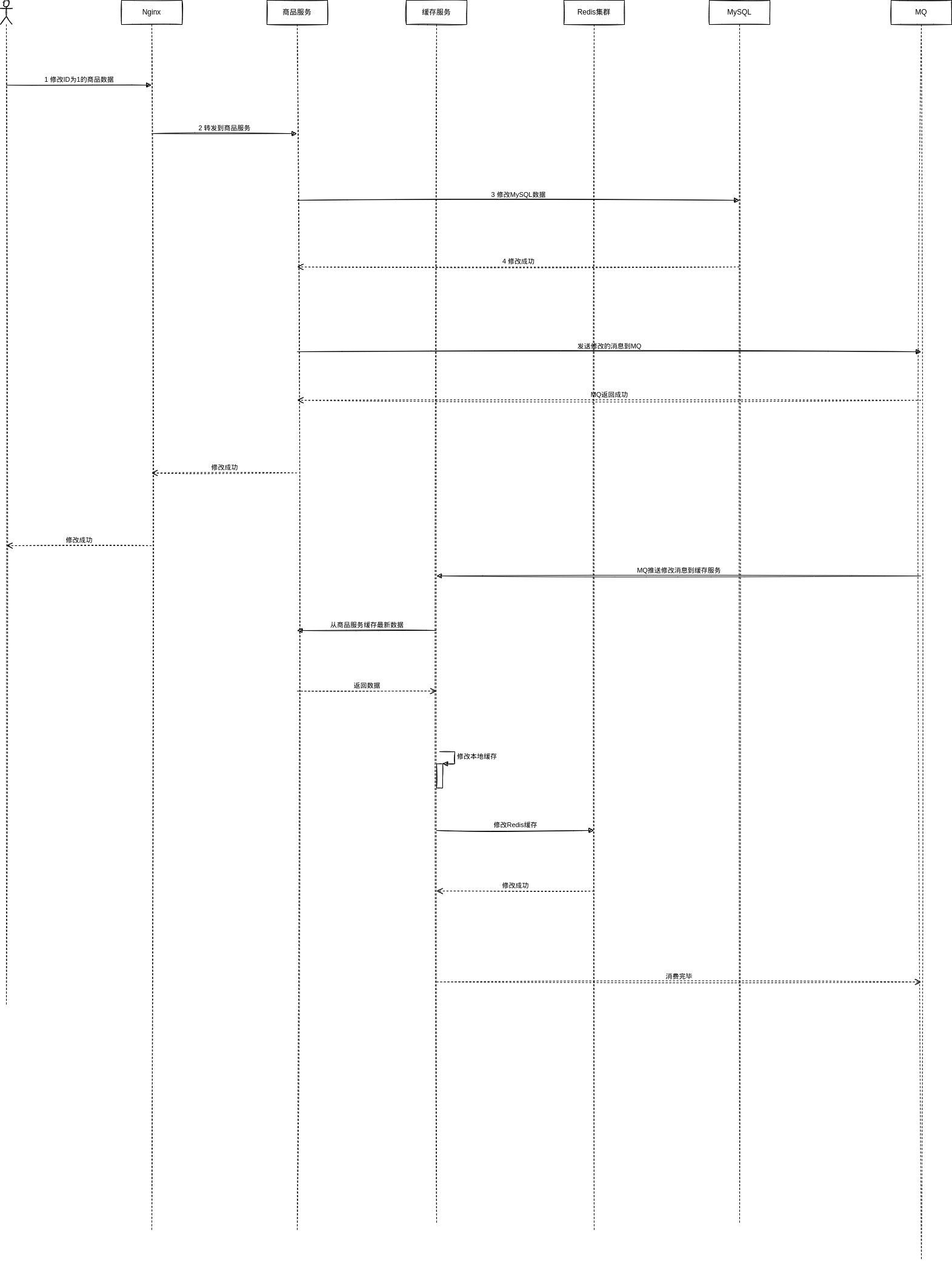
1.2.1.2. Write Flow [Write-behind]
After other services modify data, write an MQ message and route it to the cache service. The cache service reads the latest data and updates the cache.
1.2.2. High Freshness Requirement
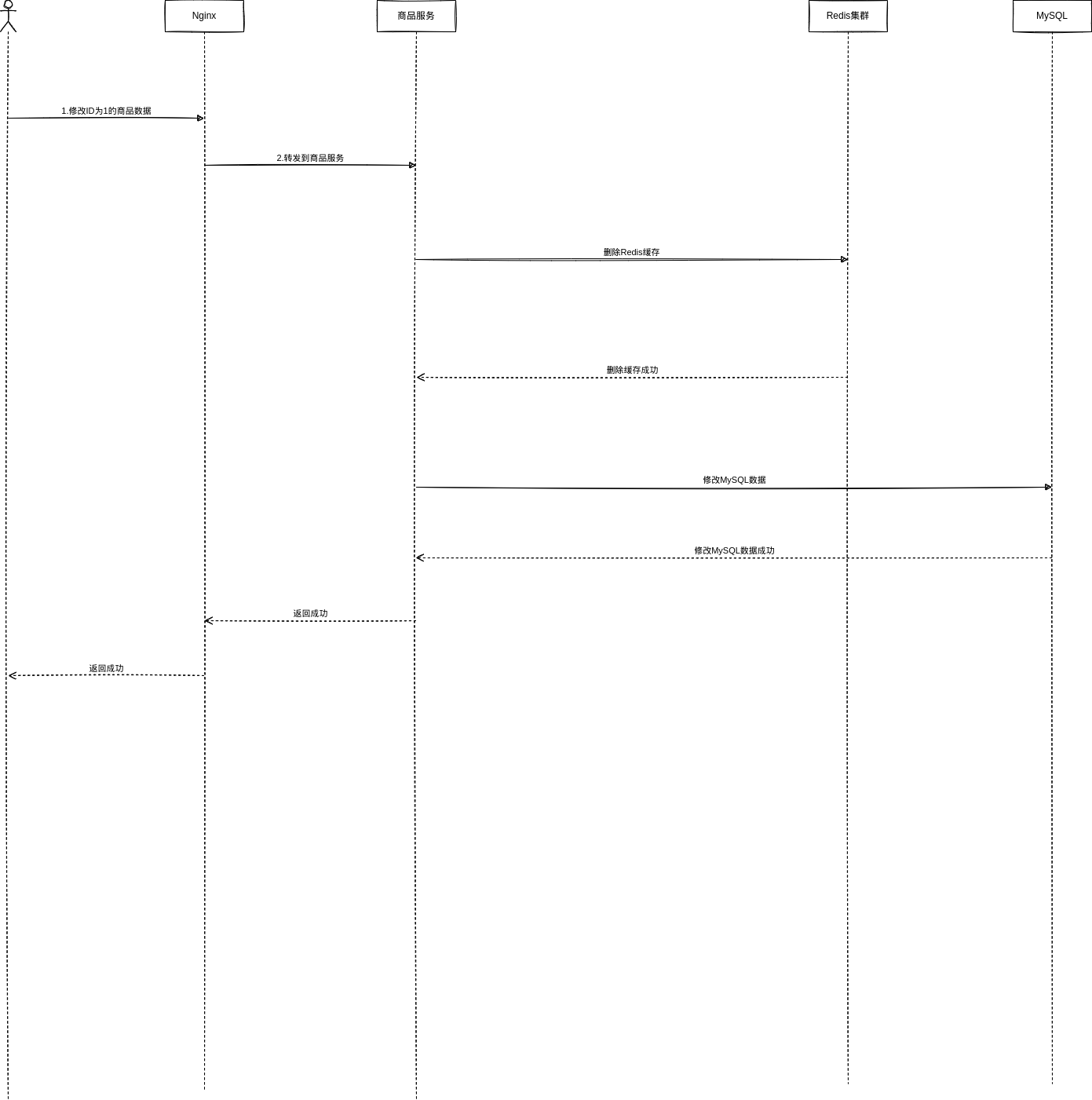
1.2.2.1. Write Flow [Cache Aside Pattern]
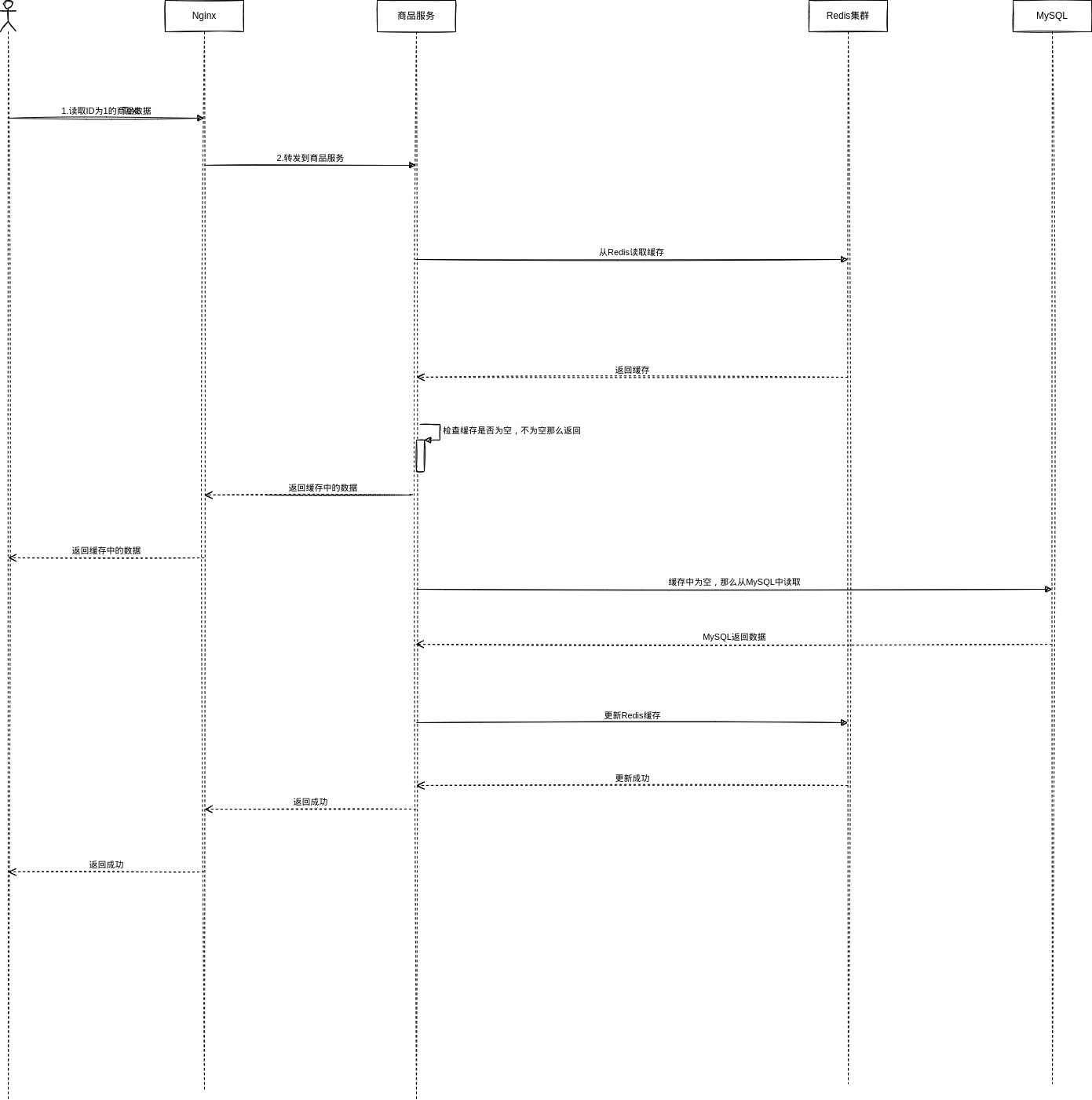
1.2.2.2. Read Flow [Cache Aside Pattern]
2. Cache Update Strategies
2.1. Cache Aside Pattern
- On a read, read the cache first. If the cache does not contain the data, read the database, put the returned data into the cache, and return the response.
- On an update, delete the cache first and then update the database.
2.1.1. Why Delete the Cache Instead of Updating It?
The idea is lazy computation. Some cached values need computation, which consumes a lot of CPU.
2.1.2. Problems
2.1.2.1. Why Delete the Cache First During an Update?
If the database is updated first and the cache is deleted afterward, this can happen: the database update succeeds but cache deletion fails. Subsequent reads then continue to read old data.
2.1.2.2. A Read Arrives Before the Data Write Finishes
- During an update, first delete the cache and then modify the database. At this moment the database modification is not yet complete.
- A read request arrives, finds the cache empty, queries the database, reads the old data from before the modification, and puts it back into the cache.
In this situation, the cache still returns old data.
Solution: asynchronous serialization.
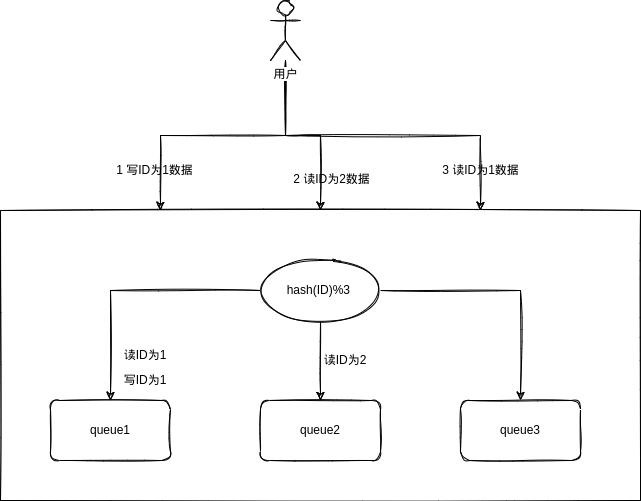
- When updating or reading data, route operations into an in-JVM queue according to the unique identifier of the data.
- One queue corresponds to one worker thread. Each worker thread serially takes and executes the corresponding operations one by one.
2.1.2.3. Multiple Reads Follow a Write and Keep Updating the Cache
If a read and a write are already ahead in the queue, subsequent reads do not need to enter the queue; they can simply wait for a period of time, avoiding meaningless repeated cache updates.
2.1.2.4. Many Writes Cause Reads Behind Them to Block for a Long Time
Use multiple instances so each instance shares part of the write operations and no queue contains too many writes.
2.1.2.5. Many Reads Block in the Queue
Run a load test.
2.1.2.6. Request Routing with Multiple Service Instances
After introducing multiple instances, how can requests with the same ID always be routed to a fixed instance and a fixed queue? Use Nginx to route by taking the ID modulo the number of instances.
2.1.2.7. Hot Products Cause Skewed Routing
Run a load test.
2.1.3. Implement the Inventory Service
Implementing a Cache/Database Double-Write Consistency Solution in the Inventory Service
2.2. Asynchronously Update the Cache
2.2.1. Problems
2.2.1.1. Concurrent Cache-Rebuild Conflicts
Solution: use a distributed lock.
2.2.1.2. Full Cache Updates Are Too Inefficient
A full cache update is too inefficient. For example, suppose a serialized JSON value is stored. To update it, the value is read and deserialized, a field is updated, then it is serialized to JSON again and stored back in the cache.
Solution: split the cache into dimensions.
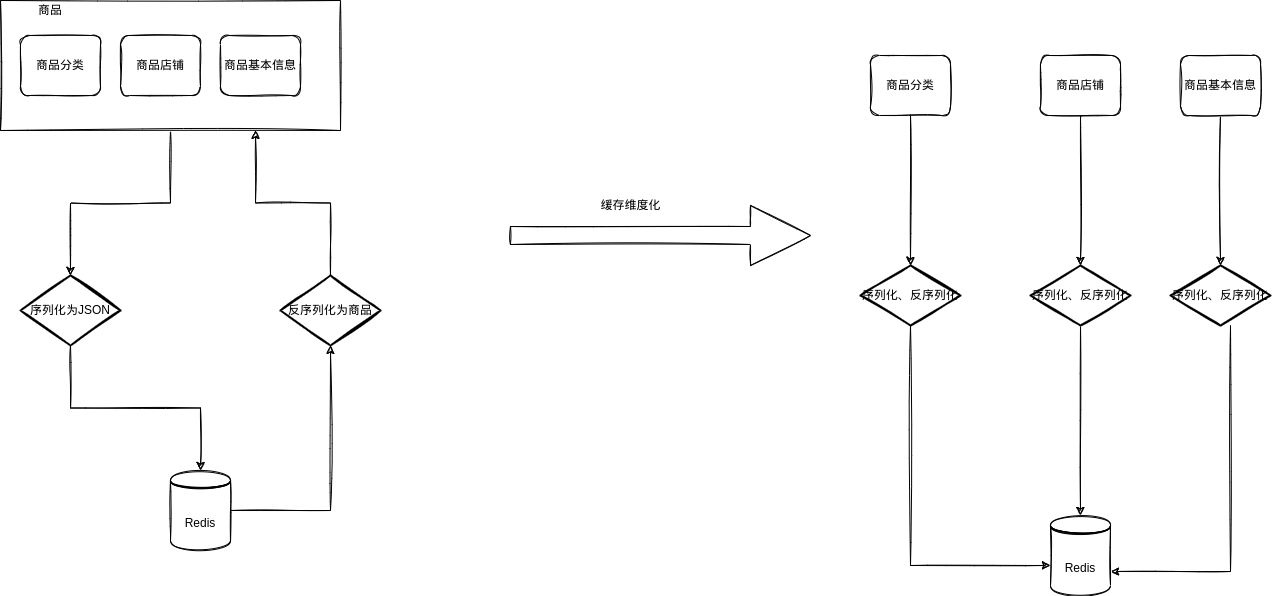
2.2.1.3. Low Hit Rate of Nginx Local Cache
Solution: deploy Nginx in two layers.
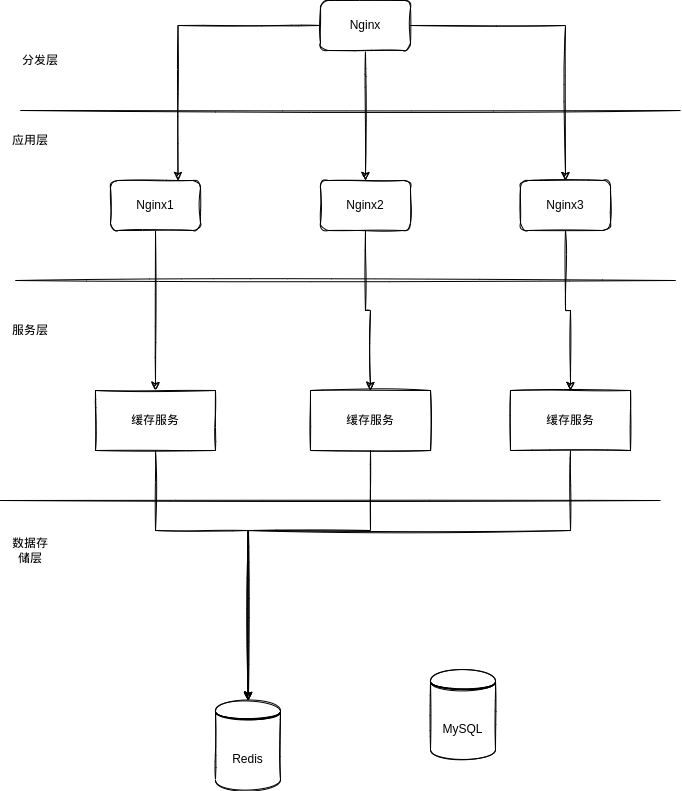
2.2.1.3.1. Distribution-Layer Nginx
-
OpenResty
HTTP -
nginx.conf
upstream shopping_gateway {
    server 127.0.0.1:8001;
}

server {
    listen       80;
    server_name  localhost;

    charset utf-8;

    #access_log  logs/host.access.log  main;

    location /cache {
            default_type 'text/html';
            content_by_lua_file /home/[user]/software/openresty/nginx/lua/distributed_cache.lua;
    }

    location /hello {
            default_type 'text/plain';
            content_by_lua 'ngx.say("Hello, Lua")';
    }

    location /hello2 {
            default_type 'text/plain';
            content_by_lua_file /home/[user]/software/openresty/nginx/lua/hello.lua;
    }

    location /lua {
            default_type 'application/json';
            content_by_lua_file /home/[user]/software/openresty/nginx/lua/distributed_lua.lua;
    }

    # Proxy backend requests
    location / {
            proxy_pass http://shopping_gateway;
    }

    # Serve static resources
    location ~ .*\.(html|htm|gif|jpg|jpeg|bmp|png|ico|js|css)$ {
    root html;
    }
}
distributed_cache.lua
-- Example URL: http://localhost/lua?method=hello&productId=1
-- Get the parameters after the question mark
local uri_args = ngx.req.get_uri_args()
local method = uri_args["method"]
local productId = uri_args["productId"]

-- Decide which nginx_cache to dispatch to
local nginx_host = {"127.0.0.1:9000", "127.0.0.1:9001"}
local dispatch_ngx_host_index = (ngx.crc32_long(productId) % 2) + 1
dispatch_ngx_url = "http://"..nginx_host[dispatch_ngx_host_index]

-- Build the concrete request path without the host
local request_path = "/lua?method="..method.."&productId="..productId

-- Access nginx_cache
local http = require("resty.http")
local httpc = http.new()
local resp, err = httpc:request_uri(dispatch_ngx_url, {
    method = "GET",
    path = request_path,
    keepalive=false
})

if not resp then
    ngx.say("request error :", err)
    return
end

ngx.say(resp.body)

httpc:close()
2.2.1.3.2. Application-Layer Nginx
-
OpenResty
HTTP, cjson, template -
nginx.conf
lua_shared_dict my_cache 128m;
server {
    listen       9000;
    server_name  localhost;

    charset utf-8;

    #access_log  logs/host.access.log  main;

    # Configure the template path
    set $template_location "/templates";
    # This path needs to exist because it will later store HTML files
    set $template_root "/home/[user]/software/openresty_cache2/nginx/html/templates";

    location / {
        root   html;
        index  index.html index.htm;
    }

    location /hello {
            default_type 'text/plain';
            content_by_lua 'ngx.say("Hello, Lua")';
    }

    location /hello2 {
            default_type 'text/plain';
            content_by_lua_file /home/[user]/software/openresty_cache/nginx/lua/hello.lua;
    }

    location /cache {
            default_type 'text/html';
            content_by_lua_file /home/[user]/software/openresty_cache/nginx/lua/render.lua;
    }

    location /lua {
            default_type 'application/json';
            content_by_lua 'ngx.say("server9000")';
    }
}
render.lua
local uri_args = ngx.req.get_uri_args()
local productId = uri_args["productId"]

-- Get the cache object assigned in the previous configuration
local cache_ngx = ngx.shared.my_cache

-- Build the cache key
local productCacheKey = "product_info_"..productId

-- Get the value from the cache
local productCache = cache_ngx:get(productCacheKey)

-- If the corresponding value does not exist in the cache,
-- query the backend cache service
-- (the cache service checks Redis first, then Ehcache, then the database)
if productCache == "" or productCache == nil then
        local http = require("resty.http")
        local httpc = http.new()
        -- This address is the development-machine IP.
        -- Directly accessing the development environment is convenient here.
        local resp, err = httpc:request_uri("http://127.0.0.1:8001",{
                method = "GET",
                path = "/cache/levelCache/item/"..productId,
                keepalive=false
        })

        if not resp then
                ngx.say("request error :", err)
                return
        end

        productCache = resp.body
        -- After obtaining it, put it into the cache
        cache_ngx:set(productCacheKey, productCache, 10 * 60)
end

--if productCache ~= nil then
--      ngx.say("productCache:", productCache)
--      return
--end

-- The cached value is a string,
-- so use cjson to convert the string into a JSON object
local cjson = require("cjson")
local productCacheJSON = cjson.decode(productCache)

-- Combine product information and shop information into one large JSON object.
-- The template renderer expects this form.
local context = {
        productId = productCacheJSON.data.id,
        productTitle = productCacheJSON.data.title,
        productSellPoint = productCacheJSON.data.sellPoint
}

-- Render the product.html template with template
local template = require("resty.template")
template.render("product.html", context)
templates/product.html
product id: {* productId *}<br />
product title: {* productTitle *}<br />
product sell point: {* productSellPoint *}<br />
2.2.1.3.3. Test
- Login
- POST
http://localhost/user/login - Parameters:
{
    "username":"<example-user>",
    "password":"<example-password>"
}- Test the Nginx cache
- GET
http://localhost/cache?productId=973825 - Request header:
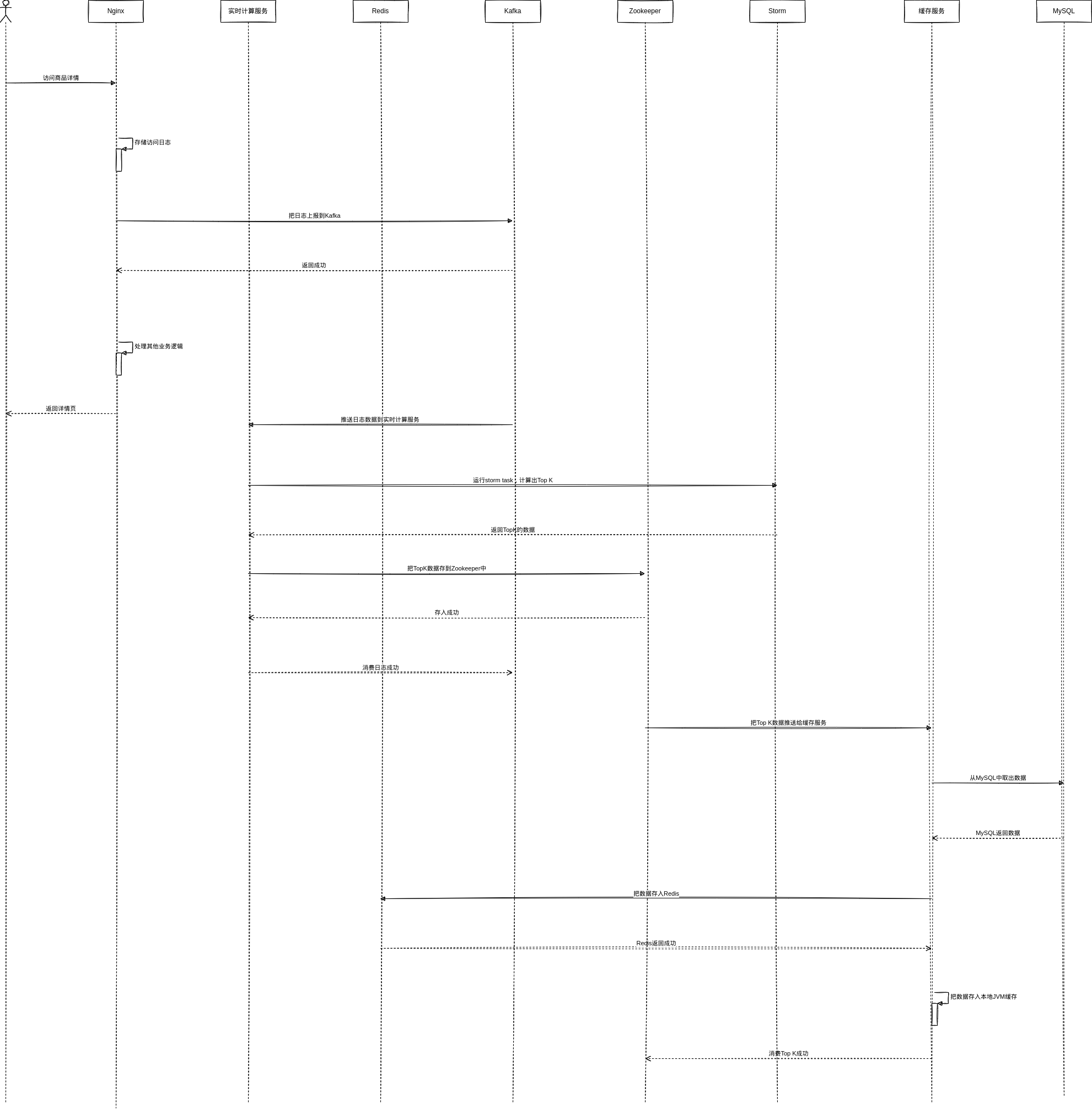
token:<example-token>3. Cache Warm-Up
Discussion
Sign in with GitHub to comment. Discussions are stored as GitHub Issues.View on GitHub