
NOTE
2.3 Full-Link Load Testing
Traffic marking, data isolation, test-data construction, and tooling for full-link load testing.
This is a historical learning note and may contain outdated or incomplete understanding.
1. What Is Full-Link Load Testing
- Under the premise that performance remains acceptable, test the maximum load that the overall system can support.
- Stress testing tests a particular interface or subsystem, while full-link testing tests the system as a whole.
2. Why Full-Link Load Testing Is Needed
- Find the bottlenecks of the system so that corresponding optimization and scaling can be carried out.
- Verify whether the overall system can support the estimated load.
3. How to Design Full-Link Load Testing
3.1. How the Business System Distinguishes Stress-Test Traffic from Normal Traffic
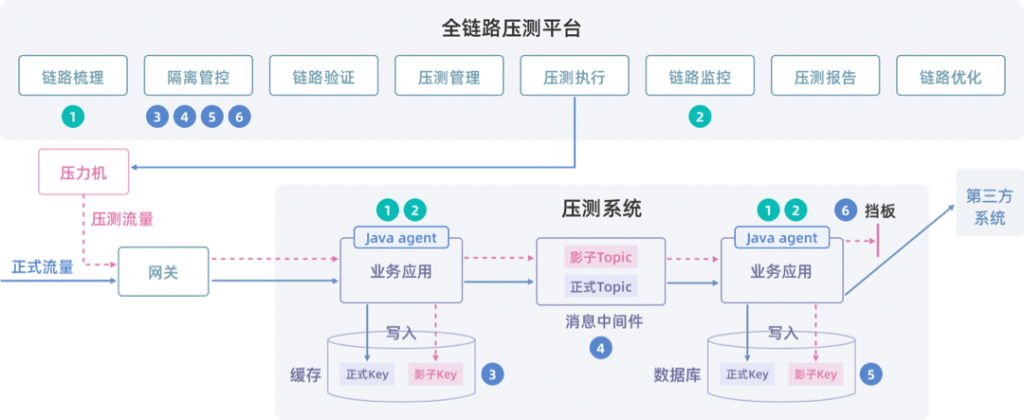
- Add a special marker to stress-test data. For example, place a stress-test marker in the header of the RPC framework.
- Pass the special marker through the entire call chain. Similar to How to design distributed tracing.
3.2. How to Isolate Stress-Test Data
- MySQL: shadow database or shadow table.
- Redis: shadow key or shadow data source; set a relatively short expiration time.
- Kafka: shadow topic or message-header marker; set a relatively short expiration time.
- External third-party interfaces: Mock.
3.3. How to Construct Stress-Test Data
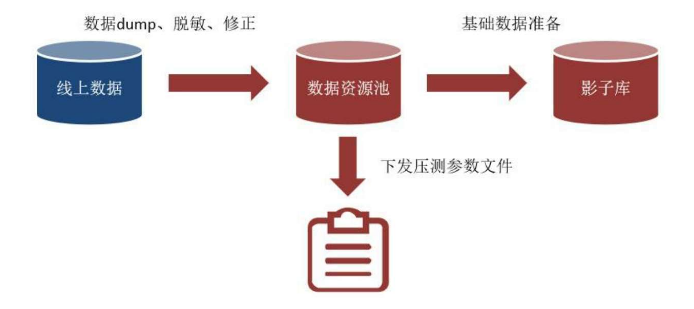
- Dump production data, then import it into the data pool after desensitization, correction, and other stages.
- Write the test data to the shadow database.
- Export the corresponding request-parameter file according to the target scenario.
3.4. How to Generate Extremely Large-Scale Stress-Test Traffic
- Implement load generation, real-time monitoring of stress-test engine data and call-chain nodes, and finally produce a stress-test report.
- For example, Jmeter.
4. Full-Link Load-Testing Components
4.1. Takin
Discussion
Sign in with GitHub to comment. Discussions are stored as GitHub Issues.View on GitHub