
NOTE
2.3 如何设计电商详情页
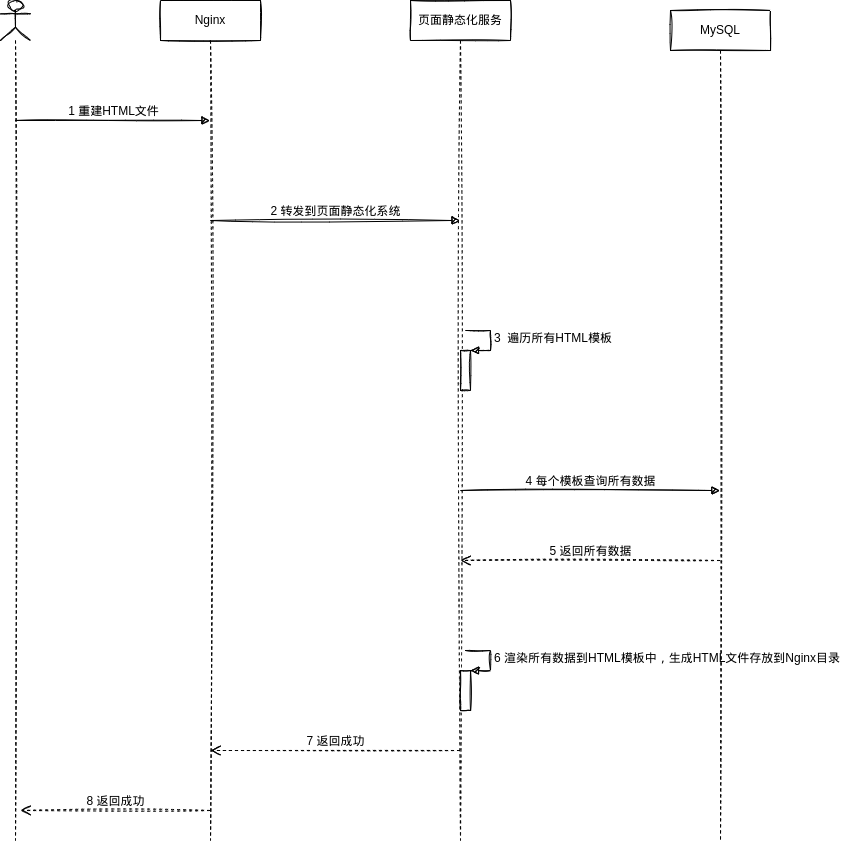
1. 电商详情页 1.1. 小型电商 1.1.1. 重建HTML 如果数据量比较小,那么可以采用全面静态化的设计:静态化系统从数据库查出所有的商品数据,使用Thymeleaf+HTML模板渲染成HTML文件,放到Nginx目录中,然后通过Nginx访问。 - 好处:访问效率非常的高 - 坏处:一旦摸
这是历史学习笔记,可能存在过时或不完整的理解。
1. 电商详情页
1.1. 小型电商
1.1.1. 重建HTML
如果数据量比较小,那么可以采用全面静态化的设计:静态化系统从数据库查出所有的商品数据,使用Thymeleaf+HTML模板渲染成HTML文件,放到Nginx目录中,然后通过Nginx访问。
- 好处:访问效率非常的高
- 坏处:一旦摸板改变就得重新渲染,当数据量很大的时候,重新渲染一次不靠谱
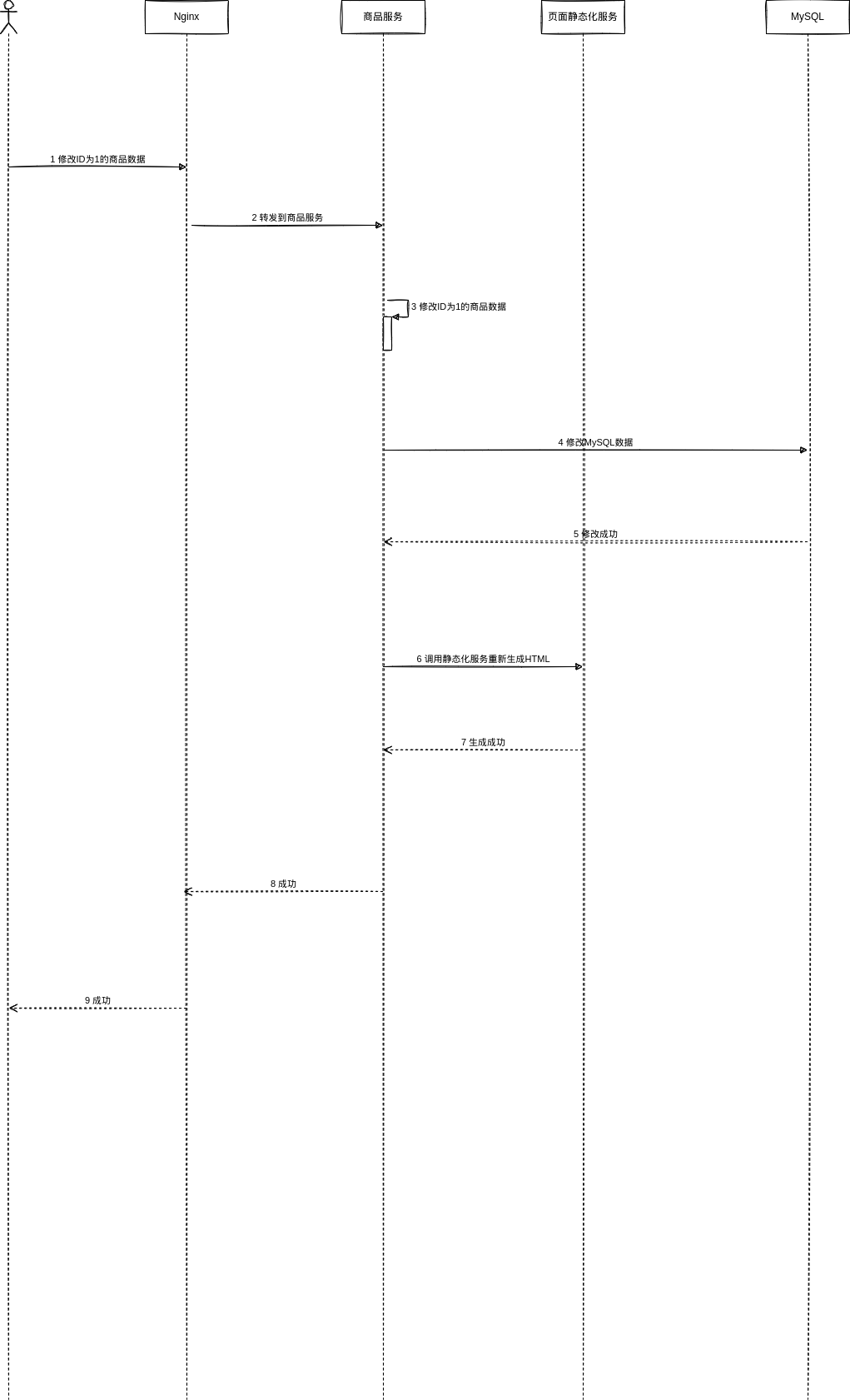
1.1.2. 写数据流程
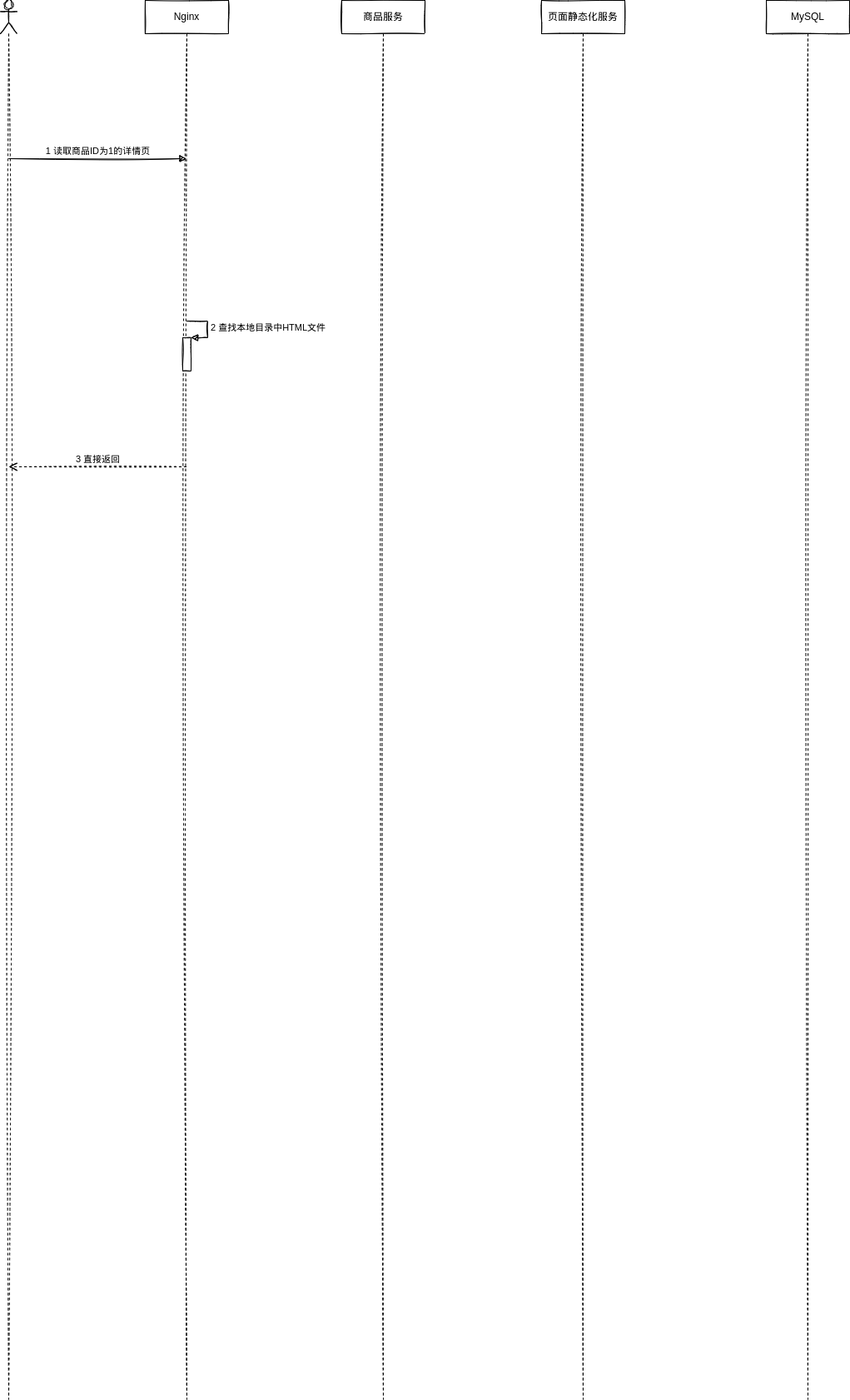
1.1.3. 读数据流程
1.2. 大型电商
1.2.1. 时效性不高
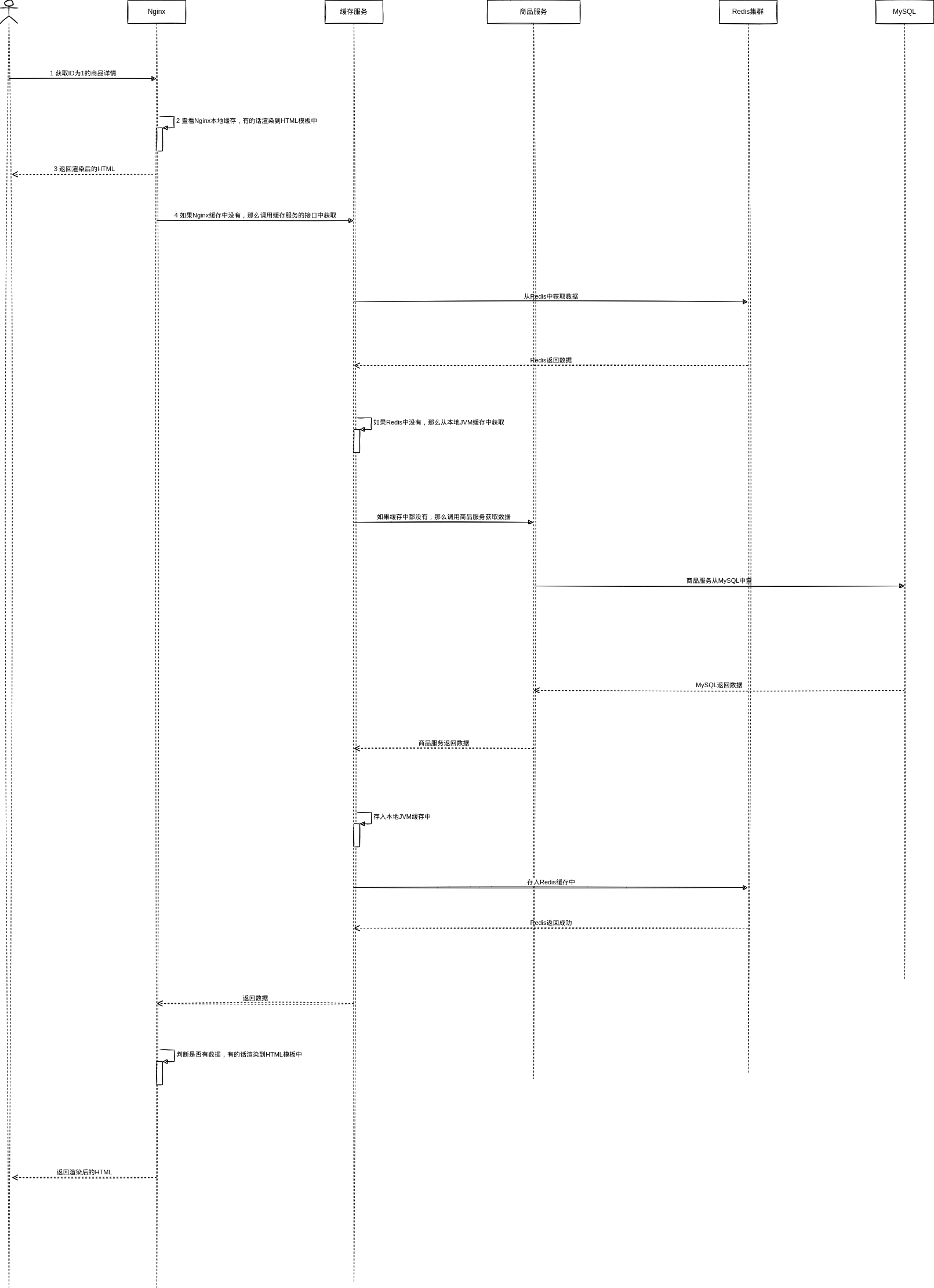
有Nginx+Redis+JVM三层缓存组成,使用Thymeleaf动态渲染HTML模板生成HTML
1.2.1.1. 读数据流程【Read-through】
1.2.1.2. 写数据流程【Write-behind】
其他服务修改数据后,写入MQ路由到缓存服务,缓存服务读取最新数据更新缓存即可
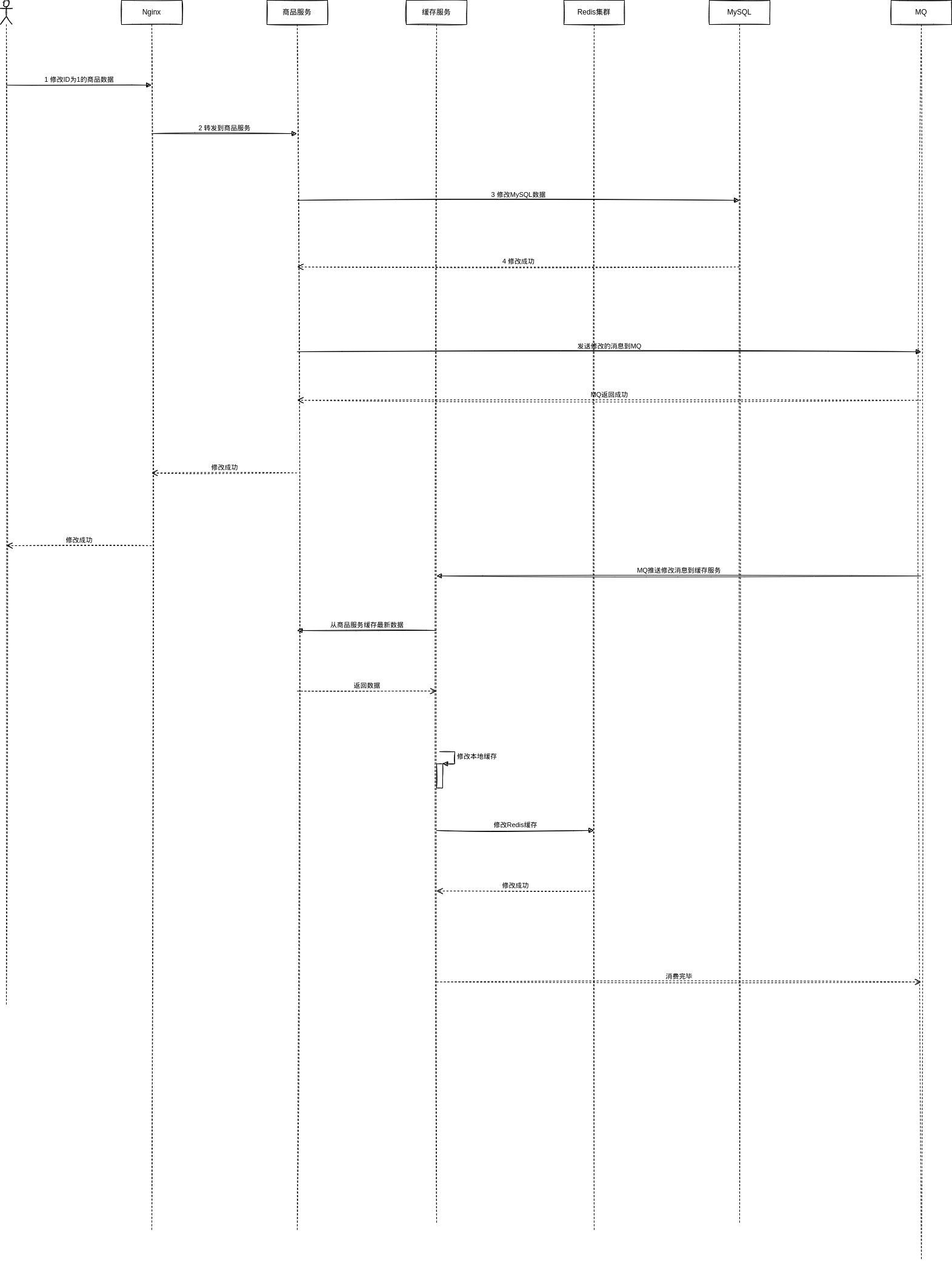
1.2.2. 时效性高
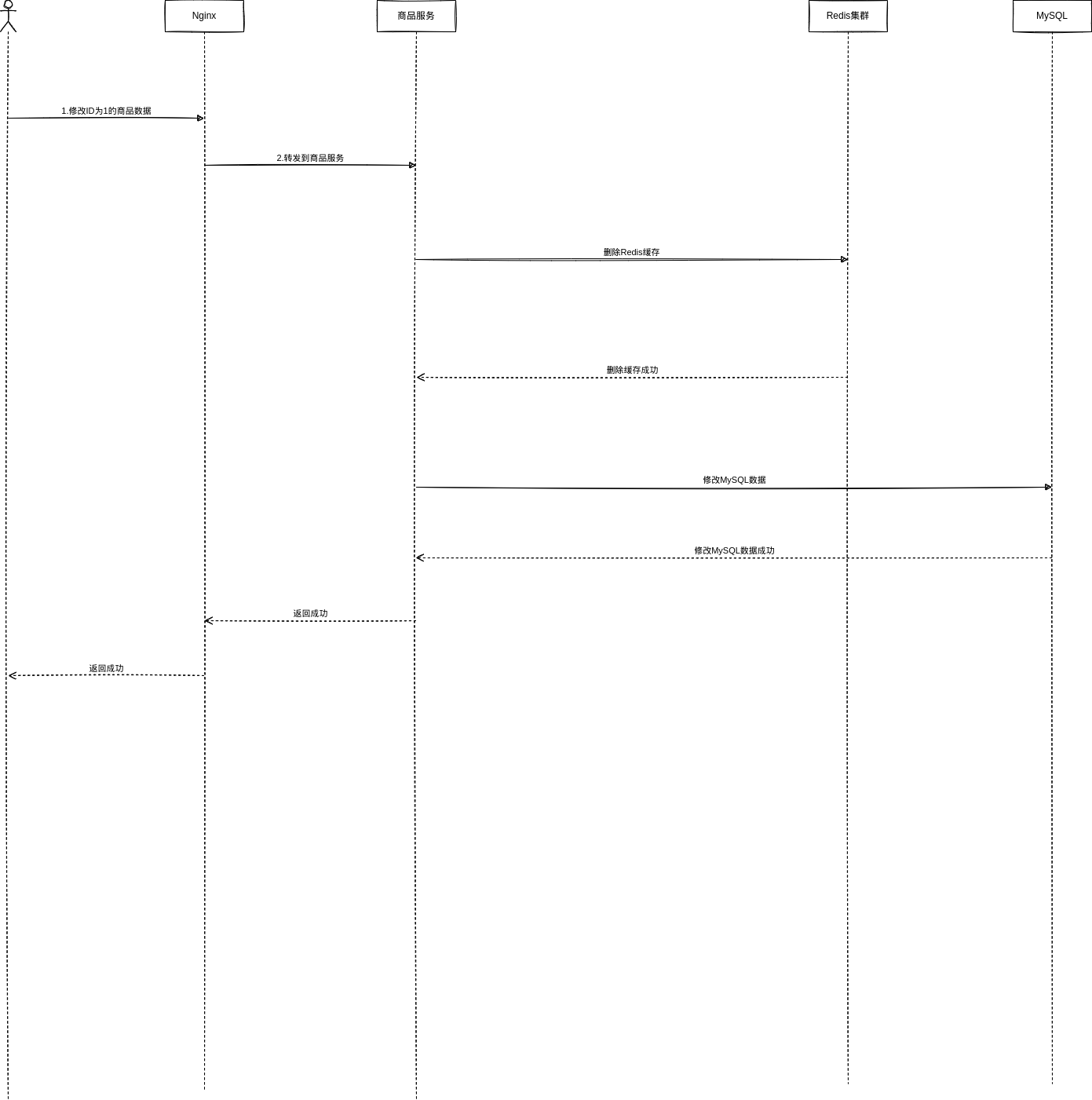
1.2.2.1. 写数据流程【Cache Aside Pattern】
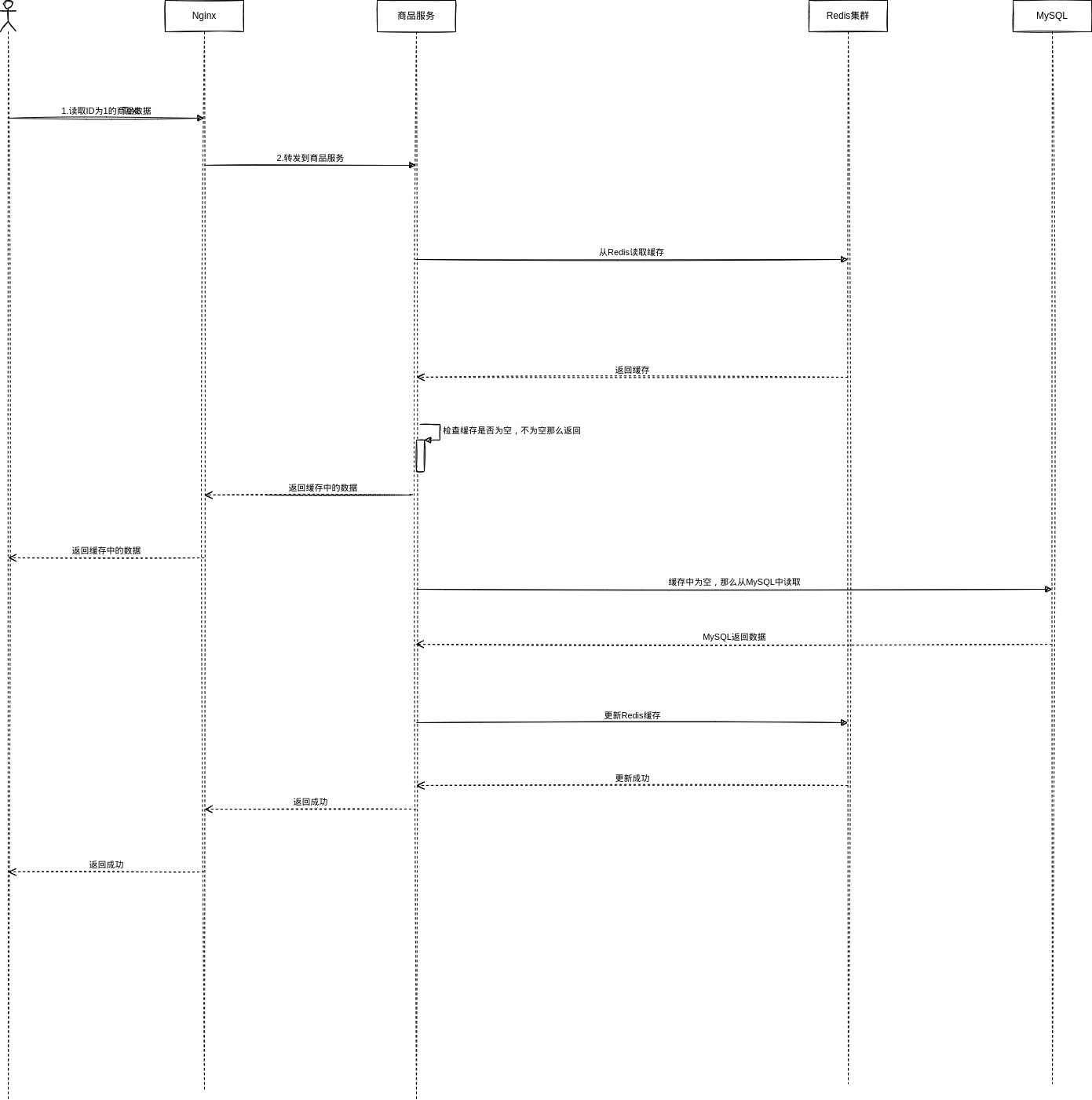
1.2.2.2. 读数据流程【Cache Aside Pattern】
2. 缓存更新策略
2.1. Cache Aside Pattern
- 读的时候,先读缓存,缓存没有的话,那么就读数据库,然后取出数据后放入缓存,同时返回响应
- 更新的时候,先删除缓存,然后再更新数据库
2.1.1. 为什么更新的时候是删除缓存而不是更新缓存
懒计算的思想。有些缓存需要计算,很耗费CPU
2.1.2. 问题
2.1.2.1. 为什么更新的时候需要先删除缓存
如果先更新数据库再删除缓存,那么可能造成这样一种现象:就是更新数据库成功,但是删除缓存失败。此后读到的就是旧的数据了
2.1.2.2. 数据没有写完读请求过来了
- 更新的时候先删除缓存,再去修改数据库,此时数据库还没修改完成;
- 读请求过来,读缓存发现为空,那么去查询数据库,查到了修改前的旧数据并放到了缓存中
以上这种情况会造成缓存中读到的仍然是旧数据
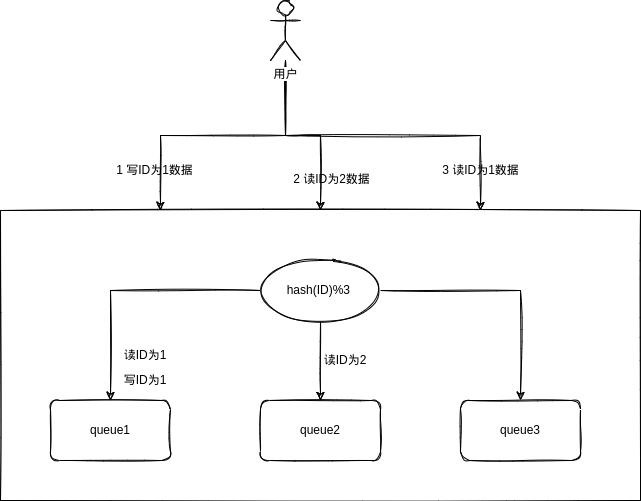
解决:异步串行化
- 更新/读取数据的时候,根据数据的唯一标识,将操作路由发送到一个 jvm 内部的队列中
- 一个队列对应一个工作线程,每个工作线程串行拿到对应的操作,然后一条一条的执行
2.1.2.3. 一个写请求后面跟着多个读请求,读请求一直更新缓存
如果队列前面已有一读一写,那么后续的读不需要入队,直接等待一段时间即可,避免无意义的重复更新缓存
2.1.2.4. 如果写请求很多,读请求放在写请求之后会阻塞很久
用多个实例,每个实例分摊写操作,让每个队列中的写操作不会很多
2.1.2.5. 读请求很多导致阻塞在队列中
压测一下
2.1.2.6. 多服务实例部署的请求路由
引入了多个实例后,如何保证ID相同的能路由到固定的一个实例和固定的一个队列:使用Nginx对ID取模路由到固定实例
2.1.2.7. 热点商品的路由问题导致请求的倾斜
压测一下
2.1.3. 实现库存服务
040. 在库存服务中实现缓存与数据库双写一致性保障方案 | Mrcode 笔记本
2.2. 异步更新缓存
2.2.1. 问题
2.2.1.1. 重建缓存并发冲突问题
解决:使用分布式锁
2.2.1.2. 全量更新缓存效率太低
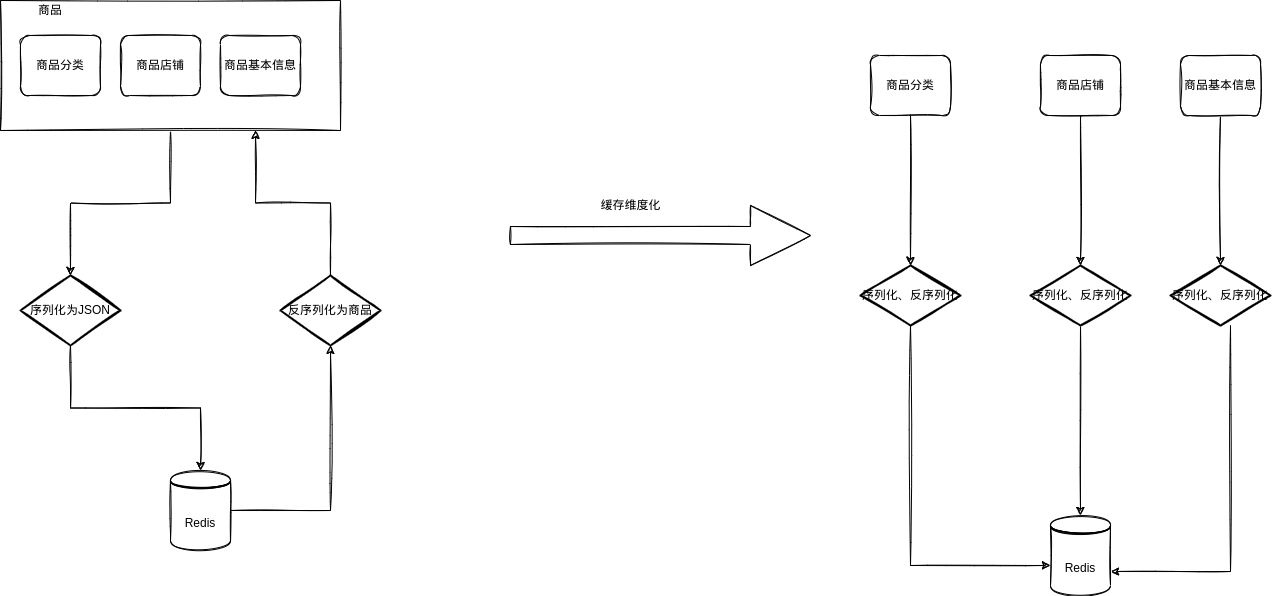
全量更新缓存效率太低,比如存入一个序列化的JSON数据,更新的时候取出来反序列化,然后更新字段,之后又序列化为JSON存入缓存
解决:缓存维度化
2.2.1.3. Nginx本地缓存命中率低
解决:Nginx分两层部署
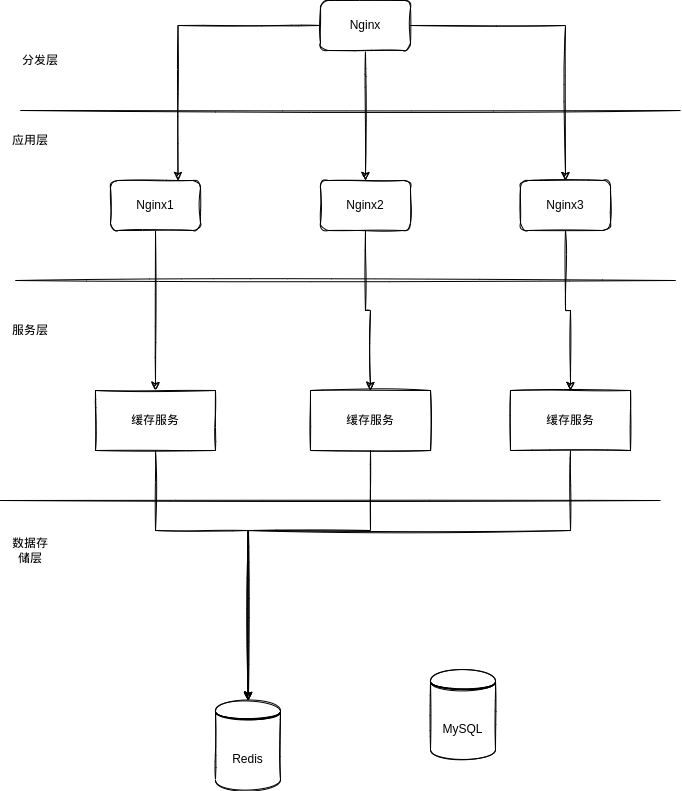
2.2.1.3.1. 分发层Nginx
-
openresty http
-
nginx.conf
upstream shopping_gateway {
    server 127.0.0.1:8001;
}


server {
    listen       80;
    server_name  localhost;

    charset utf-8;

    #access_log  logs/host.access.log  main;

    location /cache {
            default_type 'text/html';
            content_by_lua_file /home/[user]/software/openresty/nginx/lua/distributed_cache.lua;
    }


    location /hello {
            default_type 'text/plain';
            content_by_lua 'ngx.say("Hello, Lua")';
    }

    location /hello2 {
            default_type 'text/plain';
            content_by_lua_file /home/[user]/software/openresty/nginx/lua/hello.lua;
    }

    location /lua {
            default_type 'application/json';
            content_by_lua_file /home/[user]/software/openresty/nginx/lua/distributed_lua.lua;
    }
    #拦截后台请求
    location / {
            proxy_pass http://shopping_gateway;
    }

    #拦截静态资源
    location ~ .*\.(html|htm|gif|jpg|jpeg|bmp|png|ico|js|css)$ {
    root html;
    }

}- distributed_cache.lua
-- 拿一个地址来说明:http://localhost/lua?method=hello&productId=1
-- 获取问号后面的参数列表
local uri_args = ngx.req.get_uri_args()
local method = uri_args["method"]
local productId = uri_args["productId"]

-- 分派到哪个nginx_cache
local nginx_host = {"127.0.0.1:9000", "127.0.0.1:9001"}
local dispatch_ngx_host_index = (ngx.crc32_long(productId) % 2) + 1
dispatch_ngx_url = "http://"..nginx_host[dispatch_ngx_host_index]


-- 拼接具体的访问地址不带 host
local request_path = "/lua?method="..method.."&productId="..productId

-- 访问nginx_cache
local http = require("resty.http")
local httpc = http.new()
local resp, err = httpc:request_uri(dispatch_ngx_url, {
    method = "GET",
    path = request_path,
    keepalive=false
})

if not resp then
    ngx.say("request error :", err)
    return
end

ngx.say(resp.body)


httpc:close()
2.2.1.3.2. 应用层Nginx
-
openresty http、cjson、template
-
nginx.conf
lua_shared_dict my_cache 128m;
server {
    listen       9000;
    server_name  localhost;

    charset utf-8;

    #access_log  logs/host.access.log  main;

    # 配置模板路径
    set $template_location "/templates";
    # 当然这个路径需要存在,因为后续需要用来存放 html
    set $template_root "/home/[user]/software/openresty_cache2/nginx/html/templates";

    location / {
        root   html;
        index  index.html index.htm;
    }


    location /hello {
            default_type 'text/plain';
            content_by_lua 'ngx.say("Hello, Lua")';
    }

    location /hello2 {
            default_type 'text/plain';
            content_by_lua_file /home/[user]/software/openresty_cache/nginx/lua/hello.lua;
    }
    location /cache {
            default_type 'text/html';
            content_by_lua_file /home/[user]/software/openresty_cache/nginx/lua/render.lua;
    }

    location /lua {
            default_type 'application/json';
            content_by_lua 'ngx.say("server9000")';
    }
}- render.lua
local uri_args = ngx.req.get_uri_args()
local productId = uri_args["productId"]

-- 获取到之前配置中分配的缓存对象
local cache_ngx = ngx.shared.my_cache

-- 拼接两个缓存 key
local productCacheKey = "product_info_"..productId

-- 通过缓存对象获取缓存中的 value
local productCache = cache_ngx:get(productCacheKey)

-- 如果缓存中不存在对于的 value
-- 就走后端缓存服务获取数据(缓存服务先走 redis ,不存在再走 ehcache,再走数据库)
if productCache == "" or productCache == nil then
        local http = require("resty.http")
        local httpc = http.new()
  -- 这里地址是开发机器 ip,因为我们在 windows 上开发的,
  -- 这里直接访问开发环境比较方便
        local resp, err = httpc:request_uri("http://127.0.0.1:8001",{
                method = "GET",
                path = "/cache/levelCache/item/"..productId,
      keepalive=false
        })


        if not resp then
                ngx.say("request error :", err)
                return
        end

        productCache = resp.body
  -- 获取到之后,再设置到缓存中
        cache_ngx:set(productCacheKey, productCache, 10 * 60)
end

--if productCache ~= nil then
--      ngx.say("productCache:", productCache)
--      return
--end


-- 因为存到缓存中是一个字符串
-- 所以使用 cjson 库把字符串转成 json 对象
local cjson = require("cjson")
local productCacheJSON = cjson.decode(productCache)

-- 把商品信息和店铺信息拼接到一个大 json 对象中
-- 这样做的原因是:template 渲染需要这样做
local context = {
        productId = productCacheJSON.data.id,
        productTitle = productCacheJSON.data.title,
        productSellPoint = productCacheJSON.data.sellPoint
}

-- 使用 template 渲染 product.html 模板
local template = require("resty.template")
template.render("product.html", context)- temlates/product.html
product id: {* productId *}<br />
product title: {* productTitle *}<br />
product sell point: {* productSellPoint *}<br />
2.2.1.3.3. 测试
- 登录
- POST http://localhost/user/login
- 参数
{
	"username":"<example-user>",
	"password":"<example-password>"
}- 测试Nginx缓存
- GET http://localhost/cache?productId=973825
- 参数header
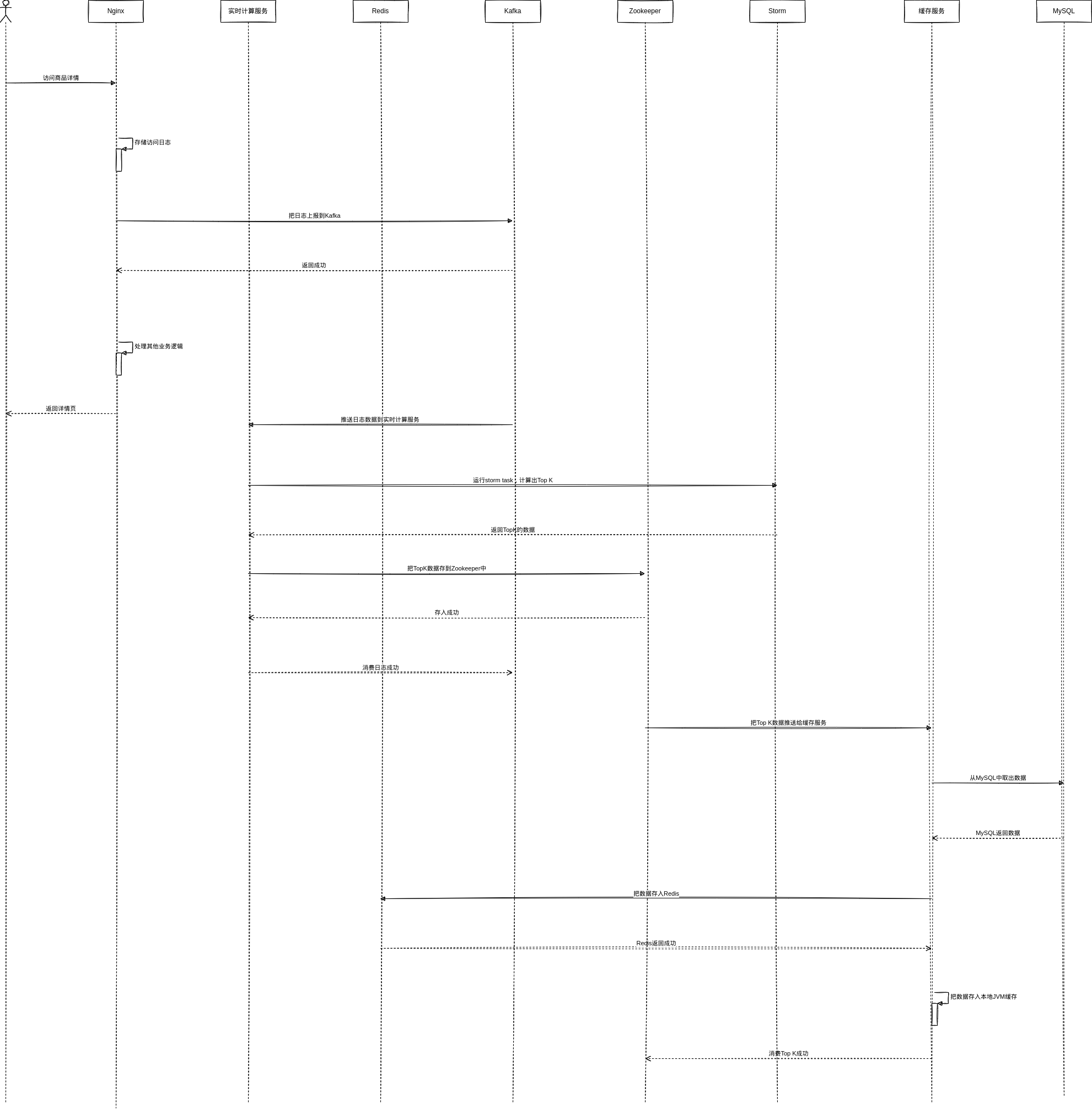
token:<example-token>3. 缓存预热
讨论
使用 GitHub 账号参与讨论,评论会保存在 GitHub Issues 中。在 GitHub 查看