
NOTE
7.1 Computer Network
Historical overview of OSI, TCP/IP layers, representative protocols, and the network transmission flow.
This is a historical learning note and may contain outdated or incomplete understanding.
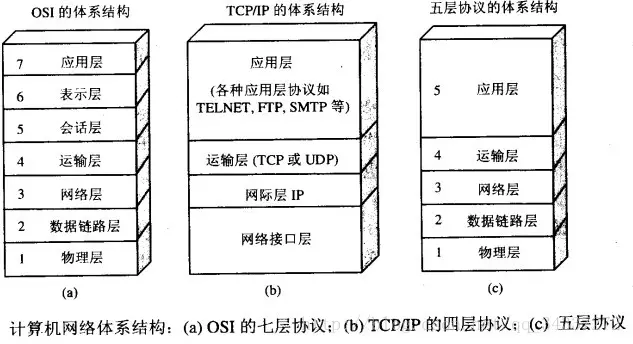
1. OSI Seven-Layer Architecture
From bottom to top:
-
Physical layer
Transmits bit streams over transmission media. -
Data-link layer
Transmits frames between adjacent machine nodes. -
Network layer
Transmits data from host to host across a network. -
Transport layer
Transmits data from process to process on hosts. -
Session layer
Establishes, manages, and terminates sessions. -
Presentation layer
Performs data conversion, encryption, and compression. -
Application layer
Users access network resources through network applications.
2. TCP/IP Four-Layer Protocol Architecture
From bottom to top:
2.1. Seven Layers vs. Four Layers
- The data-link layer in the four-layer model corresponds to the physical layer + data-link layer.
- The application layer in the four-layer model corresponds to the session layer + presentation layer + application layer.
2.2. Typical Protocols
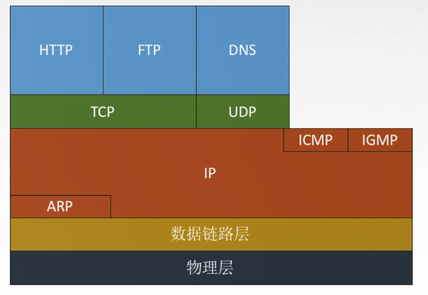
3. Network Transmission Flow
3.1. Application Layer
- The application layer belongs to user space.
- Running
exec 8<> /dev/tcp/www.baidu.com/80creates a new fd under/proc/$$/fd; fd 8 points to a socket. - Then
echo -e "GET /HTTP/1.0\n" 1>& 8can send data to Baidu. - Finally,
cat 0<& 8receives Baidu’s data.
3.2. Transport Layer
- The transport layer and the layers below it belong to kernel space.
- The transport layer first establishes a connection and needs to disconnect after data transmission. Connection establishment uses a three-way handshake and disconnection uses a four-way teardown.
tcpdump -nn -i eth0 port 80can be used to capture packets. - Established connections can be viewed with
netstat -antp. From this command it can also be seen that generally one process, or thread, corresponds to one connection. Can one process correspond to multiple connections? Yes, using I/O multiplexing. - A socket is composed of
(IP1, Port1, IP2, Port2). Then a question arises: if127.0.0.1:5555has established a connection withwww.baidu.com:80, can127.0.0.1:5555also establish a connection withwww.google.com:80? Yes.
3.3. Network Layer
- Network configuration can be performed through
vim /etc/sysconfig/network-scripts/ifcfg-eth0. Four important dimensions are:
IP address
Subnet mask
Gateway
DNS- These four dimensions can be observed in the routing table printed by
route -n. The routing table solves the problem of where the next hop goes. - Whether
pingsucceeds is also determined through the routing table. First, bitwise-AND thedestination IPwithGenmask; if the result equalsDestination, the packet can be sent toGateway.
3.4. Link Layer
- Packet transmission within a LAN is implemented through the ARP table, which can be printed with
arp -a.
Discussion
Sign in with GitHub to comment. Discussions are stored as GitHub Issues.View on GitHub