
NOTE
protobuf
1. What it is An efficient serialization and deserialization format 1.1. Ordinary serialization 1.2. protobuf serialization 1.3. Comparison 2. Installation 3. Usage 4. References
This is a historical learning note and may contain outdated or incomplete understanding.
1. What It Is
An efficient way to serialize and deserialize data.
1.1. Ordinary Serialization
- Teacher
public class Teacher implements Serializable
{
    private Long teacherId;
    private Integer age;
    private String name;
    private List<String> courses = new ArrayList<>();

    public Long getTeacherId()
    {
        return teacherId;
    }

    public void setTeacherId(Long teacherId)
    {
        this.teacherId = teacherId;
    }

    public Integer getAge()
    {
        return age;
    }

    public void setAge(Integer age)
    {
        this.age = age;
    }

    public String getName()
    {
        return name;
    }

    public void setName(String name)
    {
        this.name = name;
    }

    public List<String> getCourses()
    {
        return courses;
    }

    public void setCourses(List<String> courses)
    {
        this.courses = courses;
    }

    @Override
    public String toString()
    {
        return "Teacher{" + "teacherId=" + teacherId + ", age=" + age + ", name='" + name + '\'' + ", courses=" + courses + '}';
    }
}- Test
public class Test
{
    public static void main(String[] args) throws IOException, ClassNotFoundException
    {
        Teacher teacher = new Teacher();
        teacher.setTeacherId(1L);
        teacher.setAge(32);
        teacher.setName("张飞");
        teacher.getCourses().add("java");

        byte[] bytes = serialize(teacher);
        System.out.println(Arrays.toString(bytes));

        Teacher teacher1 = deserialize(bytes);

        System.out.println(teacher1);
    }

    private static Teacher deserialize(byte[] bytes) throws IOException, ClassNotFoundException
    {
        ObjectInputStream objectInputStream = new ObjectInputStream(new ByteArrayInputStream(bytes));
        return (Teacher) objectInputStream.readObject();
    }

    private static byte[] serialize(Teacher teacher) throws IOException
    {
        ByteArrayOutputStream byteArrayOutputStream = new ByteArrayOutputStream();
        ObjectOutputStream outputStream = new ObjectOutputStream(byteArrayOutputStream);
        outputStream.writeObject(teacher);
        return byteArrayOutputStream.toByteArray();
    }
}- Result
You can see that the byte sequence is fairly large.
[-84, -19, 0, 5, 115, 114, 0, 29, 99, 111, 109, 46, 122, 115, 107, 46, 116, 101, 115, 116, 46, 112, 114, 111, 116, 111, 98, 117, 102, 46, 84, 101, 97, 99, 104, 101, 114, 94, 99, 107, -78, -117, -101, -64, 60, 2, 0, 4, 76, 0, 3, 97, 103, 101, 116, 0, 19, 76, 106, 97, 118, 97, 47, 108, 97, 110, 103, 47, 73, 110, 116, 101, 103, 101, 114, 59, 76, 0, 7, 99, 111, 117, 114, 115, 101, 115, 116, 0, 16, 76, 106, 97, 118, 97, 47, 117, 116, 105, 108, 47, 76, 105, 115, 116, 59, 76, 0, 4, 110, 97, 109, 101, 116, 0, 18, 76, 106, 97, 118, 97, 47, 108, 97, 110, 103, 47, 83, 116, 114, 105, 110, 103, 59, 76, 0, 9, 116, 101, 97, 99, 104, 101, 114, 73, 100, 116, 0, 16, 76, 106, 97, 118, 97, 47, 108, 97, 110, 103, 47, 76, 111, 110, 103, 59, 120, 112, 115, 114, 0, 17, 106, 97, 118, 97, 46, 108, 97, 110, 103, 46, 73, 110, 116, 101, 103, 101, 114, 18, -30, -96, -92, -9, -127, -121, 56, 2, 0, 1, 73, 0, 5, 118, 97, 108, 117, 101, 120, 114, 0, 16, 106, 97, 118, 97, 46, 108, 97, 110, 103, 46, 78, 117, 109, 98, 101, 114, -122, -84, -107, 29, 11, -108, -32, -117, 2, 0, 0, 120, 112, 0, 0, 0, 32, 115, 114, 0, 19, 106, 97, 118, 97, 46, 117, 116, 105, 108, 46, 65, 114, 114, 97, 121, 76, 105, 115, 116, 120, -127, -46, 29, -103, -57, 97, -99, 3, 0, 1, 73, 0, 4, 115, 105, 122, 101, 120, 112, 0, 0, 0, 1, 119, 4, 0, 0, 0, 1, 116, 0, 4, 106, 97, 118, 97, 120, 116, 0, 6, -27, -68, -96, -23, -93, -98, 115, 114, 0, 14, 106, 97, 118, 97, 46, 108, 97, 110, 103, 46, 76, 111, 110, 103, 59, -117, -28, -112, -52, -113, 35, -33, 2, 0, 1, 74, 0, 5, 118, 97, 108, 117, 101, 120, 113, 0, 126, 0, 7, 0, 0, 0, 0, 0, 0, 0, 1]
Teacher{teacherId=1, age=32, name='张飞', courses=[java]}
1.2. protobuf Serialization
- TearchSerializer.proto
syntax = "proto3";

option java_package = "com.example.test.protobuf.proto";
option java_outer_classname = "TearcherSerializer";

message Teacher {
    int64 tearcherId = 1;
    int32 age = 2;
    string name = 3;
    repeated string courses = 4;
}- Generate Java
protoc .\TeacherSerializer.proto --java_out=.\- Test
public class TestSerializer
{
    public static void main(String[] args) throws InvalidProtocolBufferException
    {
        byte[] bytes = serialize();

        System.out.println(Arrays.toString(bytes));

        TearcherSerializer.Teacher teacher = deserialize(bytes);

        System.out.println(teacher.getTearcherId());
        System.out.println(teacher.getName());
        System.out.println(teacher.getAge());
        System.out.println(teacher.getCoursesList());
    }

    private static TearcherSerializer.Teacher deserialize(byte[] bytes) throws InvalidProtocolBufferException
    {
        return TearcherSerializer.Teacher.parseFrom(bytes);
    }

    private static byte[] serialize()
    {
        TearcherSerializer.Teacher.Builder builder = TearcherSerializer.Teacher.newBuilder();
        builder.setTearcherId(1L).setAge(22).setName("张飞").addCourses("java");
        TearcherSerializer.Teacher build = builder.build();

        return build.toByteArray();
    }
}- Result
You can see that the generated byte sequence is much smaller.
[8, 1, 16, 22, 26, 6, -27, -68, -96, -23, -93, -98, 34, 4, 106, 97, 118, 97]
1
张飞
22
[java]
1.3. Comparison
protobuf serialization removes some additional information.
For example, an int normally occupies four bytes, while protobuf uses 1–5 bytes depending on its value.
1.3.1. Ordinary Serialization and Deserialization
public class TestInteger
{
    public static void main(String[] args)
    {
        byte[] bytes = intToBytes(11);
        System.out.println(Arrays.toString(bytes));

        int value = bytesToInt(bytes);
        System.out.println(value);
    }

    private static int bytesToInt(byte[] bytes)
    {
        return (bytes[0] & 0xFF) |
                ((bytes[1] << 8) & 0xFF00) |
                ((bytes[2] << 16) & 0xFF0000) |
                ((bytes[3] << 24) & 0xFF000000);
    }

    // Big-endian: high-order byte at a low address. Little-endian: low-order byte at a low address.
    private static byte[] intToBytes(int value)
    {
        byte[] bytes = new byte[4];

        // AND with 0xFF000000 to keep only the highest byte, then shift right by 3*8
        // to move that byte to the end; cast to byte to extract it.
        bytes[3] = (byte)((value & 0xFF000000) >> 3*8);
        bytes[2] = (byte)((value & 0x00FF0000) >> 2*8);
        bytes[1] = (byte)((value & 0x0000FF00) >> 1*8);
        bytes[0] = (byte)((value & 0x000000FF)); // use little-endian here

        return bytes;
    }
}
1.3.2. protobuf Source Code
com.google.protobuf.AbstractMessageLite#toByteArray->com.example.test.protobuf.proto.TearcherSerializer.Teacher#writeTo
public void writeTo(com.google.protobuf.CodedOutputStream output)
                    throws java.io.IOException {
  if (tearcherId_ != 0L) {
    output.writeInt64(1, tearcherId_);// written in order; this is field 1
  }
  if (age_ != 0) {
    // Follow this into com.google.protobuf.CodedOutputStream.ArrayEncoder#writeInt32
    output.writeInt32(2, age_);// written in order; this is field 2
  }
  if (!getNameBytes().isEmpty()) {
    com.google.protobuf.GeneratedMessageV3.writeString(output, 3, name_);// field 3
  }
  for (int i = 0; i < courses_.size(); i++) {
    com.google.protobuf.GeneratedMessageV3.writeString(output, 4, courses_.getRaw(i));// field 4
  }
  unknownFields.writeTo(output);
}
com.google.protobuf.CodedOutputStream.ArrayEncoder#writeInt32
public final void writeInt32(final int fieldNumber, final int value) throws IOException {
  writeTag(fieldNumber, WireFormat.WIRETYPE_VARINT);
  // com.google.protobuf.CodedOutputStream.ArrayEncoder#writeInt32NoTag
  writeInt32NoTag(value);
}
com.google.protobuf.CodedOutputStream.ArrayEncoder#writeInt32NoTag
public final void writeInt32NoTag(int value) throws IOException {
  if (value >= 0) {
    // com.google.protobuf.CodedOutputStream.ArrayEncoder#writeUInt32NoTag
    writeUInt32NoTag(value);
  } else {
    // Must sign-extend.
    writeUInt64NoTag(value);
  }
}
com.google.protobuf.CodedOutputStream.ArrayEncoder#writeUInt32NoTag
public final void writeUInt32NoTag(int value) throws IOException {
  if (HAS_UNSAFE_ARRAY_OPERATIONS
      && !Android.isOnAndroidDevice()
      && spaceLeft() >= MAX_VARINT32_SIZE) {
    if ((value & ~0x7F) == 0) {
      UnsafeUtil.putByte(buffer, position++, (byte) value);
      return;
    }
    UnsafeUtil.putByte(buffer, position++, (byte) (value | 0x80));
    value >>>= 7;
    if ((value & ~0x7F) == 0) {
      UnsafeUtil.putByte(buffer, position++, (byte) value);
      return;
    }
    UnsafeUtil.putByte(buffer, position++, (byte) (value | 0x80));
    value >>>= 7;
    if ((value & ~0x7F) == 0) {
      UnsafeUtil.putByte(buffer, position++, (byte) value);
      return;
    }
    UnsafeUtil.putByte(buffer, position++, (byte) (value | 0x80));
    value >>>= 7;
    if ((value & ~0x7F) == 0) {
      UnsafeUtil.putByte(buffer, position++, (byte) value);
      return;
    }
    UnsafeUtil.putByte(buffer, position++, (byte) (value | 0x80));
    value >>>= 7;
    UnsafeUtil.putByte(buffer, position++, (byte) value);
  } else {
    try {
      // The key code is here and uses little-endian style processing.
      // Each loop handles one byte.
      while (true) {
        // Invert 0x7F and AND it with value, leaving the high 25 bits.
        // If the result is zero, there are no more high bits to process,
        // or equivalently the number fits in one byte (<= 127).
        if ((value & ~0x7F) == 0) {
          buffer[position++] = (byte) value;
          return;
        } else {
          // AND value with 0x7F to take the low 7 bits, then OR with 0x80
          // so the eighth bit is 1. This forms one byte to store in the buffer.
          buffer[position++] = (byte) ((value & 0x7F) | 0x80);
          // Continue with the next 7 bits.
          value >>>= 7;
        }
      }
    } catch (IndexOutOfBoundsException e) {
      throw new OutOfSpaceException(
          String.format("Pos: %d, limit: %d, len: %d", position, limit, 1), e);
    }
  }
}
2. Installation
2.1. Install protobuf
- Download
Releases · protocolbuffers/protobuf
- Extract it and configure the environment variables
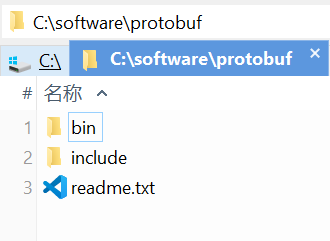
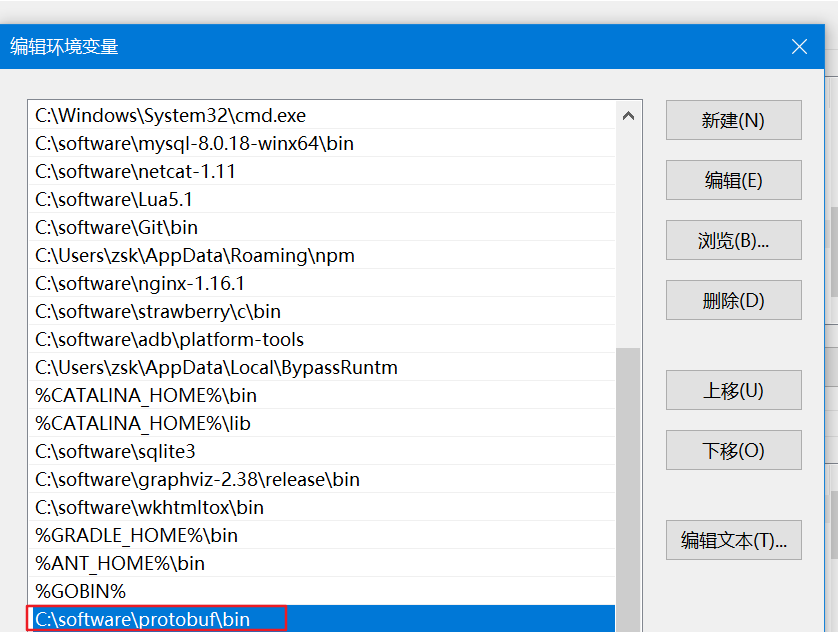
2.2. Install protoc-gen-go
- Prerequisite: configure the GOBIN environment variable
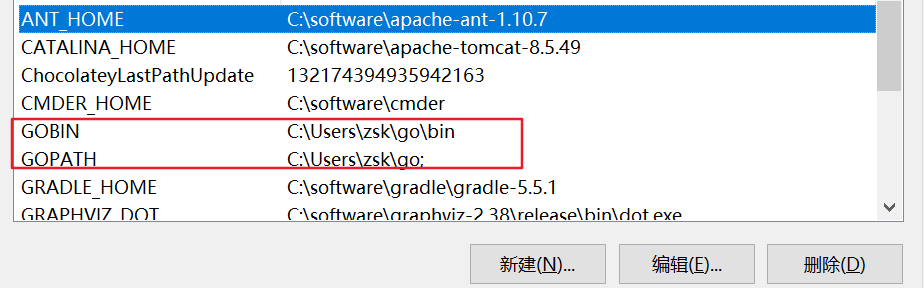
- Download the source code
go get -v github.com/golang/protobuf/{proto,protoc-gen-go}- Put the executable in the protoc installation directory
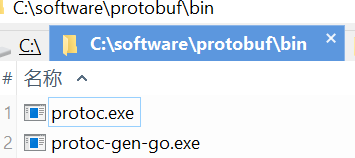
- It can also be installed into GOBIN
cd $GOPATH/src/github.com/golang/protobuf/protoc-gen-go
go install
cd $GOBIN
ls
3. Usage
- proto1.proto
syntax = "proto3"; // specify the version; omitting it causes an error
option go_package = ".;pb"; // package name of the generated Go file
// message is the keyword used to define a message type
message Person {
    // name
    string name = 1;
    // age
    int32 age = 2;
    // email
    repeated string emalis = 3;
    // phone
    repeated string phones = 4;
    // repeated means the field may occur multiple times; in Go it is usually represented as a slice
}- Generate the Go file
protoc --go_out=./ *.proto- Test the generated Go file
import (
	"fmt"
	"github.com/golang/protobuf/proto"
	pb "my_demo/proto_test"
)

func main() {
	p := &pb.Person{
		Name:   "example",
		Age:    25,
		Emalis: []string{"<EMAIL>"},
		Phones: []string{"<PHONE>"},
	}
	fmt.Println(p)
	// Serialize to bytes.
	data, err := proto.Marshal(p)
	if err != nil {
		fmt.Println("Marshal error")
	}
	fmt.Println(data)

	// Deserialize bytes into an object.
	p2 := &pb.Person{}
	proto.Unmarshal(data, p2)
	fmt.Println(p2)
}
4. References
- Using Protobuf on Windows - CSDN Blog
- Configure a Terminal Proxy to Make go get Work in China | Keep Coding | Su Yibei
- WEHousing/04 Protobuf Notes.md at master · MineCoinChain/WEHousing
- golang/protobuf: Go support for Google’s protocol buffers
- Protobuf Required, Optional, and Repeated Qualifiers - CSDN Blog
Discussion
Sign in with GitHub to comment. Discussions are stored as GitHub Issues.View on GitHub