
NOTE
2.5 Kafka Producer
Kafka producer send flow, interceptors, serializers, partitioners, idempotence, transactions, and message-loss handling.
This is a historical learning note and may contain outdated or incomplete understanding.
1. What Is a Producer?
- One of Kafka’s clients, responsible for producing messages and pushing them to Kafka.
2. Producer Message-Sending Flow
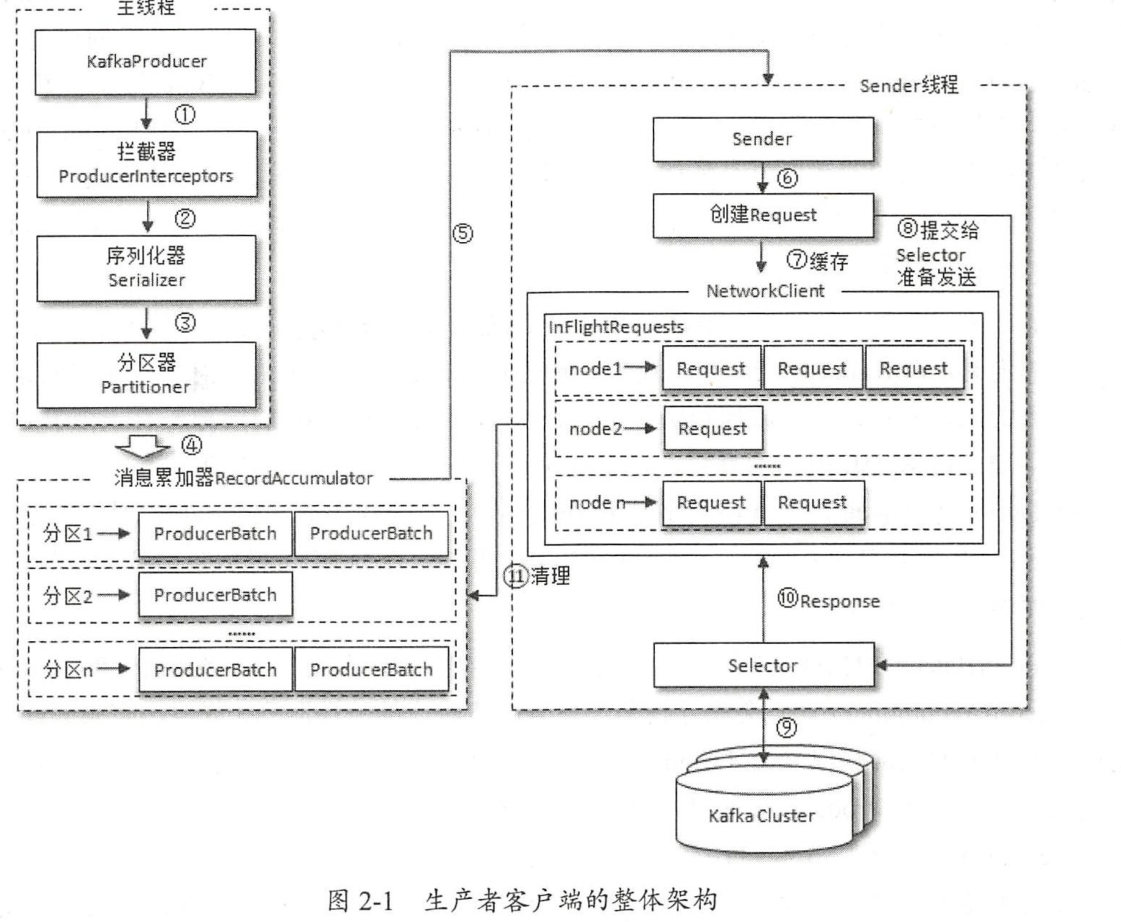
- Three objects are involved: the main thread, the Sender thread, and a thread-shared variable,
RecordAccumulator(which stores data waiting to be sent). - Process: the main thread creates a message and sends it through Interceptors -> Serializer -> Partitioner to the
RecordAccumulator. The Sender thread continuously pulls messages from theRecordAccumulatorand sends them to the Kafka broker.
2.1. Interceptor
- Performs processing before the producer sends a message to the Broker, such as filtering messages, counting messages, or modifying message content.
- A custom interceptor needs to implement
org.apache.kafka.clients.producer.ProducerInterceptor.
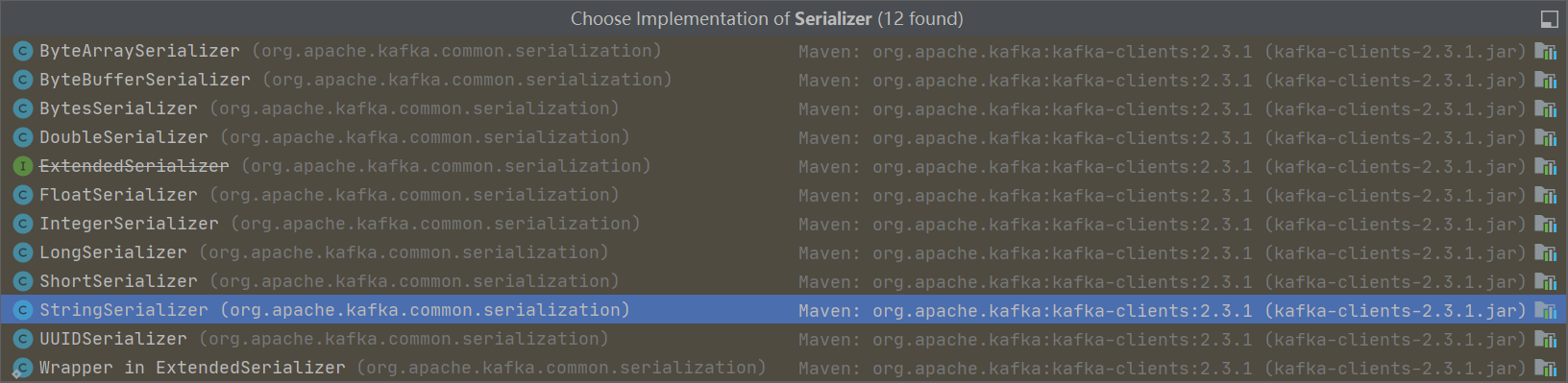
2.2. Serializer
- Data sent by the producer needs to be converted into a byte array through a serializer.
- A custom serializer needs to implement
org.apache.kafka.common.serialization.Serializer.
2.3. Partitioner
- Determines which Partition the message sent by the producer goes to.
- There are four situations:
- A partition is specified.
- Directly use the specified value as the partition value.
- No partition is specified, but there is a key.
- Use
hash(key) % number of partitions in the Topicto decide which partition receives the data.
- Use
- Neither a partition nor a key is specified.
- The first call randomly generates an integer (each subsequent call increments this integer), then takes this value modulo the total number of available partitions in the topic to obtain the partition value. This is the commonly called round-robin algorithm.
- A custom partitioner can be used.
- It needs to implement
org.apache.kafka.clients.producer.Partitioner.
- It needs to implement
- A partition is specified.
3. How a Producer Ensures Messages Are Not Duplicated
3.1. What Does “No Duplicate Messages” Mean?
- Ensuring messages are not duplicated is essentially the concept of idempotency.
3.2. Why Duplicate Messages Occur
- Kafka producers use
at least once. The reason is:- if a producer sends successfully, the message has already been committed to the log file, with the protection of the multi-replica mechanism;
- if sending fails, the producer can retry until it succeeds.
- A producer may write a message repeatedly. After idempotence is enabled, writing the same message multiple times is equivalent to writing it once; in other words, there is only one message.
3.3. How to Ensure It
3.3.1. Enable Idempotence
- Enable it on the producer client with
enable.idempotence=true. - At the same time,
retriesmust be greater than 0,acksmust be -1, andmax.in.flight.requests.per.connectioncannot be greater than 5.
3.3.1.1. Implementation of Idempotence
- Producer ID and sequence number
- Producer: each producer has a producer ID when initialized. When sending a message to a partition, it increments the sequence number by 1.
- Broker: maintains a sequence number for a producer ID and partition.
- If the producer’s
sn_new = broker's sn_old + 1, accept it. - If the producer’s
sn_new < broker's sn_old + 1, it is a duplicate and is discarded. - If the producer’s
sn_new > broker's sn_old + 1, a message was missed and an error is reported.
- If the producer’s
3.3.2. Enable Transactions
- The producer enables
enable.idempotence=trueand also setstransactional.id. - Example
Properties properties= new Properties(); properties.put(ProducerConfig.KEY_SERIALIZER_CLASS_CONFIG,StringSerializer.class . getName()) ; properties.put(ProducerConfig . VALUE SERIALIZER_CLASS_CONFIG ,StringSerializer.class . getName()); properties.put(ProducerConfig.BOOTSTRAP_SERVERS_CONFIG , brokerList); properties.put(ProducerConfig.TRANSACTIONALIDCONFIG , transactionid); KafkaProducer<String , String> producer= new KafkaProducer<>(properties ); producer.initTransactions (); producer.beginTransaction(); try { // Process business logic and create ProducerRecords ProducerRecord<String, String> recordl =new ProducerRecord<>(topic,”msgl ”); producer.send(recordl) ; ProducerRecord<String, String> record2 =new ProducerRecord<>(topic,”msg2 ”); producer.send(record2); ProducerRecord<String, String> record3 =new ProducerRecord<>(topic,”msg3 ”); producer.send(record3); // Process some other logic producer.commitTransaction() ; } catch (ProducerFencedException e) { producer.abortTransaction() ; } producer.close(); - Consumer
- Set
isolation.level.- If it is
read_commited, the consumer application cannot see (consume) uncommitted transactions. - If it is
read_uncommiter, the consumer application can see (consume) uncommitted transactions.
- If it is
- Set
3.3.2.1. Why Have Transactions?
- Idempotence can only apply to one partition, while transactions can span multiple partitions.
- Transactions can ensure the atomicity of write operations across multiple partitions.
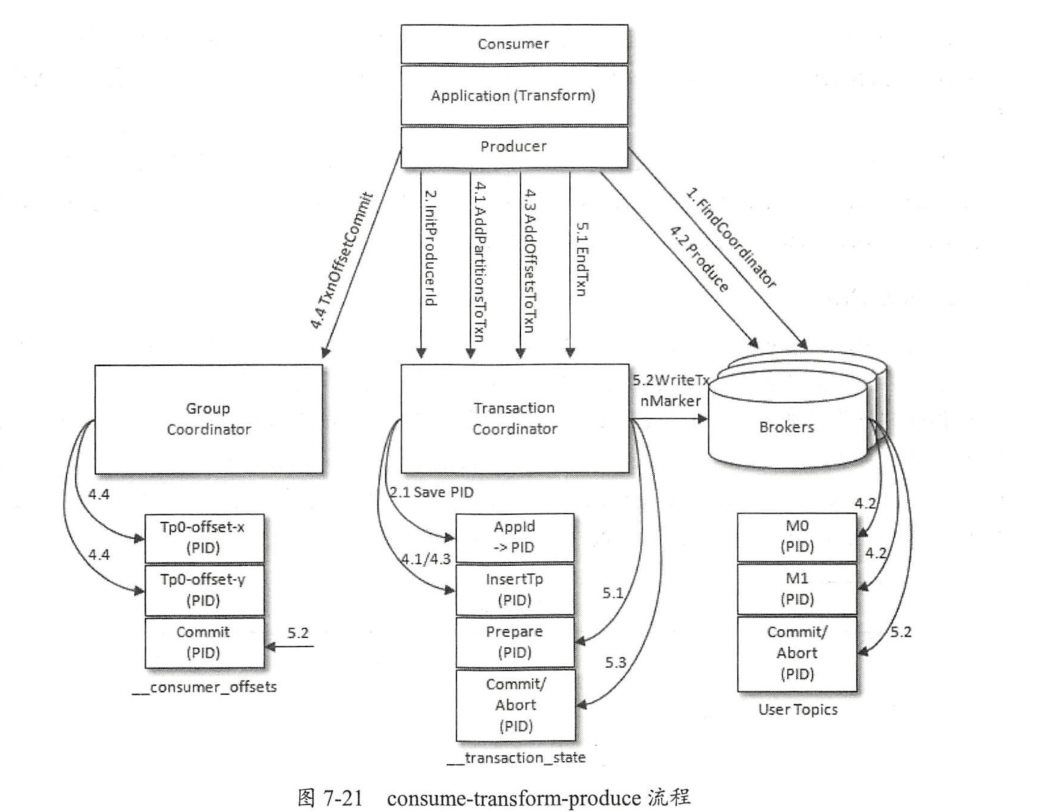
3.3.2.2. Implementation of Transactions
- Transaction coordinator.
4. How a Producer Prevents Message Loss
4.1. Set the Buffer
- Use
block.on.buffer.full = true. When the asynchronous buffer is full, block there and wait for the buffer to become available; do not clear the buffer.
4.2. Use Asynchronous Callbacks for Message Sending
- There are three ways to send messages:
- asynchronous by default:
send(xxx); - synchronous:
send(xxx).get(); - asynchronous callback:
send(xxx, callback).
- asynchronous by default:
- Use
KafkaProducer.send(record, callback). After sending a message, the callback function is invoked. If sending succeeds, send the next one; if sending fails, record it in the log and let a scheduled script scan it later (a reported send failure may not mean the actual send failed; it may only mean no feedback was received, so the scheduled script may send it again).
4.3. Set Retries
- Use
retriesandretry.backoff.msto set the number of retries and the interval between retries.
Discussion
Sign in with GitHub to comment. Discussions are stored as GitHub Issues.View on GitHub