
NOTE
2.1 Kafka Installation
Kafka version naming, a three-broker ZooKeeper-based cluster setup, directory structure, and configuration examples.
This is a historical learning note and may contain outdated or incomplete understanding.
1. Kafka Version Number
In kafka_2.12-2.8.0.tgz, the number 2.12 at the front represents the Scala version, and the number 2.8.0 at the back is the Kafka version.
2. Building a Kafka Cluster
2.1. Set Up the ZooKeeper Environment
2.2. Set Up the Scala Environment
2.2.1. Download Scala
2.2.2. Install Scala
Extract it directly, then modify PATH.
vim ~/.zshrc
# Add export PATH=$HOME/software/scala/bin:$PATH
source ~/.zshrc
2.3. Set Up Kafka
2.3.1. Download Kafka
2.3.2. Extract Three Directories
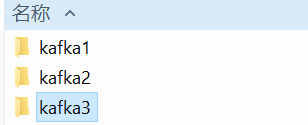
2.3.3. Modify the Configuration Files
- kafka1
broker.id=0
host.name=127.0.0.1
listeners=PLAINTEXT://:9093

num.network.threads=3
num.io.threads=8
socket.send.buffer.bytes=102400
socket.receive.buffer.bytes=102400
socket.request.max.bytes=104857600
log.dirs=<USER_HOME>/software/kafkas/kafka1/logs
num.partitions=1
num.recovery.threads.per.data.dir=1
offsets.topic.replication.factor=1
transaction.state.log.replication.factor=1
transaction.state.log.min.isr=1

log.retention.hours=168
message.max.byte=5242880
default.replication.factor=2
replica.fetch.max.bytes=5242880
log.segment.bytes=1073741824
log.retention.check.interval.ms=300000

zookeeper.connect=127.0.0.1:2181,127.0.0.1:2182,127.0.0.1:2183
zookeeper.connection.timeout.ms=6000
group.initial.rebalance.delay.ms=0- kafka2
broker.id=1
host.name=127.0.0.1
listeners=PLAINTEXT://:9094
num.network.threads=3
num.io.threads=8
socket.send.buffer.bytes=102400
socket.receive.buffer.bytes=102400
socket.request.max.bytes=104857600
log.dirs=<USER_HOME>/software/kafkas/kafka2/logs
num.partitions=1
num.recovery.threads.per.data.dir=1
offsets.topic.replication.factor=1
transaction.state.log.replication.factor=1
transaction.state.log.min.isr=1

log.retention.hours=168
message.max.byte=5242880
default.replication.factor=2
replica.fetch.max.bytes=5242880
log.segment.bytes=1073741824
log.retention.check.interval.ms=300000

zookeeper.connect=127.0.0.1:2181,127.0.0.1:2182,127.0.0.1:2183
zookeeper.connection.timeout.ms=6000
group.initial.rebalance.delay.ms=0- kafka3
broker.id=2
host.name=127.0.0.1
listeners=PLAINTEXT://:9095
num.network.threads=3
num.io.threads=8
socket.send.buffer.bytes=102400
socket.receive.buffer.bytes=102400
socket.request.max.bytes=104857600
log.dirs=<USER_HOME>/software/kafkas/kafka3/logs
num.partitions=1
num.recovery.threads.per.data.dir=1
offsets.topic.replication.factor=1
transaction.state.log.replication.factor=1
transaction.state.log.min.isr=1

log.retention.hours=168
message.max.byte=5242880
default.replication.factor=2
replica.fetch.max.bytes=5242880
log.segment.bytes=1073741824
log.retention.check.interval.ms=300000

zookeeper.connect=127.0.0.1:2181,127.0.0.1:2182,127.0.0.1:2183
zookeeper.connection.timeout.ms=6000
group.initial.rebalance.delay.ms=0
2.3.4. Start
- kafka1
kafka1/bin/kafka-server-start.sh kafka1/config/server.properties- kafka2
kafka2/bin/kafka-server-start.sh kafka2/config/server.properties- kafka3
kafka3/bin/kafka-server-start.sh kafka3/config/server.properties3. Kafka Directory Structure
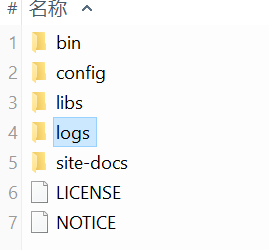
bindirectory- Broker-related
kafka-server-start.sh: start the broker.kafka-server-stop.sh: stop the broker.kafka-topics.sh: operate on Topics.
- Consumer-related
kafka-console-consumer.sh: operate on Consumers. Older versions connect to ZooKeeper; newer versions can connect directly to Brokers.
- Producer-related
kafka-console-producer.sh: operate on Producers; connect directly to Brokers.
- Broker-related
configdirectoryconsumer.properties
# The following configurations need to be changed
bootstrap.servers=localhost:9092
group.id=test-consumer-group
max.partition.fetch.bytes=12695150
producer.properties
# The following configurations need to be changed
bootstrap.servers=localhost:9092
max.request.size=12695150
server.properties
# The following configurations need to be changed broker.id=0 delete.topic.enable=true log.dirs=/tmp/kafka-logs zookeeper.connect=localhost:2181logsdirectory- Stores Topic data and log files.
Discussion
Sign in with GitHub to comment. Discussions are stored as GitHub Issues.View on GitHub