
NOTE
2.3 Kafka Usage
Kafka command-line usage and Java producer and consumer examples from the original VNote.
This is a historical learning note and may contain outdated or incomplete understanding.
1. Command-Line Usage
1.1. Topic
- Create a Topic
kafka-topics.bat --create --zookeeper localhost:2181 --partitions 2 --replication-factor 1 --topic firstThe Topic is named first.
--partitions 2 means there are two partitions, which can be seen in the logs directory.
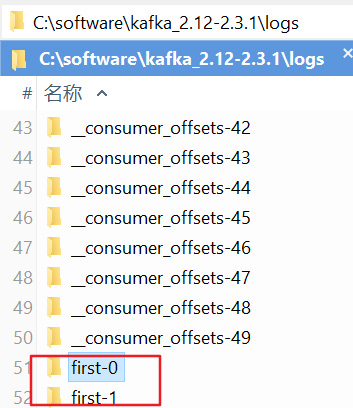 Setting
 replication-factor to 1 means there is only one copy of the data, namely the broker itself. Setting it to 2 causes an error because there is only one broker and the replicas cannot be distributed.
Error while executing topic command : Replication factor: 2 larger than available brokers: 1.
[2020-04-08 11:11:23,062] ERROR org.apache.kafka.common.errors.InvalidReplicationFactorException: Replication factor: 2 larger than available brokers: 1.
(kafka.admin.TopicCommand$)- List Topics
kafka-topics.bat --list --zookeeper localhost:2181- View Topic Details
kafka-topics.bat --zookeeper localhost:2181 --describe --topic first2- Output
Topic:first2    PartitionCount:2        ReplicationFactor:1     Configs:
    Topic: first2   Partition: 0    Leader: 0       Replicas: 0     Isr: 0
    Topic: first2   Partition: 1    Leader: 0       Replicas: 0     Isr: 0
This Topic is named first2, with two partitions and one replica (the broker itself).
The Leader of the first partition is on broker0, and the replica is also on broker0.
The Leader of the second partition is on broker1, and the replica is also on broker1.
1.2. Producer
- Produce data
kafka-console-producer.bat --broker-list localhost:9092 --topic first1.3. Consumer
- Consume data
kafka-console-consumer.bat --bootstrap-server localhost:9092 --topic first2. Java API
- Maven dependency
<dependencies>
    <dependency>
        <groupId>org.apache.kafka</groupId>
        <artifactId>kafka-clients</artifactId>
        <version>2.3.1</version>
    </dependency>
</dependencies>
2.1. Producer
2.1.1. Producer with Synchronous Calls
Properties properties = new Properties();
properties.put(ProducerConfig.BOOTSTRAP_SERVERS_CONFIG, "localhost:9092");// Server information
properties.put(ProducerConfig.ACKS_CONFIG, "all");// Acknowledgement level
properties.put(ProducerConfig.RETRIES_CONFIG, 0);// Number of retries

// Data is sent to Kafka when either of these two conditions is reached
properties.put(ProducerConfig.BATCH_SIZE_CONFIG, 16384);// Send when the size reaches this threshold: 16K
properties.put(ProducerConfig.LINGER_MS_CONFIG, 1);// Send when the time exceeds this threshold

properties.put(ProducerConfig.BUFFER_MEMORY_CONFIG, 33554432);// Buffer: 32M
properties.put(ProducerConfig.KEY_SERIALIZER_CLASS_CONFIG, "org.apache.kafka.common.serialization.StringSerializer");// Key serializer
properties.put(ProducerConfig.VALUE_SERIALIZER_CLASS_CONFIG, "org.apache.kafka.common.serialization.StringSerializer");// Value serializer

KafkaProducer<String, String> producer = new KafkaProducer<>(properties);
for (int i = 0; i < 10; i++)
{
    try
    {
        RecordMetadata metadata = producer.send(new ProducerRecord<>("first", String.valueOf(i))).get();
        System.out.println("Topic: " + metadata.topic() + " Partition: " +  metadata.partition() + " Offset: " + metadata.offset());
    }
    catch (InterruptedException e)
    {
        e.printStackTrace();
    }
    catch (ExecutionException e)
    {
        e.printStackTrace();
    }

}
producer.close();
2.1.2. Producer with Asynchronous Callback
Properties properties = new Properties();
properties.put(ProducerConfig.BOOTSTRAP_SERVERS_CONFIG, "localhost:9092");// Server information
properties.put(ProducerConfig.ACKS_CONFIG, "all");// Acknowledgement level
properties.put(ProducerConfig.RETRIES_CONFIG, 0);// Number of retries

// Data is sent to Kafka when either of these two conditions is reached
properties.put(ProducerConfig.BATCH_SIZE_CONFIG, 16384);// Send when the size reaches this threshold: 16K
properties.put(ProducerConfig.LINGER_MS_CONFIG, 1);// Send when the time exceeds this threshold

properties.put(ProducerConfig.BUFFER_MEMORY_CONFIG, 33554432);// Buffer: 32M
properties.put(ProducerConfig.KEY_SERIALIZER_CLASS_CONFIG, "org.apache.kafka.common.serialization.StringSerializer");// Key serializer
properties.put(ProducerConfig.VALUE_SERIALIZER_CLASS_CONFIG, "org.apache.kafka.common.serialization.StringSerializer");// Value serializer

KafkaProducer<String, String> producer = new KafkaProducer<>(properties);
for (int i = 0; i < 10; i++)
{
    producer.send(new ProducerRecord<>("first", String.valueOf(i)), new Callback()
    {
        @Override
        public void onCompletion(RecordMetadata metadata, Exception exception)
        {
            if (exception == null)
            {
                System.out.println("partition: " + metadata.partition() + ", offset: " + metadata.offset());
            }
            else
            {
                System.err.println("Send failed");
            }
        }
    });
}
producer.close();
2.1.3. Producer with a Custom Partitioning Strategy
public class ProducerTest3
{
    public static void main(String[] args)
    {
        Properties properties = new Properties();
        properties.put(ProducerConfig.BOOTSTRAP_SERVERS_CONFIG, "localhost:9092");// Server information
        properties.put(ProducerConfig.ACKS_CONFIG, "all");// Acknowledgement level
        properties.put(ProducerConfig.RETRIES_CONFIG, 0);// Number of retries

        // Data is sent to Kafka when either of these two conditions is reached
        properties.put(ProducerConfig.BATCH_SIZE_CONFIG, 16384);// Send when the size reaches this threshold: 16K
        properties.put(ProducerConfig.LINGER_MS_CONFIG, 1);// Send when the time exceeds this threshold

        properties.put(ProducerConfig.BUFFER_MEMORY_CONFIG, 33554432);// Buffer: 32M
        properties.put(ProducerConfig.KEY_SERIALIZER_CLASS_CONFIG, "org.apache.kafka.common.serialization.StringSerializer");// Key serializer
        properties.put(ProducerConfig.VALUE_SERIALIZER_CLASS_CONFIG, "org.apache.kafka.common.serialization.StringSerializer");// Value serializer

        properties.put(ProducerConfig.PARTITIONER_CLASS_CONFIG, "com.example.kafka.PartitionerTest");// Value serializer

        KafkaProducer<String, String> producer = new KafkaProducer<>(properties);
        for (int i = 0; i < 10; i++)
        {
            producer.send(new ProducerRecord<>("first", String.valueOf(i)), new Callback()
            {
                @Override
                public void onCompletion(RecordMetadata metadata, Exception exception)
                {
                    if (exception == null)
                    {
                        System.out.println("partition: " + metadata.partition() + ", offset: " + metadata.offset());
                    }
                    else
                    {
                        System.err.println("Send failed");
                    }
                }
            });
        }
        producer.close();
    }
}

public class PartitionerTest implements Partitioner
{
    @Override
    public int partition(String topic, Object key, byte[] keyBytes, Object value, byte[] valueBytes, Cluster cluster)
    {
        // Only use partition 0
        return 0;
    }

    @Override
    public void close()
    {

    }

    @Override
    public void configure(Map<String, ?> configs)
    {

    }
}
2.1.4. Test
- Create a Topic from the command line
kafka-topics.bat --create --zookeeper localhost:2181 --partitions 2 --replication-factor 1 --topic first- Command-line consumer
kafka-console-consumer.bat --bootstrap-server localhost:9092 --topic first

# Output
0
2
4
6
8
1
3
5
7
9

# Analysis
It can be seen that during consumption, all data in one partition is consumed before moving to the next partition.
Therefore, ordering is preserved within a partition, but not across partitions.
2.2. Consumer
2.2.1. Ordinary Consumer
Properties properties = new Properties();
properties.put(ConsumerConfig.BOOTSTRAP_SERVERS_CONFIG, "localhost:9092");// Server information
properties.put(ConsumerConfig.GROUP_ID_CONFIG, "test");// Set consumer group
properties.put(ConsumerConfig.ENABLE_AUTO_COMMIT_CONFIG, "true");// Automatically commit offset

properties.put(ConsumerConfig.AUTO_COMMIT_INTERVAL_MS_CONFIG, "1000");// Commit delay

properties.put(ConsumerConfig.KEY_DESERIALIZER_CLASS_CONFIG, "org.apache.kafka.common.serialization.StringDeserializer");// Key deserializer
properties.put(ConsumerConfig.VALUE_DESERIALIZER_CLASS_CONFIG, "org.apache.kafka.common.serialization.StringDeserializer");// Value deserializer

KafkaConsumer<String, String> consumer = new KafkaConsumer<String, String>(properties);
// Specify topics
consumer.subscribe(Arrays.asList("first", "second"));
// Get data
while (true)
{
    ConsumerRecords<String, String> records = consumer.poll(100);
    for (ConsumerRecord<String, String> record : records)
    {
        System.out.println("Topic: " + record.topic() + " Partition: " + record.partition() + " Value: " + record.value());
    }
}
2.2.2. Test
- Start the producer from the command line
kafka-console-producer.bat --broker-list localhost:9092 --topic first
Discussion
Sign in with GitHub to comment. Discussions are stored as GitHub Issues.View on GitHub