
NOTE
ps
1. Usage Normal usage Show threads Show thread count 2. Output 3. Explanation USER: user running the process PID: process ID %CPU: percentage of CPU used %MEM: percentage of memory used VSZ: virtual memory used, KB RSS: physical memory used, KB TTY:
This is a historical learning note and may contain outdated or incomplete understanding.
1. Usage
- Normal usage
ps aux- Show threads
ps -eLf- Show thread count
ps -mq PID2. Output
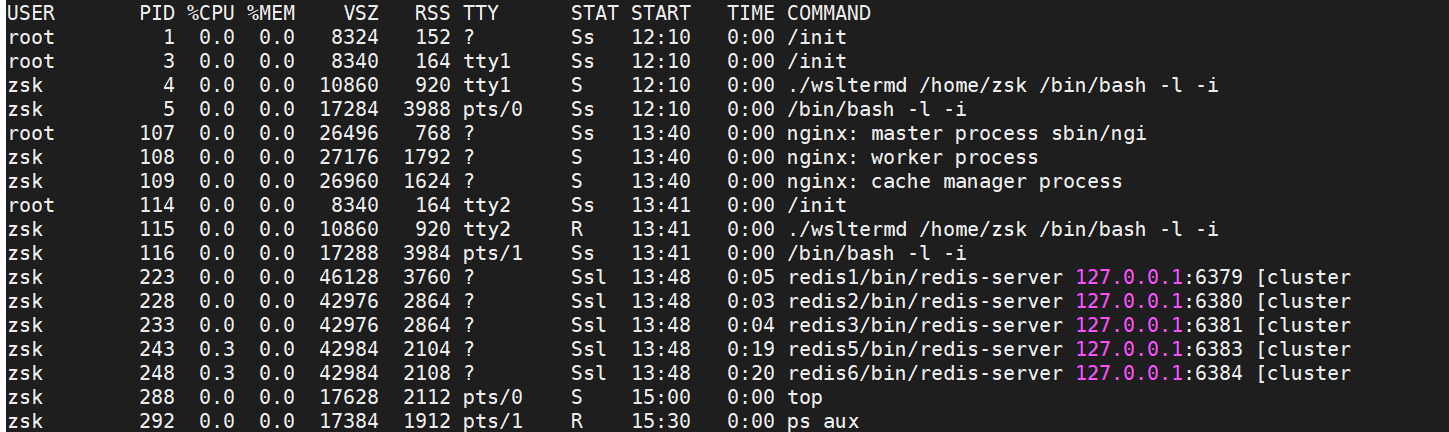
3. Explanation
- USER: user running the process
- PID: process ID
- %CPU: percentage of CPU used
- %MEM: percentage of memory used
- VSZ: virtual memory used, KB
- RSS: physical memory used, KB
- TTY: which terminal it is running on; if it is unrelated to a terminal, what is shown?
- tty1-tty6 are local logins; pts/0 and so on are network logins
- STAT: state
- R: running
- S: sleeping
- T: stopped, for example ctrl+Z
- Z: zombie
- D: uninterruptible
- Additional
- s: multiple processes
- l: multiple threads
- +: foreground
- <: high priority
- N: low priority
- START: start time
- TIME: running duration
- COMMAND: process name
Discussion
Sign in with GitHub to comment. Discussions are stored as GitHub Issues.View on GitHub