
NOTE
OAuth
Historical OAuth 2.0 notes covering why OAuth is needed, the authorization flow, grant modes, token refresh, and scopes.
This is a historical learning note and may contain outdated or incomplete understanding.
1. What Is OAuth
- An authorization protocol.
- Used to authorize third-party applications to obtain user data.
2. Why OAuth Is Needed
- Take logging into Jianshu with Weibo as an example: Jianshu needs to use the user’s Weibo avatar and nickname.
- The traditional approach is to enter the Weibo username + password to obtain them. This has several problems:
- The Weibo username and password are exposed to Jianshu and may be leaked.
- The user only wants Jianshu to obtain the Weibo avatar and nickname, but with the Weibo username and password, Jianshu can do anything.
- Therefore OAuth was created.
3. OAuth Flow
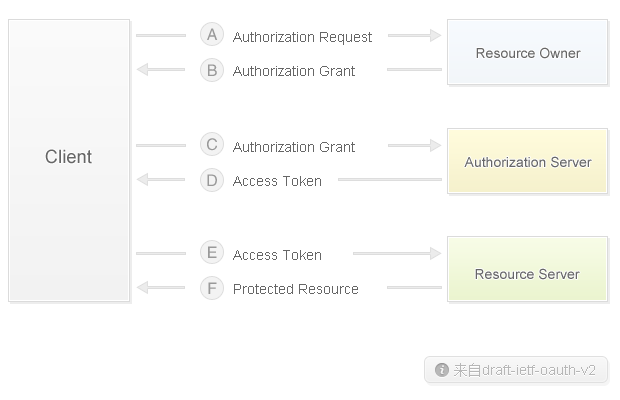
- In the scenario of logging into Jianshu with a Weibo account:
- Client is Jianshu.
- Resource Owner is the user.
- Authorization Server is Weibo’s authorization server.
- Resource Server is Weibo’s API server.
- The specific flow is as follows:
- A: Jianshu requests authorization from the User to access Weibo.
- B: The User agrees to authorize.
- C: Jianshu requests Weibo to issue an access token.
- D: Weibo returns the access token.
- E: Jianshu accesses the Weibo API with the access token.
- F: The Weibo API returns the avatar and nickname.
3.1. How OAuth Solves the Authorization Problem
- How does it solve the problem of exposing the username + password to a third party?
- Through an access token. This token has a short validity period, can be revoked at any time, and can access only part of the resources.
- How does it solve the problem of excessive access permissions?
- Through an access token. This token has a short validity period, can be revoked at any time, and can access only part of the resources.
- Why is user consent needed?
- The user may suddenly no longer want Jianshu to obtain personal information from WeChat.
- Why is it necessary to access the Authorization Server to obtain an access token?
- In essence, this is authorization. Without a token, other malicious users could also obtain the user’s information.
- How does the Application obtain information from the Resource Server?
- Through Weibo’s Open API.
3.2. Token-Issuing Modes
These are steps C and D in the OAuth flow.
3.2.1. Authorization Code
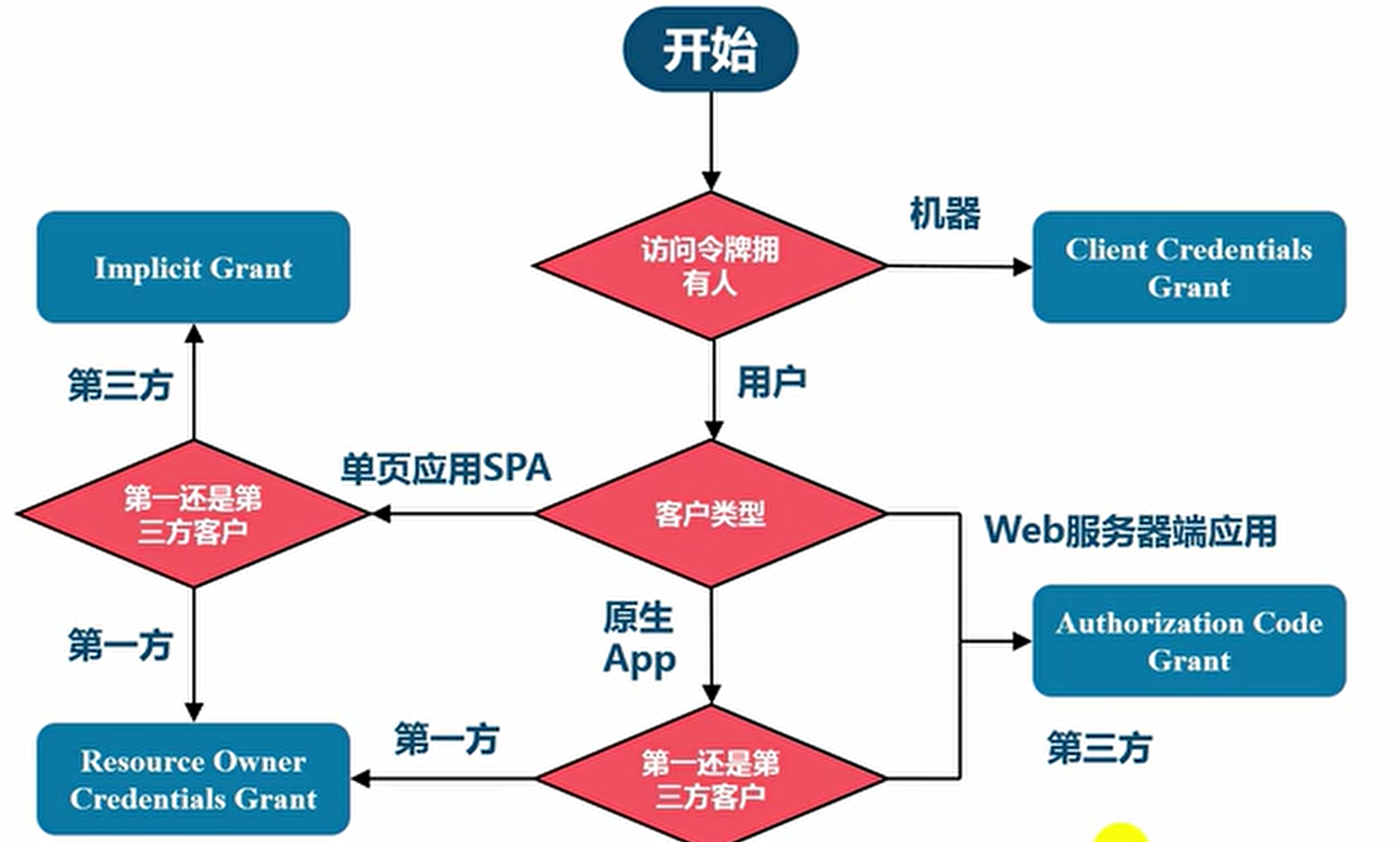
- The third-party application first applies for an authorization code, then uses the code to obtain a token.
- Generally, the frontend obtains the authorization code and passes it to the backend, and the backend obtains the token using the authorization code.
- Suitable for Web scenarios with a backend.

3.2.2. Implicit
- No authorization code needs to be obtained; the token is returned directly to the frontend.
- Suitable for pure frontend applications without a backend.

3.2.3. Password
- Directly tell the third-party application the username and password.
- Suitable for highly trusted applications.
3.2.4. Client Credentials
Suitable for command-line applications without a frontend, that is, requesting a token from the command line.
3.2.5. Mode Selection
3.3. How to Refresh a Token
When the Token expires, how is it refreshed?
One way is to go through the token-issuing flow again.
Another way is to issue two tokens at once: one is used to obtain data, and the other is used to obtain a new token (the refresh token field). Before the token expires, the user sends a request with the refresh token to refresh the token.
3.4. scope
[Article] How to Use OAuth 2.0 Scopes to Provide Role-Based Authorization to APIs Exposed via WSO2 API Manager Role-Based Access Control with OAuth Scopes - WSO2 API Manager Documentation 3.2.0 How to Design a Permission System.md (related note not yet published)
4. References
- Introduction to OAuth 2.0 - QQ Connect WIKI
- A Simple Explanation of OAuth 2.0 - Ruan Yifeng’s Weblog
- Four OAuth 2.0 Methods - Ruan Yifeng’s Weblog
- Understanding OAuth 2.0 - Ruan Yifeng’s Weblog
- Task 7: Introduction to OAuth2 - bilibili
- Spring Security OAuth 2.0 Authentication and Authorization Topic - bilibili
- Authorization Mechanism Description - Weibo API
- Things About OAuth | Huoding Notes
- What Is the Difference Between OpenID and OAuth? - Zhihu
- wx.login(Object object) | WeChat Open Documentation
- OAuth 2.0 — OAuth
Discussion
Sign in with GitHub to comment. Discussions are stored as GitHub Issues.View on GitHub