
NOTE
How to Design a Load-Balancing Component
What load balancing is, why it is needed, common algorithms, hardware/software/DNS choices, L2/L3/L7 approaches, and client-side versus server-side load balancing.
This is a historical learning note and may contain outdated or incomplete understanding.
1. What Is Load Balancing
- Distribute requests (workloads) evenly across multiple machines to improve performance and availability.
2. Why Load Balancing Is Needed
- Improve availability through machine redundancy.
- Make horizontal scaling easier to improve performance and throughput.
- Vertical scaling means replacing machines with more powerful ones. The price is naturally higher, and the cost-performance ratio is not very good.
3. How to Implement a Load-Balancing Component
3.1. What Load-Balancing Algorithms Are There?
The load-balancing algorithm determines which healthy backend servers are selected. Several commonly used algorithms are:
3.1.1. Round Robin
- Each request from the network is assigned to internal servers in turn, from 1 to N, and then starts over.
- This balancing algorithm is suitable when all servers in the cluster have the same software and hardware configuration and average service requests are relatively balanced.
3.1.2. Weighted Round Robin
- Assign different weights to each server according to their different processing capabilities, so that each can receive a number of service requests corresponding to its weight.
- This balancing algorithm ensures that high-performance servers receive more utilization and prevents low-performance servers from being overloaded.
3.1.3. Random
- Randomly distribute requests from clients to multiple internal servers.
- With enough data, it can achieve a relatively balanced distribution.
3.1.4. Consistent Hash
- Use some data in the request (such as MAC, IP address, or certain parameter information in a higher-level protocol) as a feature value to calculate which node the request should land on. The algorithm generally ensures that the same feature value always lands on the same server.
3.1.5. Response Time
- The load-balancing device sends a probe request (for example, Ping) to each internal server, then decides which server should respond to the client’s service request according to the fastest response time among the internal servers.
- This balancing algorithm can reflect the current operating state of the servers relatively well, but the fastest response time here only refers to the fastest response time between the load-balancing device and the server, not between the client and the server.
3.1.6. Least Connection
- The least-connections algorithm maintains a record for each server being load-balanced, recording the number of connections that server is currently handling. When a new service connection request arrives, the request is assigned to the server with the fewest connections.
- This balancing strategy is suitable for requests that take a long time to process.
3.2. Should the Load Balancer Be Hardware or Software?
3.2.1. Hardware vs. Software
| Hardware | Software | DNS | |
|---|---|---|---|
| Principle | Implemented directly with an application-specific integrated circuit (ASIC) | Operating-system kernel or application program | One domain name resolves to multiple IPs through DNS |
| Examples | F5, A10 | LVS and Nginx, L5, HAProxy, KeepAlived | DNS |
| Advantages | High efficiency; avoids operating-system or application-layer overhead | High flexibility | Simple; no need to develop and maintain load balancing; nearby access improves access speed |
| Disadvantages | Expensive; low flexibility | Low efficiency; inexpensive | Updates are not timely; few load-balancing strategies |
- Software load balancing is divided into two types: balancers built directly into the operating-system kernel and balancers implemented as applications.
- The former has high performance and does not need to copy packets back and forth between kernel space and application space.
- The latter has high flexibility and low efficiency.
3.3. Should the Load Balancer Work at Layer 4 or Layer 7?
3.3.1. Layer 4 vs. Layer 7
| Layer 4 | Layer 7 | |
|---|---|---|
| Layer | Network layer or data-link layer | Application layer |
| Software | F5 load balancing, LVS Layer-4 load balancing, HAProxy Layer-4 load balancing, Nginx Layer-4 load balancing | Nginx Layer-7 load balancing, HAProxy Layer-7 load balancing |
| Principle | Virtual MAC <-> real MAC or virtual IP <-> real IP | Parse HTTP requests and forward them to application servers |
| Advantage | High efficiency | High flexibility |
- A “Layer-4” load balancer does not actually work only at Layer 4 (the transport layer); it includes Layer 2 and Layer 3. After all, by the transport layer the traffic has already reached a particular application on the host, so there is not much left to load-balance.
- Layer-2 load balancer (data-link layer)
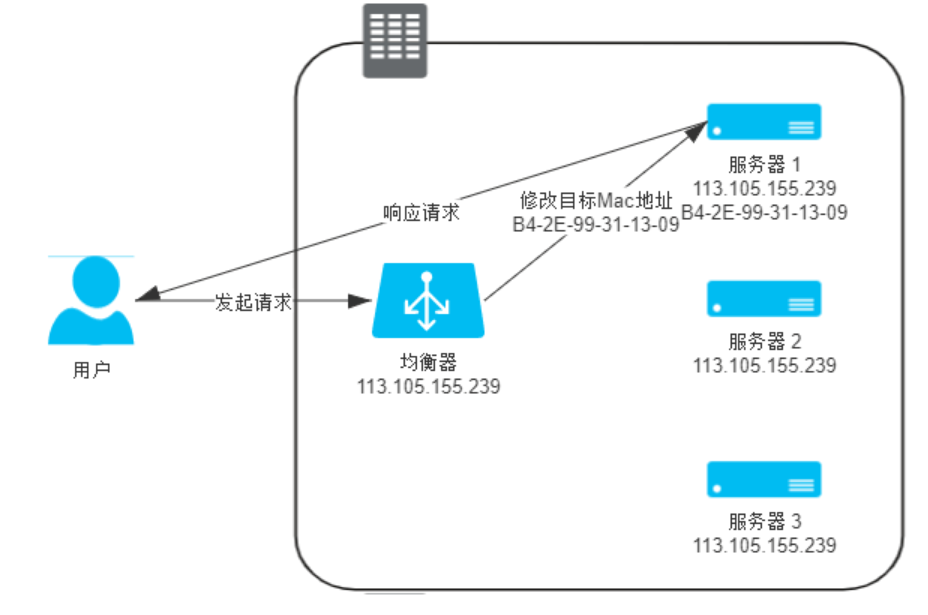
- Advantage: works at Layer 2, so efficiency is high.
- Disadvantages: cannot perceive the application; cannot cross subnets.
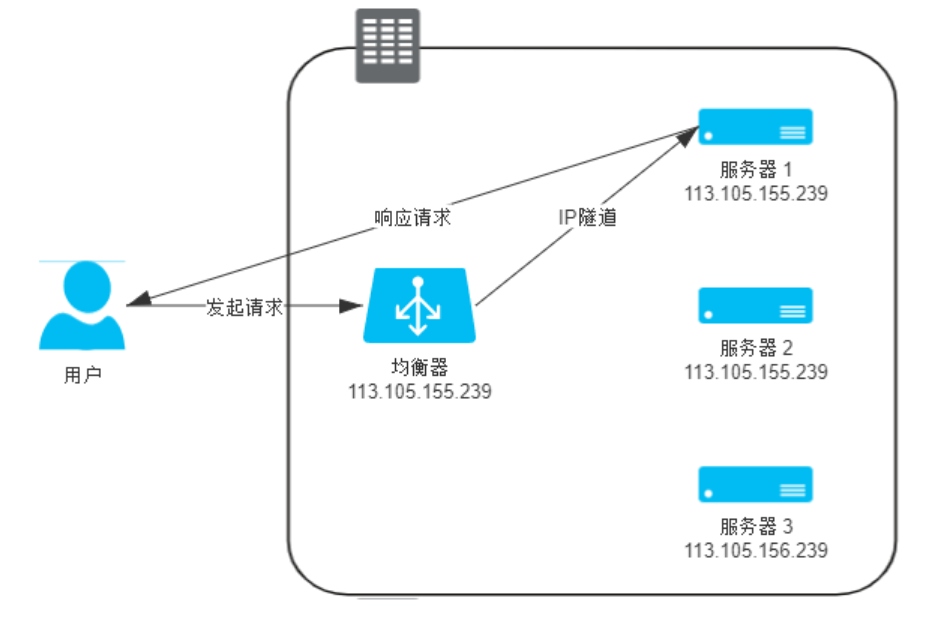
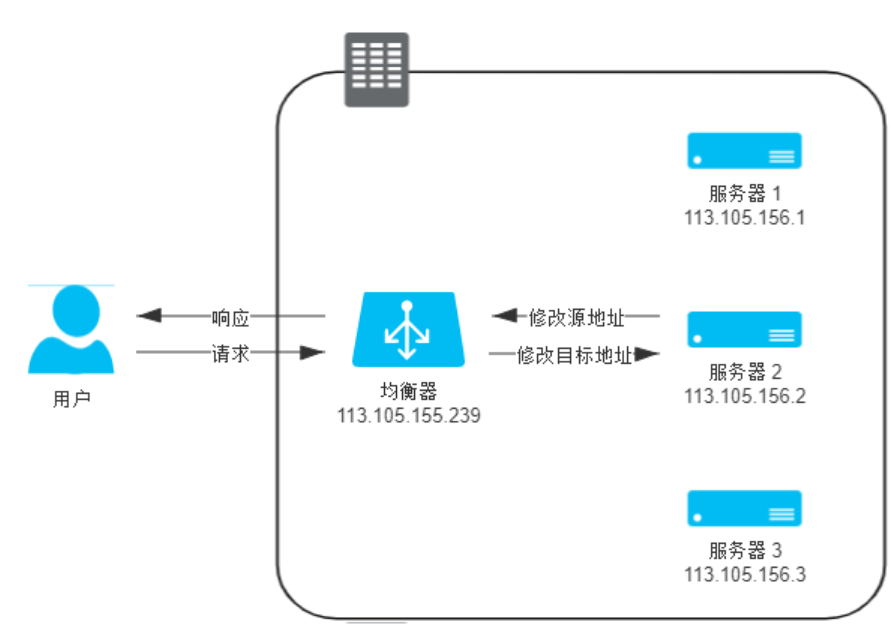
- Layer-3 load balancer (network layer)
- IP tunnel mode:
- NAT mode:
- IP tunnel mode:
- Layer-2 load balancer (data-link layer)
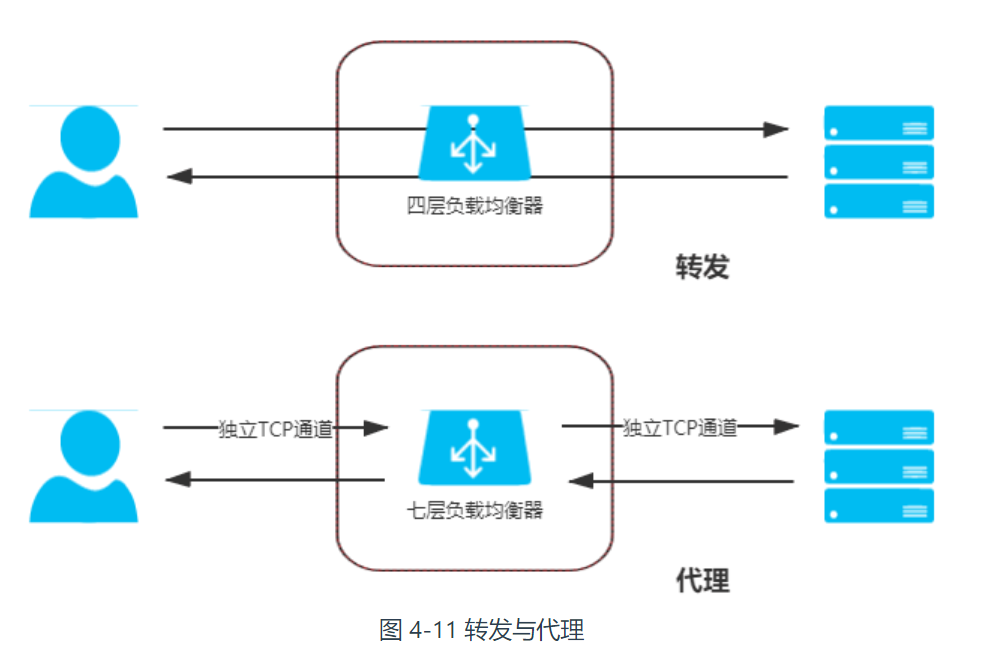
- Layer-7 load balancing is proxying rather than forwarding; it also refers to reverse proxying.
- Proxy vs. forwarding:
- Proxy types:
- Forward proxy: the client can perceive it, while the server cannot.
- Reverse proxy: the client cannot perceive it, while the server can.
- Transparent proxy: neither the client nor the server can perceive it. A proxy service configured on an intermediate network device, for example a transparent proxy on a router for bypassing network restrictions.
- Proxy vs. forwarding:
3.4. Should the Load Balancer Be on the Client or Server Side?
3.4.1. Server Side
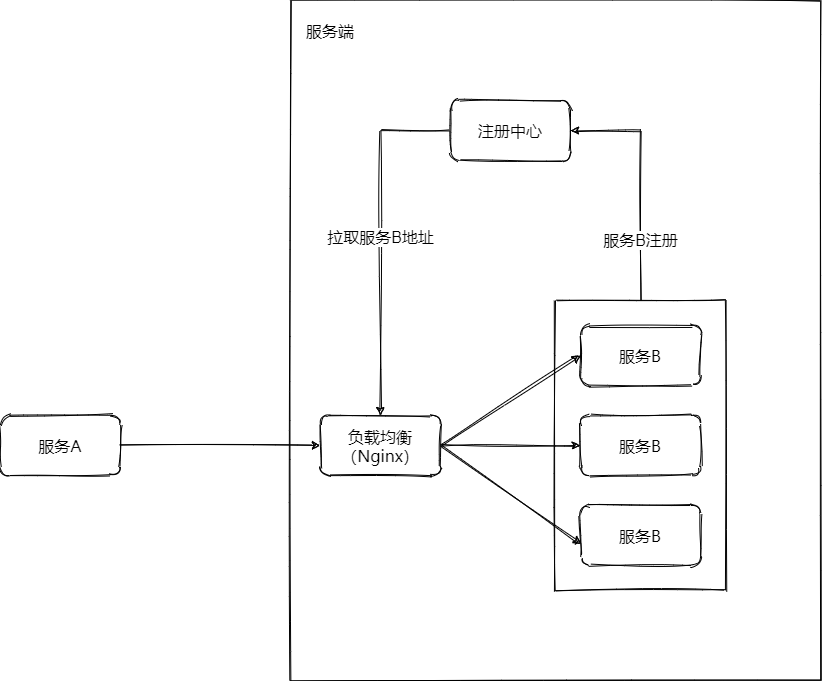
- The load-balancing component is server-side (such as F5, Nginx, etc.) and can be used together with a service registry.
- The service provider registers its address in the service registry.
- The service consumer finds the address of the load-balancing component through DNS, and then the load-balancing component forwards the request to the service provider.
- Advantage: transparent to the client.
- Disadvantage: compared with the client-side solution, the server side involves network transmission and is less efficient.
3.4.2. Client Side
3.4.2.1. Built into the Consumer
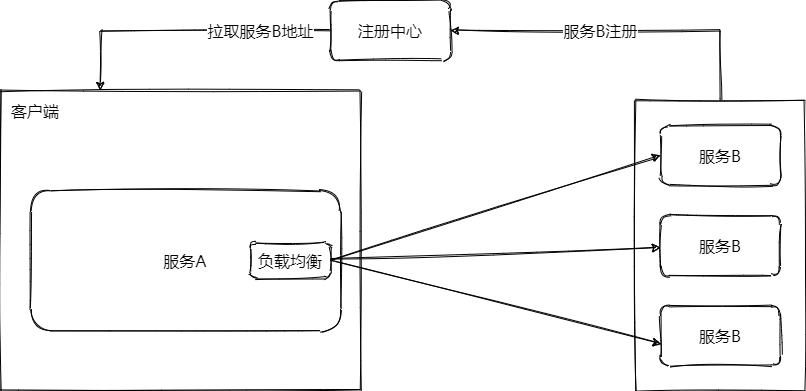
- The load-balancing component is client-side and built into the service consumer, and can be used together with a service registry.
- The service provider registers its address in the service registry.
- The service consumer retrieves addresses from the service registry, then load balancing forwards the request to any node.
- Advantage: inter-process communication does not involve the network, so efficiency is high.
- Disadvantage: every language has to implement its own load-balancing component.
3.4.2.2. Independent Component
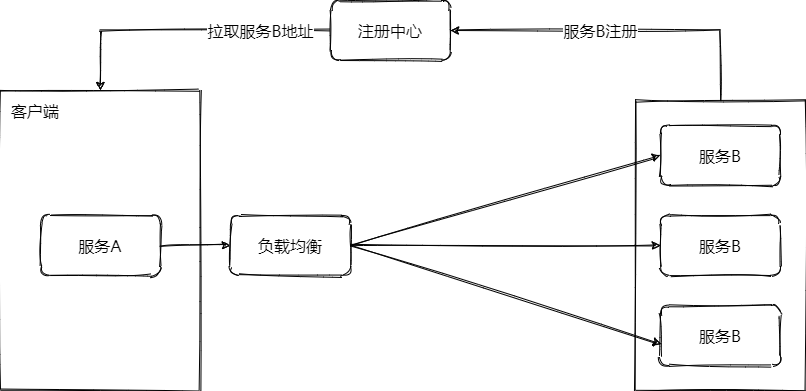
- The load-balancing component is client-side and independent, and can be used together with a service registry.
- The service provider registers its address in the service registry.
- The service consumer retrieves addresses from the service registry, then load balancing forwards the request to any node.
- Advantage: although it involves network communication, it is on localhost together with the client, so efficiency is not low; there is no need to implement a load-balancing component separately for every language.
- Disadvantage: every language still needs to implement its own load-balancing client, while the component itself is shared.
3.4.3. Client Side vs. Server Side
| Client Side | Server Side | |
|---|---|---|
| Definition | The client obtains all backend server addresses and then performs load balancing | The client directly calls the load-balancing server, which forwards to a backend server |
| Example | Ribbon | Nginx |
| Advantage | Inter-process communication does not involve the network, so efficiency is high | Transparent to the client |
| Disadvantage | Every language has to implement it once | Network transmission makes efficiency lower |
4. Examples
4.1. Ribbon
4.2. Nginx
5. References
- Load Balancing - Wikipedia, the Free Encyclopedia
- What Is Load Balancing? - Zhihu
- Principles of Server-Cluster Load Balancing - DavidChen’s Blog - CSDN
- Load Balancing, DNS, F5, Reverse Proxy, LVS, Layer 4 and Layer 7, CDN
- Detailed Explanation of Layer 4, Layer 7, and DNS Geographic Load Balancing - Zhihu
- The Most Detailed Illustrated Explanation of Load-Balancing Principles on the Web - Zhihu
- Load-Balancing Explanation (Layer 2/3/4/7), and Detailed Advantages and Disadvantages of Nginx/LVS/HAProxy - zzhongcy’s Column - CSDN
Discussion
Sign in with GitHub to comment. Discussions are stored as GitHub Issues.View on GitHub