
NOTE
5.3 ArrayList
What ArrayList is, how to use it, and source analysis of construction, add, remove, resizing, and fail-fast behavior.
This is a historical learning note and may contain outdated or incomplete understanding.
1. What Is It?
An expandable sequential list implemented underneath by an array.
It is ordered and allows duplicate elements.
2. How to Use It
public class ArrayListTest
{
    public static void main(String[] args)
    {
        ArrayList<String> list = new ArrayList<>();
        list.add("1");
        list.add("2");

        System.out.println(list);

        list.remove(0);
        list.remove("2");
    }
}
3. Implementation Analysis
3.1. UML
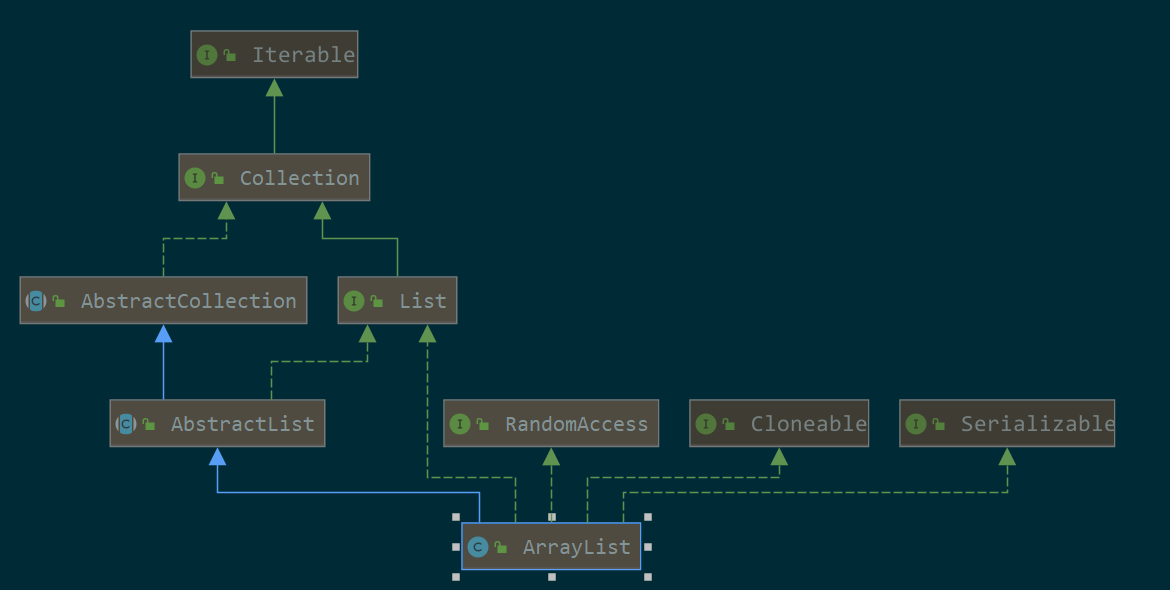
It can be seen that ArrayList is a List, can be cloned, can be serialized, and supports indexed access.
3.2. Constructor
It uses an Object array internally, and the default no-argument constructor starts with length 0.
public class ArrayList<E> extends AbstractList<E>
        implements List<E>, RandomAccess, Cloneable, java.io.Serializable
{
    // With the default no-argument constructor, initial capacity is 0.
    // On the first expansion, capacity becomes 10.
    private static final int DEFAULT_CAPACITY = 10;

    // Empty arrays used when there are no elements.
    private static final Object[] EMPTY_ELEMENTDATA = {};
    private static final Object[] DEFAULTCAPACITY_EMPTY_ELEMENTDATA = {};

    // List is implemented underneath with an Object array.
    transient Object[] elementData;

    // Number of actually used elements in the Object array.
    private int size;

    public ArrayList() {
        // Default empty array.
        this.elementData = DEFAULTCAPACITY_EMPTY_ELEMENTDATA;
    }
}
3.3. add Method
- O(1) without expansion, O(N) when expansion is required.
public boolean add(E e) {
    // Ensure there is enough capacity.
    ensureCapacityInternal(size + 1);  // Increments modCount!!
    // Assign at the end.
    elementData[size++] = e;
    return true;
}
3.3.1. Ensure Enough Capacity for the New Element
private void ensureCapacityInternal(int minCapacity) {
    ensureExplicitCapacity(calculateCapacity(elementData, minCapacity));
}

private static int calculateCapacity(Object[] elementData, int minCapacity) {
    // If created with the default constructor, capacity is 0,
    // so the first expansion is to 10.
    if (elementData == DEFAULTCAPACITY_EMPTY_ELEMENTDATA) {
        return Math.max(DEFAULT_CAPACITY, minCapacity);
    }
    return minCapacity;
}

private void ensureExplicitCapacity(int minCapacity) {
    modCount++;

    // overflow-conscious code
    // Compare by subtraction to help avoid overflow.
    if (minCapacity - elementData.length > 0)
        // Expansion is required.
        grow(minCapacity);
}

private void grow(int minCapacity) {
    // overflow-conscious code
    int oldCapacity = elementData.length;
    // New length = old length * 1.5.
    int newCapacity = oldCapacity + (oldCapacity >> 1);
    // If the new length is smaller than the minimum required length,
    // use the minimum required length.
    if (newCapacity - minCapacity < 0)
        newCapacity = minCapacity;

    // If the new length exceeds MAX_ARRAY_SIZE,
    // use hugeCapacity.
    if (newCapacity - MAX_ARRAY_SIZE > 0)
        newCapacity = hugeCapacity(minCapacity);
    // minCapacity is usually close to size, so this is a win:
    // Copy the elements from the old array into the new array.
    elementData = Arrays.copyOf(elementData, newCapacity);
}

private static int hugeCapacity(int minCapacity) {
    // If the minimum required length itself overflowed, OOM.
    if (minCapacity < 0) // overflow
        throw new OutOfMemoryError();
    // If minCapacity is greater than MAX_ARRAY_SIZE, use Integer.MAX_VALUE;
    // otherwise use MAX_ARRAY_SIZE.
    return (minCapacity > MAX_ARRAY_SIZE) ?
        Integer.MAX_VALUE :
        MAX_ARRAY_SIZE;
}
3.3.2. Put the Element at the End of the Array
// Assign and increment the index.
elementData[size++] = e;
3.4. remove Method [Delete by Index]
- O(N)
public E remove(int index) {
    // Prevent index out of bounds.
    rangeCheck(index);

    modCount++;
    // Save the element to delete so it can be returned.
    E oldValue = elementData(index);

    // Number of elements to move.
    int numMoved = size - index - 1;
    if (numMoved > 0)
        // Move later elements forward.
        System.arraycopy(elementData, index+1, elementData, index,
                         numMoved);
    // The actual array length does not change. size must be updated.
    elementData[--size] = null; // clear to let GC do its work

    return oldValue;
}
3.4.1. Move Data After index Forward
// Calculate how many elements after index need to be moved.
int numMoved = size - index - 1;
if (numMoved > 0)
    // Move later elements forward.
    System.arraycopy(elementData, index+1, elementData, index,
                     numMoved);
3.4.2. Update size [The Array Does Not Shrink]
// The physical array length does not change; size is updated.
elementData[--size] = null; // clear to let GC do its work
3.5. remove Method [Delete by Element Value]
- O(N)
public boolean remove(Object o) {
    // null
    if (o == null) {
        // Find the index.
        for (int index = 0; index < size; index++)
            // Compare with == null.
            if (elementData[index] == null) {
                // Delete the element at that index.
                fastRemove(index);
                return true;
            }
    } else {
        for (int index = 0; index < size; index++)
            // Compare with equals.
            if (o.equals(elementData[index])) {
                fastRemove(index);
                return true;
            }
    }
    return false;
}
3.5.1. First Find the Index of the Element to Delete
for (int index = 0; index < size; index++)
{
//...
}
As shown above, this is simply a traversal search with O(N) complexity, after which deletion is performed by index.
- fastRemove
private void fastRemove(int index) {
    modCount++;
    // Calculate the number of elements to move.
    int numMoved = size - index - 1;
    if (numMoved > 0)
        // Copy forward.
        System.arraycopy(elementData, index+1, elementData, index,
                         numMoved);
    // Set to null and size--.
    elementData[--size] = null; // clear to let GC do its work
}
This logic is the same as the previous remove method that deletes by index.
3.5.2. Move Data After index Forward
// Calculate the number of elements to move.
int numMoved = size - index - 1;
if (numMoved > 0)
    // Copy forward.
    System.arraycopy(elementData, index+1, elementData, index,
                     numMoved);
3.5.3. Update size [The Array Does Not Shrink]
// Set to null and decrement size.
elementData[--size] = null; // clear to let GC do its work
4. ConcurrentModificationException
See: fail-fast
public class ConcurrentModificationExceptionTest
{
    public static void main(String[] args)
    {
        List<String> stringList = new ArrayList<>();
        for (int i = 0; i < 1000; i++)
        {
            stringList.add(String.valueOf(i));
        }

        for (String s : stringList)
        {
            stringList.remove(s);//java.util.ConcurrentModificationException
        }
    }
}
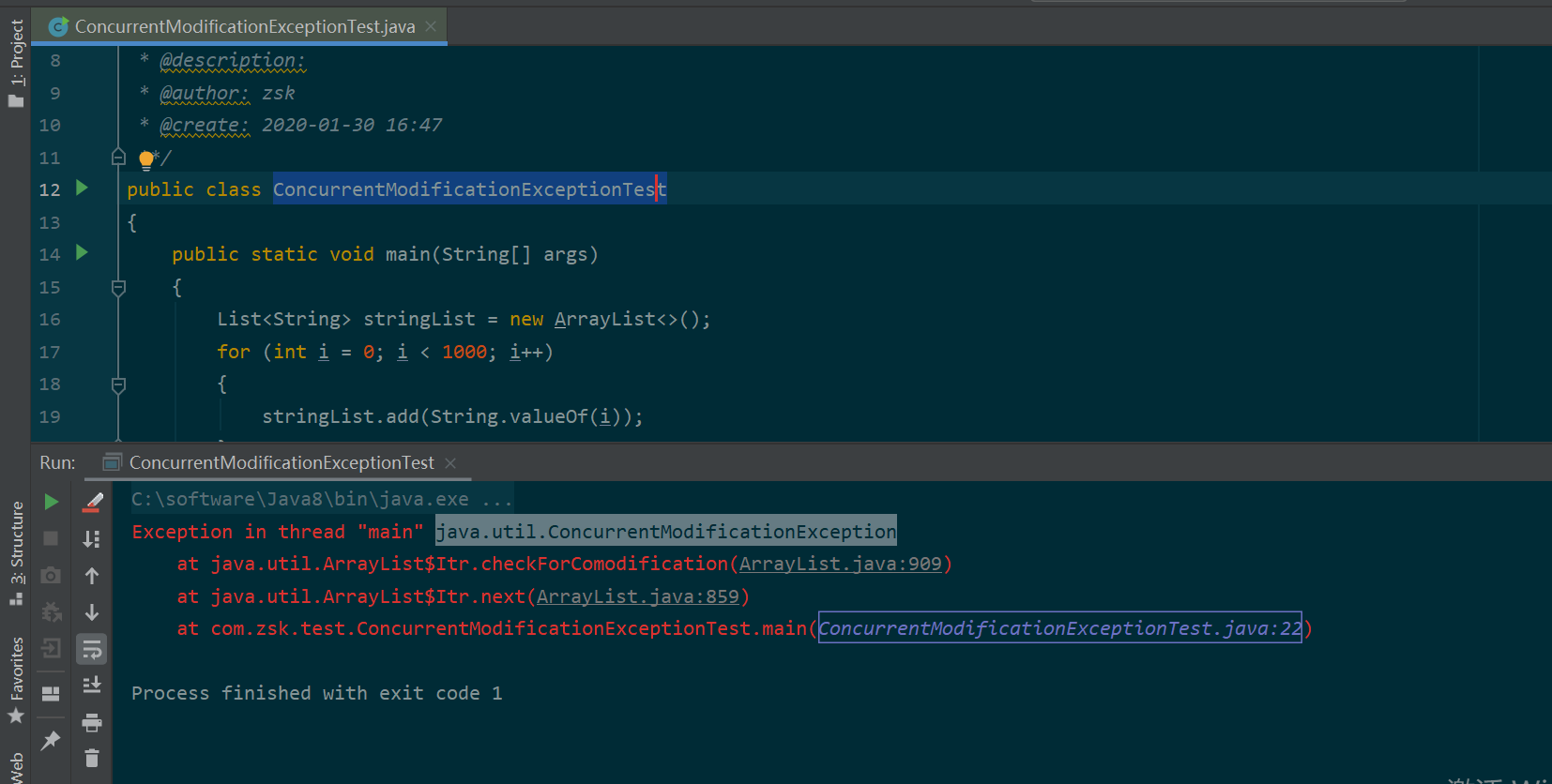
The code above throws ConcurrentModificationException while running.
4.1. Cause Analysis
Deleting with remove while traversing with an iterator can trigger this exception. This is the fail-fast mechanism.
It is caused by modCount and expectedModCount no longer being equal.
4.2. Solution
Use the fail-safe CopyOnWriteArrayList from the JUC package when that behavior is appropriate.
Discussion
Sign in with GitHub to comment. Discussions are stored as GitHub Issues.View on GitHub