
NOTE
7.21 JVM Parameter Tuning
Which JVM parameters to tune, JVM parameter types, how to inspect them, common options, examples, and a typical configuration.
This is a historical learning note and may contain outdated or incomplete understanding.
1. Which Parameters to Adjust
-
For JVM heap settings,
-Xmsand-Xmxcan be used to limit the minimum and maximum values. To avoid extra time spent by the garbage collector growing and shrinking the heap between the minimum and maximum, they are often set to the same value. -
The young and old generations are allocated from the heap according to a default ratio in the historical JVM configuration described by this note. Their size relationship can be adjusted through
NewRatio. The young generation can also be configured directly with-XX:NewSizeand-XX:MaxNewSize. To avoid resizing the young generation, these are sometimes set to the same value. -
How large should the young and old generations be?
- A larger young generation necessarily leaves a smaller old generation. A larger young generation lengthens the interval between ordinary young-generation GCs but can increase the time per GC; a smaller old generation can lead to more frequent Full GCs.
- A smaller young generation necessarily leaves a larger old generation. A smaller young generation can cause more frequent ordinary GCs, but each GC may take less time; a larger old generation can reduce Full-GC frequency.
The choice depends on the distribution of object lifetimes in the application. If the application creates many temporary objects, a larger young generation may be appropriate. If it has relatively many long-lived objects, the old generation should be larger. Many applications do not have such obvious characteristics.
When choosing, the original note recommends considering:
- Based on the principle of minimizing Full GC, leave enough old-generation space for long-lived/common objects.
- Observe the application’s old-generation usage during peak load. Without causing additional Full GCs, increase the young generation according to actual behavior, while reserving sufficient growth space for the old generation.
-
On a machine with stronger hardware, such as multiple cores and plenty of memory, the historical note suggests the parallel old-generation collector:
-XX:+UseParallelOldGC. -
Thread-stack settings: each thread reserves stack space for stack frames, call parameters, local variables, etc. Reducing stack size can allow more threads under the same memory budget, but the actual limit is also constrained by the operating system and by the stack depth required by the application.
2. JVM Parameter Types
2.1. Standard Parameters
2.2. X Parameters
-Xms is equivalent to -XX:InitialHeapSize.
-Xmx is equivalent to -XX:MaxHeapSize.
2.3. XX Parameters [Important]
2.3.1. Boolean Type
-XX:+/-<parameter>
2.3.2. Key-Value Type
-XX:<key>=<value>
3. How to Inspect JVM Parameters
3.1. View Parameters of a Process
3.1.1. Check Whether a Parameter Is Enabled
- First use
jps -lto obtain the process ID. - Then use
jinfo -flag PrintGCDetails PIDto view the parameter state. - Example result:
-XX:-PrintGCDetailsThis means PrintGCDetails is disabled.
3.1.2. View the Current JVM Parameters of a Process
jinfo -flags PID3.2. View Default / Effective Values
java -XX:+PrintCommandLineFlags -version: before startup, print XX options explicitly set by the user or automatically selected by the JVM.java -XX:+PrintFlagsInitial: print the initial/default values of XX options.java -XX:+PrintFlagsFinal: print the effective values of XX options when the program runs.
In the output, parameters containing := have been modified; parameters containing only = retain their unmodified value.
4. Common JVM Parameters
4.1. -Xms
Initial heap size.
Equivalent to -XX:InitialHeapSize.
4.2. -Xmx
Maximum heap size.
Equivalent to -XX:MaxHeapSize.
4.3. -Xss
Sets the stack size for each thread.
Equivalent to -XX:ThreadStackSize.
4.4. -Xmn
Sets the young-generation size in the heap.
4.5. -XX:PermSize
Sets the PermGen size in JVM versions that still use PermGen.
4.6. -XX:MaxPermSize
Sets the maximum PermGen size in JVM versions that still use PermGen.
4.7. -XX:MetaspaceSize
Sets the initial high-water mark at which class-metadata usage can trigger GC; it is not simply the fixed metaspace size.
4.8. -XX:MaxMetaspaceSize
Sets the maximum Metaspace size.
4.9. -XX:+PrintGCDetails
Print detailed GC logs.
4.10. -XX:+PrintGCDateStamps
Use timestamp format when printing GC information.
4.10.1. Example
HelloGc
public class HelloGc
{
    public static void main(String[] args) throws InterruptedException
    {
        byte[] bytes = new byte[1024 * 1024 * 50];
        TimeUnit.SECONDS.sleep(Integer.MAX_VALUE);
    }
}- JVM parameters
-Xms10m -Xmx10m -XX:+PrintGCDetails- Result
[GC (Allocation Failure) [PSYoungGen: 1322K->464K(2560K)] 1322K->472K(9728K), 0.0054838 secs] [Times: user=0.00 sys=0.00, real=0.01 secs]
[GC (Allocation Failure) [PSYoungGen: 464K->400K(2560K)] 472K->408K(9728K), 0.0054238 secs] [Times: user=0.01 sys=0.00, real=0.00 secs]
[Full GC (Allocation Failure) [PSYoungGen: 400K->0K(2560K)] [ParOldGen: 8K->369K(7168K)] 408K->369K(9728K), [Metaspace: 2965K->2965K(1056768K)], 0.0310888 secs] [Times: user=0.06 sys=0.00, real=0.03 secs]
[GC (Allocation Failure) [PSYoungGen: 0K->0K(2560K)] 369K->369K(9728K), 0.0016863 secs] [Times: user=0.01 sys=0.00, real=0.01 secs]
[Full GC (Allocation Failure) [PSYoungGen: 0K->0K(2560K)] [ParOldGen: 369K->350K(7168K)] 369K->350K(9728K), [Metaspace: 2965K->2965K(1056768K)], 0.0212330 secs] [Times: user=0.04 sys=0.00, real=0.02 secs]
Exception in thread "main" java.lang.OutOfMemoryError: Java heap space
    at com.zsk.context.gc.HelloGc.main(HelloGc.java:14)
Heap
 PSYoungGen      total 2560K, used 152K [0x00000000ffd00000, 0x0000000100000000, 0x0000000100000000)
  eden space 2048K, 7% used [0x00000000ffd00000,0x00000000ffd26240,0x00000000fff00000)
  from space 512K, 0% used [0x00000000fff00000,0x00000000fff00000,0x00000000fff80000)
  to   space 512K, 0% used [0x00000000fff80000,0x00000000fff80000,0x0000000100000000)
 ParOldGen       total 7168K, used 350K [0x00000000ff600000, 0x00000000ffd00000, 0x00000000ffd00000)
  object space 7168K, 4% used [0x00000000ff600000,0x00000000ff657b08,0x00000000ffd00000)
 Metaspace       used 3052K, capacity 4496K, committed 4864K, reserved 1056768K
class space used 327K, capacity 388K, committed 512K, reserved 1048576K- Explanation
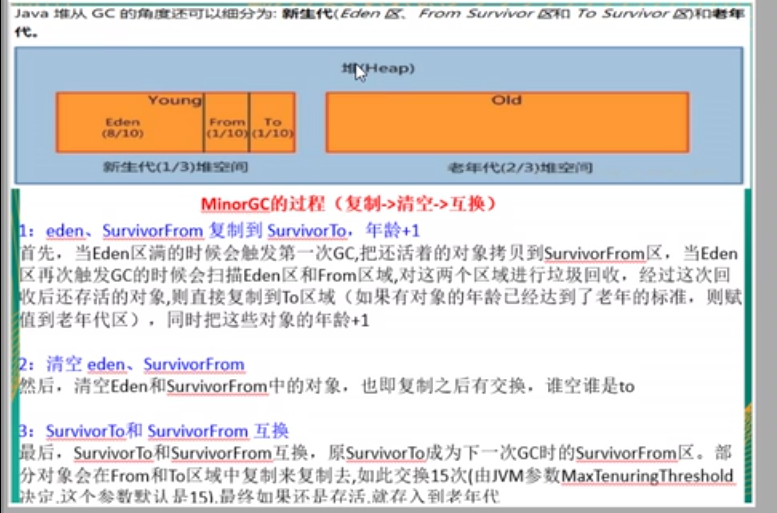
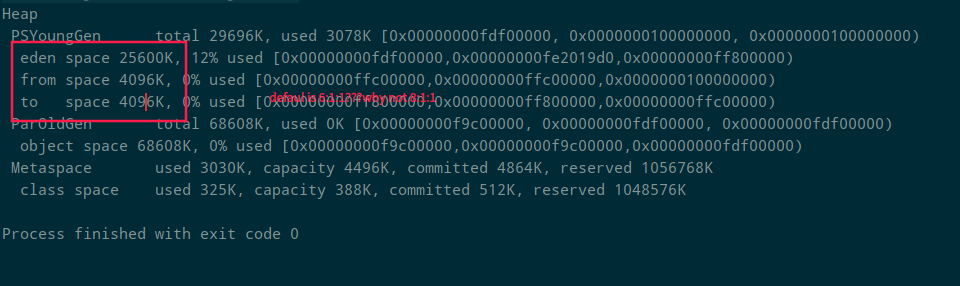
4.11. -XX:SurvivorRatio
Sets the ratio between Eden and each Survivor area in the young generation.

4.12. -XX:NewRatio
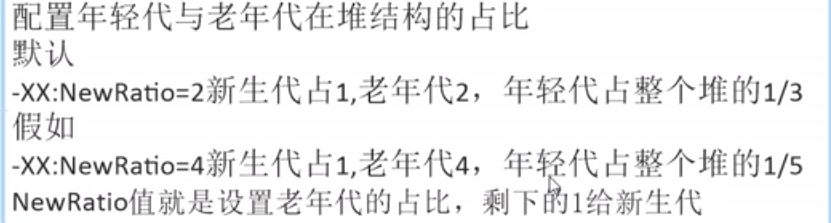
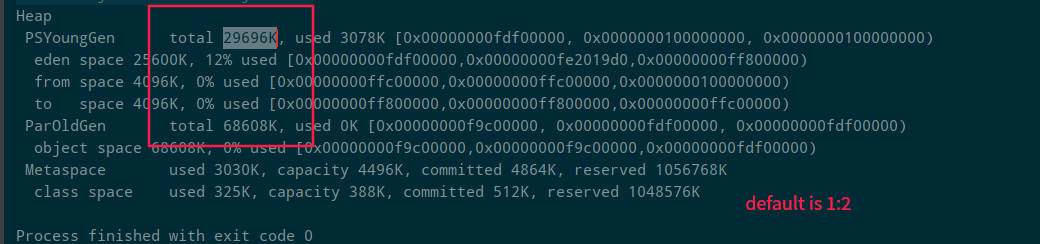
Sets the ratio between old-generation and young-generation space.
4.13. -XX:MaxTenuringThreshold
Sets the object-age threshold for promotion from the young generation to the old generation.
5. Typical Example Configuration
5.1. Before Modification
-XX:+PrintCommandLineFlagsPrinted values:
-XX:InitialHeapSize=128699840
-XX:MaxHeapSize=2059197440
-XX:+PrintCommandLineFlags
-XX:+UseCompressedClassPointers
-XX:+UseCompressedOops
-XX:+UseParallelGC
5.2. After Modification
-Xms128m -Xmx4096m -Xss1024k -XX:MetaspaceSize=512m -XX:+PrintCommandLineFlags -XX:+PrintGCDetails -XX:+UseSerialGCPrinted values:
-XX:InitialHeapSize=134217728
-XX:MaxHeapSize=4294967296
-XX:MetaspaceSize=536870912
-XX:+PrintCommandLineFlags
-XX:+PrintGCDetails
-XX:ThreadStackSize=1024
-XX:+UseCompressedClassPointers
-XX:+UseCompressedOops
-XX:+UseSerialGC
Discussion
Sign in with GitHub to comment. Discussions are stored as GitHub Issues.View on GitHub